Sheena Kaul
Community Manager
Community Manager
June 16, 2020
Answered

InDesign Share for Review - FAQ

  • June 16, 2020
  • 137 replies
  • 63436 views

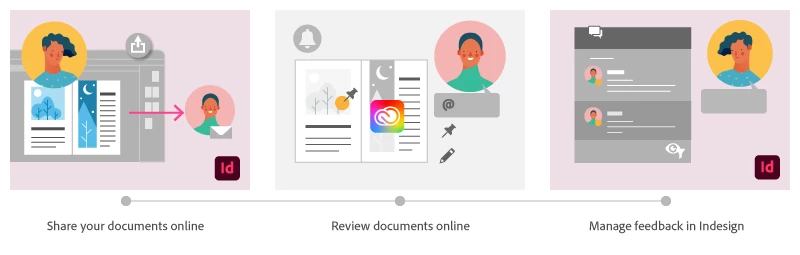
Using Share for Review in InDesign’s June 2020 release, you can share your designs for online review, and manage feedback right within the app. Stakeholders can open the shared document in a browser to provide feedback. Share for Review streamlines and simplifies the review process for both designers and their stakeholders 


The following FAQs provide clarity on common questions around Share for Review 

Share the document for review - FAQ

View reviewer comments - FAQ 

Review the document - FAQ

Best practices


How is Share for Review different from the ‘Integrated comment and review’ feature in InDesign CS5? How does it compare to the Import PDF Comments (IPC) feature?  

Adobe is investing in features and services that make creative collaboration easier and more enjoyable.  

With Share for Review, our aspiration is to make reviewing and editing InDesign creative more seamless, and address the following limitations in CS Review: 

  • Requirement for a flash plugin to use this feature 
  • Lack of support for key features such as email notifications 
  • User challenges with feature discoverability 

Compared to Import PDF Comments (IPC), Share for Review reduces time by eliminating the need to create and share PDFs and collate the resulting feedback. We will be working to enhance the reviewing features and capabilities in Share for Review, which will soon help this tool surpass the experience of IPC, from end to end.   


Does Share for Review include text commenting capabilities? 

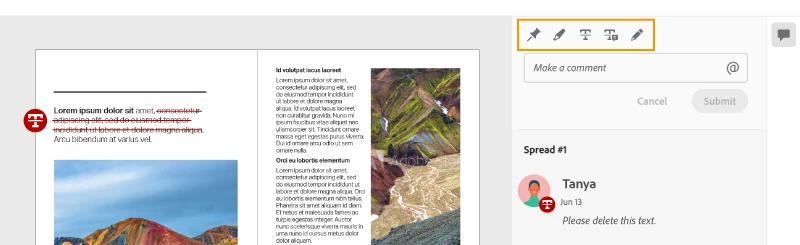
This first version of the feature allows you to provide feedback through the sticky note and pencil tools. We will continue to improve the experience, and we will soon incorporate more text commenting capabilities, including text highlight, text strikethrough, and the ability to accept text comments in a single click. 


Is this feature being introduced into InCopy?  

It is not. Instead, we’ll be making significant updates to InCopy by taking it to the Web to provide better collaboration capabilities. Stay tuned!    


What text capabilities do I have as a reviewer?  

As a reviewer, you will be able to highlight text, strikethrough text, and replace text corresponding to your comment. 


Let us know of any challenges, or questions you have for us around Share for Review and we’ll be happy to assist you. 

Correct answer Nathan Marroquin

This has worked for others:

  1. Save any work and close all open
  2. Sign out of InDesign (Help > Sign out). This will cause indesign to quit.
  3. Launch InDesign again, at which point you should be prompted to sign in again.

137 replies

Participant
October 20, 2021

Hello,

I like this feature; however, is there a way to compile the comments/print the comments? Without the ability to do this with the comments, it is difficult to reconcile/verify all comments have been resolved. There is a resolve button but this removes the comments from view. I need to be able to produce an audit trail for the comments.

Am I missing something? 


Any help is appreciated.


ufomurphy
Participating Frequently
January 2, 2022

You can kind of do what you want. In InDesign, the review panel is open, the bottom right you see a funnel icon. They call it a filter I think. Click it and you can filter and see the status resolved. 


Also, this info may help and videos may help. 1 video for sure has what I think you want. At least part of what you are looking for.

https://helpx.adobe.com/indesign/how-to/get-team-feedback-comments-real-time.html


All the best and good luck with your project.

Participating Frequently
October 14, 2021

Hi, great tool however, if I close the document and log out of In Design, when I come back, it doesn't show the version I had sent out to people for review. It invites me to create a new one. This means I have to go back to reviewers to tell them the old link is no longer valid and they need to use the new one.


This is really unprofessional.


I can't find an answer here that directly relates to losing access to the created link and being asked to create a new Share for Review.


Thanks in advance

Clare

Known Participant
October 14, 2021
Hi Clare, this happens from time to time and if you log out of Creative Cloud, then back in, I've found that this usually fixes it. Saving, closing, and restarting ID often helps too. I agree it's a pain - and it's caught me out a few times before I realised how to handle it.
Participating Frequently
October 14, 2021

It's a major fault because it means my published documents keep growing, rather than what the intention is, to have one link, one document for review, one set of tracked changes.


Is there anyway I can get back to the document? The one on the right is the one I invited everyone to review, but when I log out and back in again and open the doc from the same location, Share to Review asks me to create a new doc for review. It doesn't revert back to the old one.


So the saving, closing and restarting wipes any memory of my previous version!


Community Expert
July 15, 2021

Hi Bruce,

alright, can see your issue now.

The thing is:

If I invite myself with a mail address that is not the one of the Adobe ID that is tied to my CC subscription I can see all the controls. If I open the web interface from InDesign with the role of the author of this document I cannot see all the controls. So your stakeholders will have all the controls, you as the author, will not. How strange is that?


Below a screenshot with my two roles. The window on top is the one where I am the stakeholder, the one below you can see me as author:


This looks like a bug to me…


Regards,
Uwe Laubender

( ACP )

Participant
July 16, 2021

The other issue with that is when they do a strikethru or highlight text, I can see neither of those as well. I see the comment, but not where they are on the page. Sounds like a bug as well. Any chance of fixing this soon?

Community Expert
July 16, 2021

Hi Bruce,

well, this can happen if the highlighted or strikethrough text is done on placed graphics with text.

Placed PDFs or placed AI files for example. Also with placed InDesign pages.


Regards,
Uwe Laubender

( ACP )

Community Expert
July 15, 2021

Hi Bruce,

I'm on Windows 10 with InDesign 16.3.0.

Opened the web interface of Share For Review with my Firefox browser:


I would try a different browser perhaps.


Regards,
Uwe Laubender

( ACP )

Participant
July 15, 2021

 Why do I only have two editing tools when want to leave a comment? Pin and Draw. Another Designer on my team has several such as delete and highlight. Also I do not see the full comments that he leaves. Any suggestions? I am currently running InDesign 16.3.2. 

ufomurphy
Participating Frequently
January 2, 2022

same happeining for me.

Participating Frequently
June 2, 2021

Hi, I have lost some of the review tools. Currently, the only options are the draw tool and the pin. No highlighter or strikethrough. How can I get these back?

ufomurphy
Participating Frequently
January 2, 2022

I am having the same issue. Need help.

Known Participant
May 21, 2021

One more for this week:When I look at the shared publication in the web interface, I can clearly see the pins placed by reviewers, which makes identifying the context of their comments very easy. This does NOT happen on the InDesign version. Why?

Participating Frequently
May 21, 2021

Dave

A quick check to do is if your screen mode is in preview mode or normal.  in Preview you won't see pins in doucmnt but innirmal you should see them.  

This was touch and go at first regradless but for awhile did seem to get fixed. 

view > screen Mode > normalw

or  "w" if you have the keyborad shortcut to swicth views active.

David Cochrane
Participating Frequently
May 21, 2021
Thank you! I’ll try that.

Dave
Known Participant
May 21, 2021

A major problem I've seen this week is that highlights and strike-through added by reviewers don't line up in the InDesign file on my machine. They're two lines above, or below, or they only select half a word. This makes looking at annotation almost useless. 

David Cochrane
Participating Frequently
May 20, 2021

2. I need to see what time exactly someone makes a comment on an open, shared for review InDesign file. The date alone is not enough information. I also want to be able to choose the order of comments, i.e., most recent at the top rather than the bottom. 

Community Expert
May 21, 2021

David Cochrane said:

"I need to see what time exactly someone makes a comment…"


Hi David,

well, that's one of the weakest points in that feature. A conceptual thing from UXP side that went totally wrong.

We need not only precision in positioning pins and other corrections, but also precision in time stamps. What's also missing is a way to export the comments from InDesign to a format that can be stored, just like Acrobat Pro does this with preflight results in category Print Production for example.


Dialog sample from Acrobat Pro where you have the option to create a preflight report as text file or a commented PDF with various options:


Regards,
Uwe Laubender

( ACP )

David Cochrane
Participating Frequently
May 20, 2021

1. When I app-switch away from InDesign and then come back, my Share for Review menu has closed. This is quite painful when it's repeated hundred of times a day. The only way I've found to get around this on a Mac is to use the command-tab key combination instead of clicking on another window/app. When I do this the Share for Review menu remains open.