Sheena Kaul
Community Manager
Community Manager
June 16, 2020
Answered

InDesign Share for Review - FAQ

  • June 16, 2020
  • 137 replies
  • 63438 views

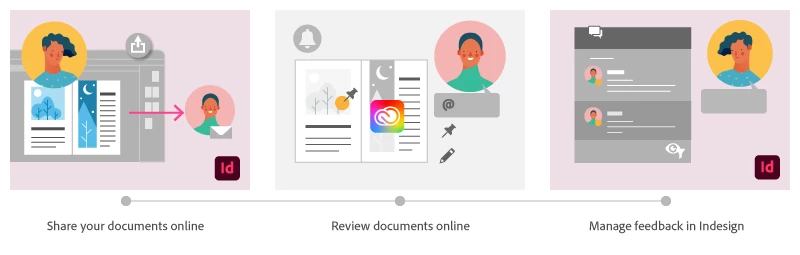
Using Share for Review in InDesign’s June 2020 release, you can share your designs for online review, and manage feedback right within the app. Stakeholders can open the shared document in a browser to provide feedback. Share for Review streamlines and simplifies the review process for both designers and their stakeholders 


The following FAQs provide clarity on common questions around Share for Review 

Share the document for review - FAQ

View reviewer comments - FAQ 

Review the document - FAQ

Best practices


How is Share for Review different from the ‘Integrated comment and review’ feature in InDesign CS5? How does it compare to the Import PDF Comments (IPC) feature?  

Adobe is investing in features and services that make creative collaboration easier and more enjoyable.  

With Share for Review, our aspiration is to make reviewing and editing InDesign creative more seamless, and address the following limitations in CS Review: 

  • Requirement for a flash plugin to use this feature 
  • Lack of support for key features such as email notifications 
  • User challenges with feature discoverability 

Compared to Import PDF Comments (IPC), Share for Review reduces time by eliminating the need to create and share PDFs and collate the resulting feedback. We will be working to enhance the reviewing features and capabilities in Share for Review, which will soon help this tool surpass the experience of IPC, from end to end.   


Does Share for Review include text commenting capabilities? 

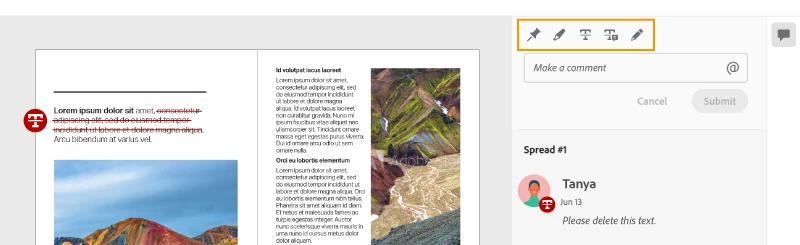
This first version of the feature allows you to provide feedback through the sticky note and pencil tools. We will continue to improve the experience, and we will soon incorporate more text commenting capabilities, including text highlight, text strikethrough, and the ability to accept text comments in a single click. 


Is this feature being introduced into InCopy?  

It is not. Instead, we’ll be making significant updates to InCopy by taking it to the Web to provide better collaboration capabilities. Stay tuned!    


What text capabilities do I have as a reviewer?  

As a reviewer, you will be able to highlight text, strikethrough text, and replace text corresponding to your comment. 


Let us know of any challenges, or questions you have for us around Share for Review and we’ll be happy to assist you. 

Correct answer Nathan Marroquin

This has worked for others:

  1. Save any work and close all open
  2. Sign out of InDesign (Help > Sign out). This will cause indesign to quit.
  3. Launch InDesign again, at which point you should be prompted to sign in again.

137 replies

Riley@beckerglove
Participating Frequently
August 17, 2020

I'm getting an error when I try to access the reviews my team has made. It's saying "You're offline, so no files are available," and yet my internet is functioning perfectly. I'm not sure why I can't access my assets. Any ideas?

Sheena Kaul
Community Manager
Community Manager
August 17, 2020

Hi there,


Are you getting this error on the web interface?

Can you try opening the link on a different browser?


Regards,

Sheena

Community Expert
August 6, 2020

Hi jbully0,

that's no feature. You cannot set a range of pages. It always is the full document.


Support this feature request, sign in and and vote:

https://indesign.uservoice.com/forums/601021-adobe-indesign-feature-requests/suggestions/40700314-page-range-s-and-pages-spreads-options-in-share-f


Regards,
Uwe Laubender

( ACP )

jbully0
Inspiring
August 6, 2020

How do I specify the range of pages to review - it doesn't seem to allow that? Automatically includes the entire document?

cgpd
Participating Frequently
August 4, 2020

Coming across more and more issues on this process. The panels are still showing blank after any InDesign crash (for any reason), forcing you to sign out and back into CC every single time, which interfers with any other work you may have open in other CC apps (this is not a solution to the problem, Adobe. If I have to sign out and back in, there's a serious issue on your end.). In addition, the program is now regularly failing to "reach the invited people", blocking me from inviting anyone, fails to update the published file's Access Settings when changed, forcing me to create brand new review files and occasionally doesn't show a web-address in the window after updating link, requiring a restart & signing out of and back into CC.

Sheena Kaul
Community Manager
Community Manager
August 10, 2020

Hi there,


Sorry to hear this. 

The blank panel issue has been identified by our engineers are working on the fix. 


For the other issue, can you elaborate a little more on what exactly is happening when you try to invite other stakeholders to review your document?


Regards,

Sheena

Participating Frequently
October 15, 2020

This has been an ongoing issue since the introduction of the feature rendering it fairly useless and totally unreliable to actually use with a client unless you like coming across as an unreliable mess.  
Now on Version 15.1.2 the feature still works for a bit then will just disconnect only showing a black box with no ability to communicate or update the review.  

Reset preferences, reinstalled InDesign, rebuilt file from an IDML all fail to reconnect the ability to get back the connection to an old review or start a new one.
As the only real feature added while everything else gets taken away and ignored it becomes even more frustrating that after all this time it still just doesn't work.

Also one of Go proof's issues with a tool for client review is ironically in a lot of creative fields the client isn't necessarily that tech-savvy and understandably like most people they don't really like signing up for extra user id's and services they don't use anywhere else.  Indesign users are already adobe customers, you all really need to support the ease of use for your customers and allow us to share a review without the need for extra adobe id's. Even though it seems a fairly innocuous step to ask a client to create an adobe id, it is an extra step, and then when the process doesn't even work it really doesn't make a good impression and comes off as just another indicator that Adobe's only real interest isn't updating the apps to meet users needs but farm Id's and even more subscription avenues. The irony here is if the priority was reversed even more people would be attracted to the software options adobe offers.

Community Expert
August 4, 2020

Starbreaker asked:

"…Is there a way to make the placed photos in the document appear at higher resolution when shared for review?"


The answer is: No.


Best do a feature request or first search for a similar feature request and when found support it by voting:

https://indesign.uservoice.com/forums/601021-adobe-indesign-feature-requests?category_id=389800&filter=top&page=1


Regards,
Uwe Laubender

( ACP )

Starbreaker
Participant
August 4, 2020

This feature is working very well for us.

Is there a way to make the placed photos in the document appear at higher resolution when shared for review? In the browser, the images are very low resolution and our client cannot get over this and comments on all of them and we end up having to make a pdf and send that for review which kind of defeats the purpose. 

Thanks for your help.

Community Expert
August 3, 2020

Hi jen jen,

you said: "…until I moved the same file to another computer and now the review panel does not have any comments in it. The file name is exactly the same."


How did you move the InDesign document to that other machine?
Did you do a duplicate of the file and use an USB stick? Did you mail it? Did you use Dropbox or a similar service?


Were you logged in with that other machine with the same Adobe ID ?


Thanks,
Uwe Laubender

( ACP )

Participant
August 2, 2020

I was using the review tool smoothly, until I moved the same file to another computer and now the review panel does not have any comments in it. The file name is exactly the same. When I loved it back to my original computer the comments were still gone. How can I fix this? Thanks

Sheena Kaul
Community Manager
Community Manager
August 4, 2020

Hi Jen,


Apologies for the delay in responding to you. 


If I understand the workflow here correctly, you copied an InDesign file to another machine and launched it in InDesign but you are not able to see the comments in the review panel anymore. Right?


If yes, I believe it is an issue of Adobe ID as the comments and review panel all are synced to a particular ID. Try to sign out and sign in to the InDesign application on the new machine now.


Let me know if that helps.


Thanks!

Sheena

Known Participant
July 30, 2020

Can I turn this feature OFF?

I don't need to see the pop-up window (and an empty pop-up window at that???), every time I open a new document.


Thanks.

Dave Creamer of IDEAS
Community Expert
Community Expert
July 30, 2020

Usually, if you close the window it won't come back unless you rebuild your preferences. 

David Creamer: Community Expert (ACI and ACE 1995-2023)
Known Participant
July 30, 2020

Unfortunately, for me it's popping up every time I open an InDesign document for the first time, secind time, third time…


Every update a new delight!

Dave Creamer of IDEAS
Community Expert
Community Expert
July 27, 2020

>...Share for Review reduces time by eliminating the need to create and share PDFs and collate the resulting feedback.<

It should be mentioned that sharing with Acrobat Pro can collate all the comments [semi-] automatically--both by email, a shared server, or in the Acrobat document cloud.

David Creamer: Community Expert (ACI and ACE 1995-2023)
Sheena Kaul
Community Manager
Community Manager
July 27, 2020

Hi there,


A similar feature was earlier introduced in the CS5 version of InDesign which was discontinued later on. That's what the FAQ is talking about. 


Regards,

Sheena