Sheena Kaul
Community Manager
Community Manager
June 16, 2020
Answered

InDesign Share for Review - FAQ

  • June 16, 2020
  • 137 replies
  • 63438 views

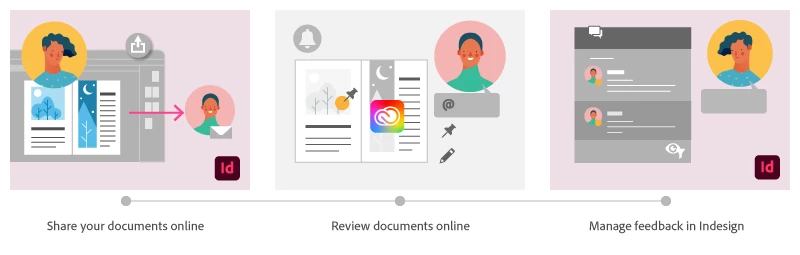
Using Share for Review in InDesign’s June 2020 release, you can share your designs for online review, and manage feedback right within the app. Stakeholders can open the shared document in a browser to provide feedback. Share for Review streamlines and simplifies the review process for both designers and their stakeholders 


The following FAQs provide clarity on common questions around Share for Review 

Share the document for review - FAQ

View reviewer comments - FAQ 

Review the document - FAQ

Best practices


How is Share for Review different from the ‘Integrated comment and review’ feature in InDesign CS5? How does it compare to the Import PDF Comments (IPC) feature?  

Adobe is investing in features and services that make creative collaboration easier and more enjoyable.  

With Share for Review, our aspiration is to make reviewing and editing InDesign creative more seamless, and address the following limitations in CS Review: 

  • Requirement for a flash plugin to use this feature 
  • Lack of support for key features such as email notifications 
  • User challenges with feature discoverability 

Compared to Import PDF Comments (IPC), Share for Review reduces time by eliminating the need to create and share PDFs and collate the resulting feedback. We will be working to enhance the reviewing features and capabilities in Share for Review, which will soon help this tool surpass the experience of IPC, from end to end.   


Does Share for Review include text commenting capabilities? 

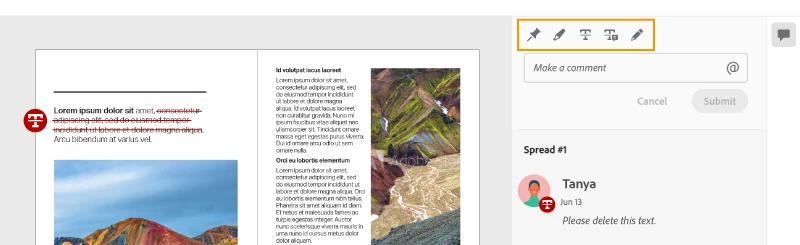
This first version of the feature allows you to provide feedback through the sticky note and pencil tools. We will continue to improve the experience, and we will soon incorporate more text commenting capabilities, including text highlight, text strikethrough, and the ability to accept text comments in a single click. 


Is this feature being introduced into InCopy?  

It is not. Instead, we’ll be making significant updates to InCopy by taking it to the Web to provide better collaboration capabilities. Stay tuned!    


What text capabilities do I have as a reviewer?  

As a reviewer, you will be able to highlight text, strikethrough text, and replace text corresponding to your comment. 


Let us know of any challenges, or questions you have for us around Share for Review and we’ll be happy to assist you. 

Correct answer Nathan Marroquin

This has worked for others:

  1. Save any work and close all open
  2. Sign out of InDesign (Help > Sign out). This will cause indesign to quit.
  3. Launch InDesign again, at which point you should be prompted to sign in again.

137 replies

Community Expert
November 25, 2020

Hi rpr,

if you do Share For Review with a document and then you want to work on under the following conditions:


[1] Save As with the same name of your document.

[2] Save As with a new name and want to work on with the new document.

[3] You did a roundtrip with Export to IDML, open IDML as document.


you will see a blank Share for Review panel in InDesign.


[4] Duplicated the document file in your file system


you'll perhaps get confused what review marks you see on the page and what can only be accessed with the original document. I just testing with a document that I duplicated in the file system. I have both documents open from time to time. As it shows I never can see all the review marks on the pages. Some show up in the original, some show up in the duplicate. But in all of the two documents I can see all the comments in the panel.


So never do Save As with your document as long as your Share for Review workflow is running.

Never do an IDML roundtrip workflow as well. This all will change the identity of your document and the Review on the web will not be able to maintain a connection to your file through the Share for Review panel.


Regards,
Uwe Laubender

( ACP )

Participating Frequently
April 26, 2021

Just seeing this reply but I do understand these points. 
I would love it that was the solution.
My issues with review have always been with the main document it started with, when it will start that is. 

Participating Frequently
November 11, 2020

This feature still doesn't seem to be reliable with documents.  Have tried resaving or creating from IDML but I still only get an empty box for the share options. Absurd this feature still is so glitchy.

Participating Frequently
November 11, 2020

resetting Preferences does not resolve the issue

Participant
November 11, 2020

I've used this feature twice in the past week. The first time, all the commenting tools you showed were available. I just shared a second document for review and when I went to manage the review on the web to add a couple comments, it only shows the Pin and Draw a Shape tools. I checked my first document, and only those two are showing there now as well. What happened to the other tools!?

Sheena Kaul
Community Manager
Community Manager
November 16, 2020

Is this something you've seen while reviewing a particular document or on all documents?

Document Geek
Community Expert
Community Expert
October 23, 2020

I tried the New Share for Review today since the additional text annotationtools were added. The improved annotations capability is great, but it's still not working properly for me. After I made annotations in my web browser (Safari on mac), those annotations imported in to InDesign. I experimented with workng with them in InDesign and when I clicked "Resolve," they disappeared! In the previous version, Resolve was like a checkmark in Acrobat. 


So I thought I'd go back into the web browser and add more comments and try again. When I launched the review again in Safari, some of the tools were missing. I could make comments, but only with the pin and the pencil.


So I tried in Chrome, and all the tools were there.


So I made some comments in Safari and then some in Chrome, and then back back to InDesign to try and interact with them. But the panel now says there are no comments.

I really need to be able to save an archive copy of my documetns with the PDF comments intact. I work with engineers on technical documetns, and it's important to have a record of the comments they make so that we can refer to them later. Is it possible to do the folowing?

  1. NOT delete the comments when I mark them as resolved
  2. Download a copy of the commented PDF for offline storage


I tried a second document and it behaved the same way: missing tools in Safari and no comments imported back into InDesign. 


It's totally unusable. 

Sheena Kaul
Community Manager
Community Manager
October 23, 2020

Marking a comment resolved moves it from the active comments panel but you can filter it using the filter option at the bottom. 

Document Geek
Community Expert
Community Expert
October 23, 2020

I wanted to check that, but my comments are not loading at all now. See above screenshot.

Participant
October 20, 2020

Hi! i just update the new version on indesign 2021 (Indesign 16.0) and try Share for review option, it work and i see something new, the replace text option, in the review pdf web platform, BUT when i see it in indesign, there is no way to apply the change in indesign (like it work when i use the import comments from PDF) i think is a little bug in the new indesign 2021 version. Please let me know when it´s fix and can apply the text in indesign


Thankyou!


WEB VIEW:


INDESIGN VIEW:

Sheena Kaul
Community Manager
Community Manager
October 21, 2020

Hi there,


This is the expected behavior because as of now we've just enabled the text comments to flow back into the InDesign app. The accept functionality is still not available in the current version. 

Unfortunately, you'll have to manually make the changes required but I've passed on the feedback to the product team for improvements. 


Regards,

Sheena

Participant
October 21, 2020

Thankyou Sheena for your replay! we love the replace text button, the problem is that dosen´t work, we have to manually copy the text an put in the correct position, there is not automatly replacemente, i think adobe have to make it work. Please let me know when they fix this issuu.

Best,

Ana

Participating Frequently
October 7, 2020

Is there a way to see who owns a document? I am trying to create a review on a project and its telling me I can't because I don't own it. And is there a way to change owners?

Sheena Kaul
Community Manager
Community Manager
October 7, 2020

Generally, the one who sends you the document for review is the owner and unfortunately, there isn't any way to change the owner yet. 

Participating Frequently
September 9, 2020

I've been using the Share and Review app with colleagues and it's been pretty successful so far but there appears to be one major glitch that causes a real continuity error, and amazingly no one; from what I can tell, seems to have mentioned to this point.


When one of my colleagues has used the website to place a pin or drawn a shape onto a specific page, this shows up fine within InDesign (here's a demo example on the website, which appears identical within InDesign):


However, if a new page is added within InDesign before the page where the current pins/drawings are located, the content looks fine within InDesign, but when the page is updated and refreshed on the review website, everything is suddenly offset by a page and in effect, becomes unsuable:


I've tried re-updating the link within the review tool, using CTRL + F5 on the website and shutting down both applications (InDesign and the web browser) but the offset drawings and pins are always incorrect on the website.


The review tool is a real bonus but when we often have large edits taking place which include new charts, graphs and the adding or removing of large paragraphs of text, which at times changes the placement of content or may require a new page for continuity, I can't really ask colleagues to hold on with any new comments until I resolve layout issues.


If there's something I'm doing wrong or I've missed, I'd really appreciate some advice. I'm currently creating a video tutorial for new staff on how to use this tool and at the moment, I have to describe this as an anomaly which will hopefully be fixed in a future update, which is a bit dubious on my part.


Many thanks,


Barry 

Sheena Kaul
Community Manager
Community Manager
September 10, 2020

Hi Barry,


I apologize for the trouble and understand the issue here. 


I suspect this I happening because the new page that you've added in Indesign is conflicting with the already reviewed version of the file but I'd definitely want to check this with the product team for more details.


Please check the private message that I've sent you. 


Regards,

Sheena 

Community Expert
September 9, 2020

Hi Angel,

"quite large" should be no problem, I think.

Once did an experiment with a 600 pages document with a lot of of tables and images, around 250 MB in document file size. Share For Review worked. However, it took about 15 minutes for the whole process to a add a review.


Regards,
Uwe Laubender

( ACP )

Participant
September 9, 2020

Hi there,


I am unable to share my document for review. Every time I try to create the link, InDesign produces an error message stating "There was an error creating the artifact." My file is quite large (±1GB) - could this be the reason why I am unsuccessful?


Many thanks

Participant
November 25, 2020

I'm getting the same error with a file less than 11MB.

Participant
September 2, 2020

Hi, this is an amazing feature. I'm excited to know how it will evolves.

Is there plans to introduce some of these features on the web interface?

- text editing

- update layout preview after text editing

- show text fitting alerts

Sheena Kaul
Community Manager
Community Manager
September 2, 2020

Hi there,


We're definitely evolving this feature and would love to get all the suggestions on our UserVoice as that's where the product team is looking right now.


Regards,

Sheena