
Installed font not showing in InDesign font menu
-Windows 11 Pro, version 24H2
-latest version of InDesign (20.1 x64) - 2025
-brand new powerful Dell XPS 8960
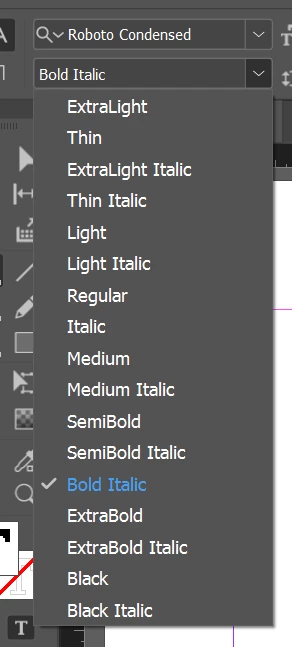
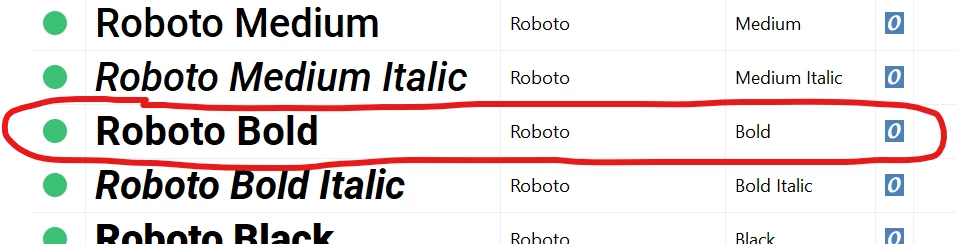
The entire Roboto Condensed family is properly installed on my computer via the font installation files (not Adobe CC Fonts), and all of the font weights show up in InDesign except for 'Roboto Condensed Bold'. It is working properly in other apps such as Word, even Illustrator, but not InDesign or Photoshop.
A while ago, Roboto Condensed Bold was 'added' on Adobe Fonts in Creative Cloud (but not installed). I then 'removed' it in Adobe Fonts, and installed the Roboto Condensed family via font files on my system. All of them work in InDesign/Photoshop except for 'Bold.' I'm thinking there is an issue with my system's font registry or font cache? But the problem only shows up in InDesign/Photoshop.
Already tried uninstalling all Adobe apps + CC desktop, running the Adobe Creative Cloud Cleaner Tool, re-installing the apps, log out, log in...still have the problem:
BOLD is missing from the menu:
But it's in my system:
Adobe Support is NOT able to help and is very frustrating to deal with.


 AdChoices