

Alexandre Brandt
Inspiring
March 6, 2018
Question

Missing links for text box

  • March 6, 2018
  • 3 replies
  • 5464 views

Hello there,

I've got a simple 4-page pamphlet with some text boxes and a few imported Ai designs.

Illustrator is telling me that I have 6 missing links. All of them are text boxes.

I don't understand, it is saying missing a font or something ? All my text is visible in my document and PDF export.
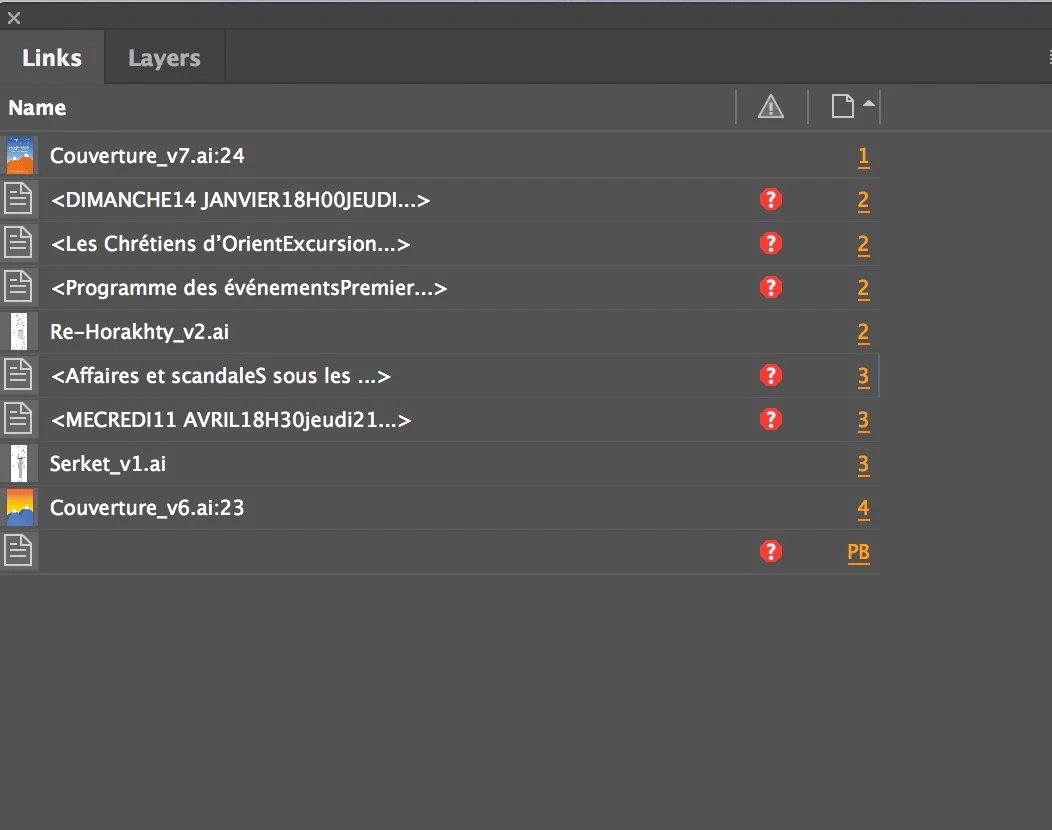
    3 replies

    Participant
    January 21, 2021

    I have the same problem in Indesign, these are bits of text that I had copied from another Indesign documents. They still read as text with the same font attributes and everything, but shows up as a missing link in my links window.

    Whats worse is that if I update modified links when I open the documant it insted of resolving the issue it completely changes the text atributes and i have to go back and reformat each pice of text.

    I first noticed this with the 2019 version of CC, but it still continues with the 16.0.2 version of Indesign in 2021.

    Community Expert
    March 6, 2018

    Alexnapo23  wrote

    … 

    Illustrator is telling me that I have 6 missing links. All of them are text boxes.

    Hi Alex,

    ah! Missing text file links from placed Illustrator files.

    So you have to go to Illustrator to solve that problem, if it's any problem at all.

    What's a bit weird is the last missing link that is listed. The one with no name where PB is indicating that the text is on the pasteboard. Maybe Illustrator can inform you what's up with that?

    If you need help with Illustrator questions ask here:

    Illustrator

    Regards,
    Uwe

    Alexandre Brandt
    Inspiring
    March 6, 2018

    Hey,

    Thanks for the tip. But as you can see from the links panel screenshot, the illustrator files are the ones that are correctly linked.

    It's the text boxes that are an issue.

    BobLevine
    Community Expert
    Community Expert
    March 6, 2018

    Those look like placed Word files and for some reason you've linked them when placing. Go to your preferences and turn that option off and then you can right click the missing links and embed them.

    Alexandre Brandt
    Inspiring
    March 6, 2018

    Hey Bob,

    I think I know what happened. I copied and passed text from a word document.

    Where is the option to turn that off in preferences ?

    BobLevine
    Community Expert
    Community Expert
    March 6, 2018

    Copy/paste would not cause that, only placing would cause that.