Admiral Adama
Inspiring
May 6, 2021
해결됨

My Arabic text is all smooshed together in reverse order - Adobe 2021 (16.1) Mac OS Big Sur (11.2.3)

  • May 6, 2021
  • 1 답변
  • 5583 조회

I was having the exact same problem on InDesign (English: USA), I spent an hour researching online and finally did every single thing that was suggested on all the various forums: 


  • Uninstalled InDesign
  • Changed my preferences in Creative Cloud to all apps in (English: arabicscript)
  • Re-installed InDesign
  • Opened a document
  • Created a NEW text box
  • Changed the language to Arabic
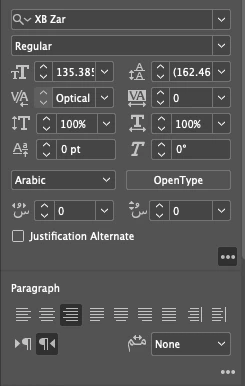
  • Changed the script to an Arabic script XB Zar
  • Changed the Paragraph alignment to RTL
  • Changed the Paragraph to right-aligned
  • Changed the Character style itself in the Character hamburger to Right-to-left
 

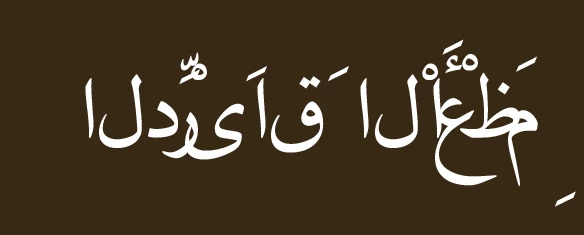
And the result is this absolutely atrocious ugly mess of all my beautiful Arabic letters smooshed together, upside down, inside out, last character first: 
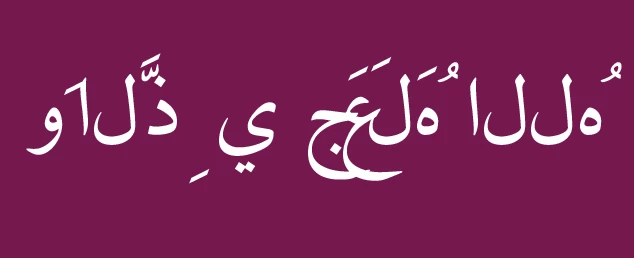


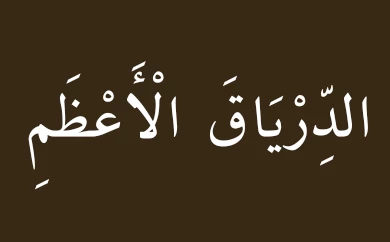
See below for how it is SUPPOSED to look, elegant and beautiful and harmonious, and right to left, all the characters in the right order: 



이 주제는 답변이 닫혔습니다.
최고의 답변: Admiral Adama

Hi there! Sorry I was under deadlines and I just saw this. 


Thank you so much for taking the time to write, I really appreciate it. 


You sound like a long time user of Adobe products, whereas I'm a new one, started in November and have had a crash-course in Premiere, Photoshop (all good there) InDesign and Illustrator (getting tough, there). 


I noticed this with InDesign with the last job I did. I had to do a system-wide preference (changing the language to French) but nothing was working on the document in French which I'd created before the change in Preferences. 


I had to re-do the entire document, and THEN, it would spell-check in French. 


The exact same thing happened with Arabic. 


Re-installing into English-for Arabic totally fixed the entire problem. 


The reason I wasn't actually seeing it, is because I was working on the legacy document from English-USA InDesign. 


I re-did my entire document pasting all the pages and elements one by one in English but ignoring the moooooooshed Arabic, and then RE-did the Arabic one by one in this new post-re-install InDesign document. 


Totally fixed, the Arabic is beautiful, I installed a new Adobe font for Arabic called Nassim Arabic Pro that just looks stunning. 


So...


Why? 


Why is a program I'm payingi $29.95 a month for not able to recognize the newly-set preferences on a legacy document? I don't understand. 


I recently upgraded Premiere, and the new Premere 2021 wouldn't open any of the 2020 Projects without creating a copy. 


I literally don't get it. 


I know this is a bit much and you probably don't have time to answer, but really, it's a little strange. 

1 답변

Community Expert
May 6, 2021

Is a different font working for you?

Did you typeset the text in InDesign?

Or did you place the text from a file?
Or did you paste the text from the clipboard?


Regards,
Uwe Laubender

( ACP )

Admiral Adama
Admiral Adama작성자답변
Inspiring
May 7, 2021

Hi there! Sorry I was under deadlines and I just saw this. 


Thank you so much for taking the time to write, I really appreciate it. 


You sound like a long time user of Adobe products, whereas I'm a new one, started in November and have had a crash-course in Premiere, Photoshop (all good there) InDesign and Illustrator (getting tough, there). 


I noticed this with InDesign with the last job I did. I had to do a system-wide preference (changing the language to French) but nothing was working on the document in French which I'd created before the change in Preferences. 


I had to re-do the entire document, and THEN, it would spell-check in French. 


The exact same thing happened with Arabic. 


Re-installing into English-for Arabic totally fixed the entire problem. 


The reason I wasn't actually seeing it, is because I was working on the legacy document from English-USA InDesign. 


I re-did my entire document pasting all the pages and elements one by one in English but ignoring the moooooooshed Arabic, and then RE-did the Arabic one by one in this new post-re-install InDesign document. 


Totally fixed, the Arabic is beautiful, I installed a new Adobe font for Arabic called Nassim Arabic Pro that just looks stunning. 


So...


Why? 


Why is a program I'm payingi $29.95 a month for not able to recognize the newly-set preferences on a legacy document? I don't understand. 


I recently upgraded Premiere, and the new Premere 2021 wouldn't open any of the 2020 Projects without creating a copy. 


I literally don't get it. 


I know this is a bit much and you probably don't have time to answer, but really, it's a little strange.