Participant
October 21, 2023
Question

New (shift+Enter) line with RTL and LTR text is broken

  • October 21, 2023
  • 2 replies
  • 525 views

Hi

I'm new to the current version of InDesign.

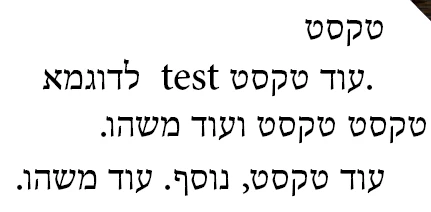
When I try to break lines in texts that contain both English and Hebrew I find that the RTL gets broken frequently.

For example:

If this is my current text -
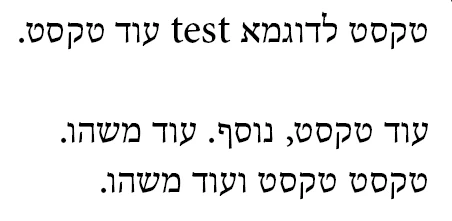
 

Shift+enter after the first word results in this:
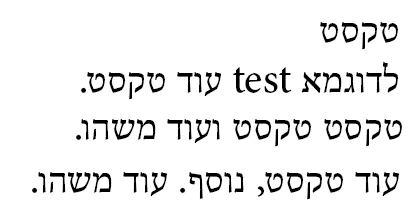
When the expected result is something like this:
 

I suspect RTL settings in general might be faulty because pressing the left and right arrows to move through text seems to opperate LTR instead of RTL as if the text was in English.

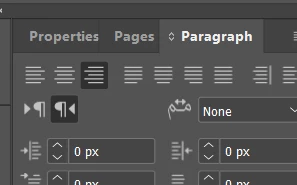
Obviously, Right to Left text is selected in the paragraph tab


This topic has been closed for replies.

2 replies

Joel Cherney
Community Expert
Community Expert
October 21, 2023

I suspect that something has changed with how InDesign handles default character direction. If I try to recreate your issue on my side, it is really easy. Same bug crops up in Arabic and Farsi as well. It seems like a soft return before some LTR text in an RTL paragraph will cause problems with default text direction:


Now, all of that text is correctly marked as Hebrew or English; I didn't touch the Character Direction setting. But, if I mark all Hebrew text and spaces as overtly Right-to-Left and only the Latin-script text as Left-to-Right, then it works just fine! 


So I headed off to indesign.uservoice.com to report a bug, but someone has already done so! They have also posted a thread here.  Turns out that you only need to mark the soft return/forced line break character as overtly Right-to-Left, and that causes the rest of the paragraph to behave appropriately. Please go and vote on the Uservoice bug report, to increase its visibility to the developers. 


Participant
October 23, 2023

Can anyone tell me what the workaround is for the All English version of Indesign? I am working on a multi-language info sheet and it includes phone numbers within the Arabic/Farsi/Urdu and this bug is popping up where it changes the direction of the phone numbers to be right to left, even though they're supposed to be RtL in the text. It's hard to explain. But it's a really big issue for me. 

Joel Cherney
Community Expert
Community Expert
October 23, 2023

If you need to work with Arabic, Farsi, and Urdu, and you're having issues with directionality, the best thing to do is to install the Middle East/North Africa version of InDesign. That gives you an English interface with tools to work with RTL content.


If you can't for some reason (corporate IT policies that forbid you from just going to the Language prefs in the Creative Cloud app and installing a new version of InDesign), then there are other ways to pull it off.  If you know how to install and run a script, this one will set any text you've selected to right-to-left character direction:


app.selection[0].characterDirection = CharacterDirectionOptions.rightToLeftDirection;


Select the forced line break/soft return and run the script, and it'll be set to RTL character direction.


Willi Adelberger
Community Expert
Community Expert
October 21, 2023
  1. Do you work and apply paragraph and character styles? The paragraph style defines the main direction, the character style defines the verso direction.
  2. Why do you use shift+return? Use keep property for the minority character style.
  3. Do you use an Adobe World Composer?