
Inspiring
Oct 19, 2026 6:04 AM UTC
Answered

No scroll bar in list of activated fonts.

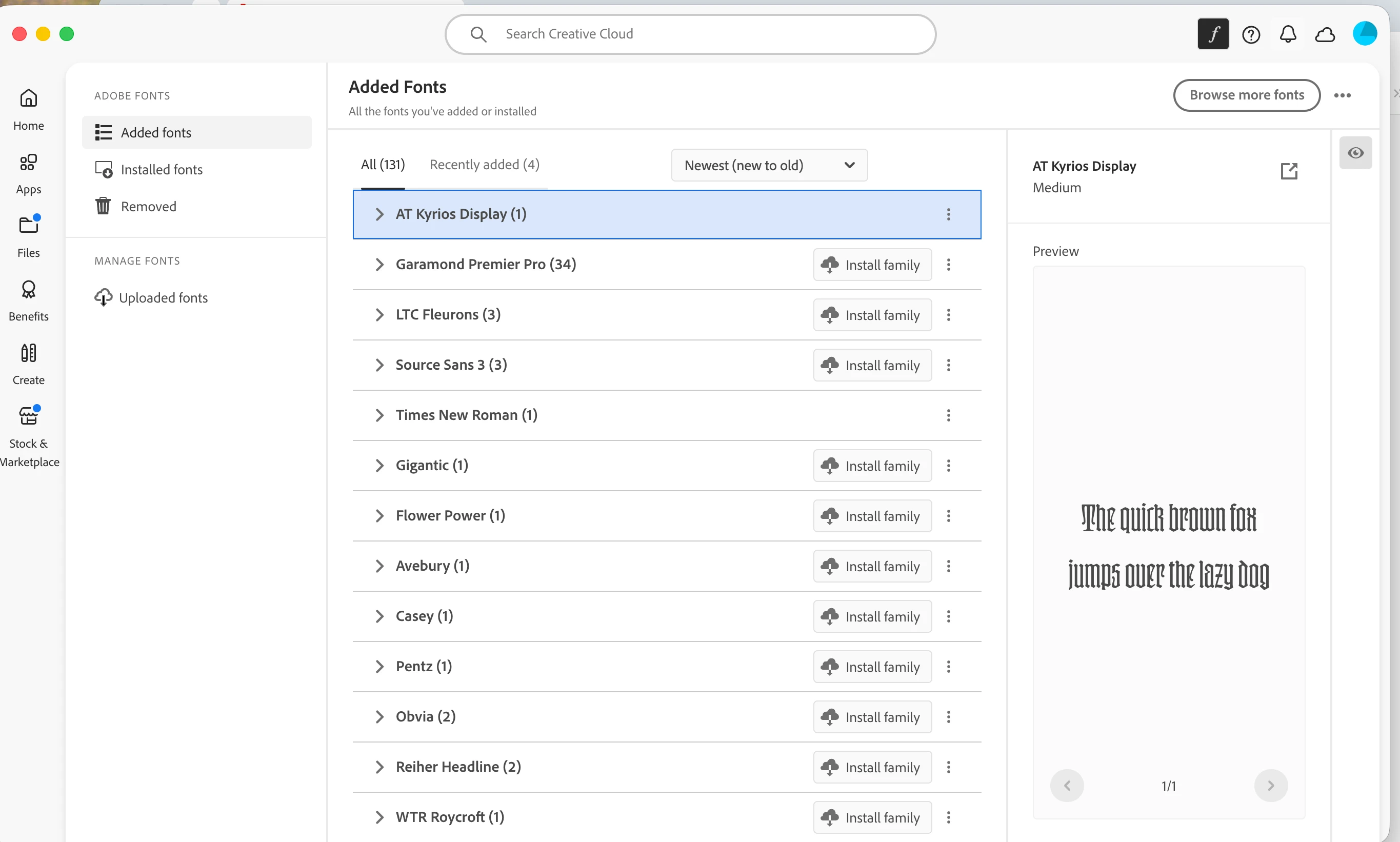
I have asked this before but am trying again. There is no scroll bar in the list of activated fonts in Creative Cloud. This makes it impossible to deactivate the fonts I no longer need. Interestingly enough, when I made a screen shot of the window and placed it here, there WAS an active scroll bar in the screen shot — again, only once it was placed. It does not appear when I am in Creative Cloud. I took a screen shot of the screen shot that showed the lack of a scroll bar; I could not place both of them in this box.

 

    Abhishek Rao
    Abhishek RaoCorrect answer
    Community Manager
    Oct 19, 2026 9:23 AM UTC

    Hi ​@Grundoon Groundhog,


    Thanks for sharing your feedback. I understand how inconvenient it can be when the scrollbar isn't consistently visible, especially while managing a large number of fonts.

    There's already an existing Adobe Fonts UserVoice feature request for a persistent scrollbar in the Creative Cloud desktop app. I'd encourage you to upvote it and add your comments to help our product team understand the impact on your workflow and prioritize the request.

    UserVoice link:
    https://adobefonts.uservoice.com/forums/940222-adobe-fonts-feature-requests-and-feedback/suggestions/47503202-please-add-a-scroll-bar-for-the-fonts-list-in-the

    Additionally, since this concerns the Creative Cloud desktop app, could you please post your query in the dedicated Creative Cloud Desktop Community as well?

    https://community.adobe.com/creative-cloud-desktop-599

    Thanks for your feedback and understanding!

    Best,
    Abhishek

    9 replies

    Inspiring
    Nov 5, 2026 5:42 AM UTC

    I have done this already. As usual there is zero response. I guess the engineers are too busy engineering to use fonts and see how helpful that would be.

    Translate
    leo.r
    Community Expert
    Community Expert
    Nov 5, 2026 5:56 AM UTC

    I’ve just replied to your post in the other thread. If the scroll doesn’t work for you, then something is seriously broken somewhere on your side. Otherwise we’d hear about this issue from other users daily non-stop.


    Translate
    Inspiring
    Nov 5, 2026 6:16 AM UTC

    How can I find out what is seriously wrong on my side?

    Translate
    Abhishek Rao
    Community Manager
    Abhishek RaoCommunity ManagerCorrect answer
    Community Manager
    Oct 19, 2026 9:23 AM UTC

    Hi ​@Grundoon Groundhog,


    Thanks for sharing your feedback. I understand how inconvenient it can be when the scrollbar isn't consistently visible, especially while managing a large number of fonts.

    There's already an existing Adobe Fonts UserVoice feature request for a persistent scrollbar in the Creative Cloud desktop app. I'd encourage you to upvote it and add your comments to help our product team understand the impact on your workflow and prioritize the request.

    UserVoice link:
    https://adobefonts.uservoice.com/forums/940222-adobe-fonts-feature-requests-and-feedback/suggestions/47503202-please-add-a-scroll-bar-for-the-fonts-list-in-the

    Additionally, since this concerns the Creative Cloud desktop app, could you please post your query in the dedicated Creative Cloud Desktop Community as well?

    https://community.adobe.com/creative-cloud-desktop-599

    Thanks for your feedback and understanding!

    Best,
    Abhishek

    Translate
    Community Expert
    Oct 19, 2026 7:56 AM UTC

    It doesn’t appear for me either - but you can scroll with the wheel of the mouse and it shows up. 
    Or if you grab the white space directly to the right of the font and drag up and down it works. 

    Strange it doesn’t show.

    Translate
    Inspiring
    Nov 5, 2026 6:13 AM UTC

    I tried dragging in the white space and it worked briefly, then stopped working. Perhaps I have to open and close the list every time? How can I establish what is wrong?

    Translate
    leo.r
    Community Expert
    Community Expert
    Oct 19, 2026 6:19 AM UTC

    Did you try to actually scroll? There’s indeed no scroll bar shown until you start scrolling. Then  the scroll bar appears. Once you stop scrolling, it disappears again. It’s a poor UI practice if you ask me but the list does scroll.

    And no, it’s not related to my scroll bar settings in System Settings as they’re set to always show scroll bars.

    Translate
    Inspiring
    Nov 5, 2026 6:15 AM UTC

    It does not scroll at all now.

    Translate