lingl87007791
Participant
June 26, 2018
Answered

Outline text with bullets & numbering

  • June 26, 2018
  • 12 replies
  • 35020 views

I can't seem to outline bullets and numbering along with text in Indesign cc 2018. Once I click "create outlines" bullets and numbering would disappear. Is it just me? Does anyone else experience this issue?

Correct answer Laubender

defaultks8d4yvdbu1n said:

"For example Im working within the signage and wayfinding sector, I outline text daily."

Yes. Perfectly doable within Acrobat Pro with a loaded PDF exported from InDesign.

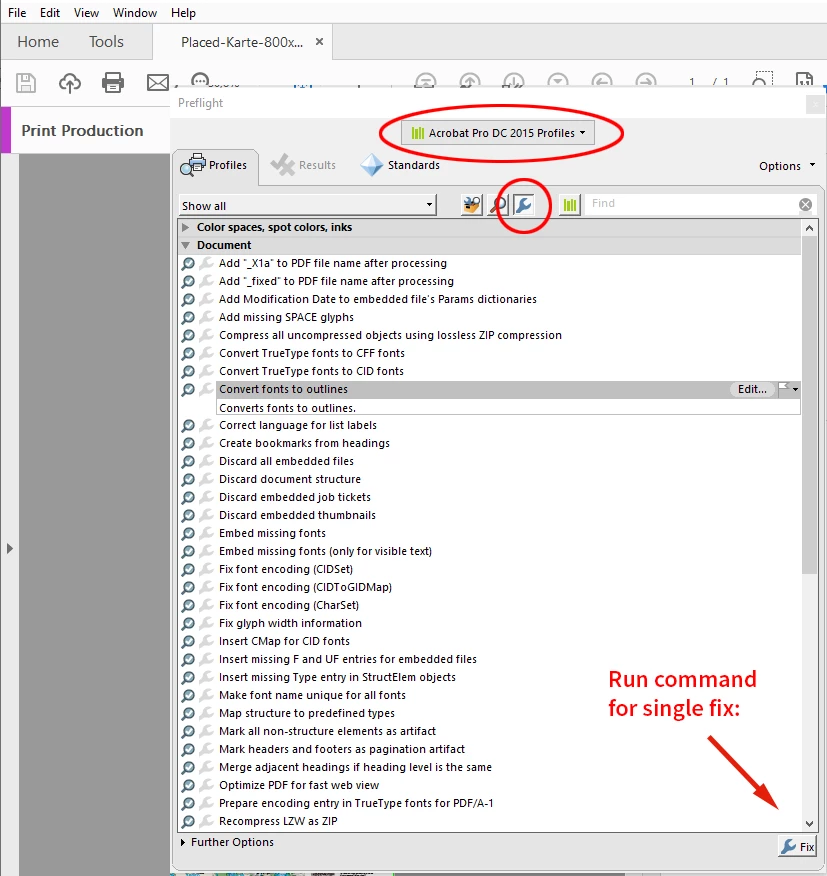
Here are the steps:


Open the exported PDF in Acrobat Pro DC.

Go to Print Production > Preflight

Select "Acrobat Pro DC 2015 Profiles".
Then list and select Single Fix Ups > Document > Convert fonts to outlines


Now run the single fix up with button Fix.


Forgot to add this screenshot from Acrobat Pro:


Regards,
Uwe Laubender

( ACP )


//EDITED: Added screenshot

12 replies

BobLevine
Community Expert
Community Expert
June 26, 2018

This is perfectly normal expected behavior. Bullets and numbers are enhancements to the text just like underlines.

Like Barb, I’d like to know why you’d even think this was good idea.

Barb Binder
Community Expert
Community Expert
June 26, 2018

Hi lingl87007791:

Why do you want to outline bullets and numbers? You certainly don't need to, nor is it a good workflow. That said, there is a bug in InDesign that makes bullets and numbers disappear when you outline them: bullets disappear when you outline the text – Adobe InDesign Feedback..

~Barb

~Barb at Rocky Mountain Training