muskoka lake
Inspiring
October 23, 2020
Answered

Paragraph style error in one entry of TOC
  • October 23, 2020
  • 30 replies
  • 1683 views


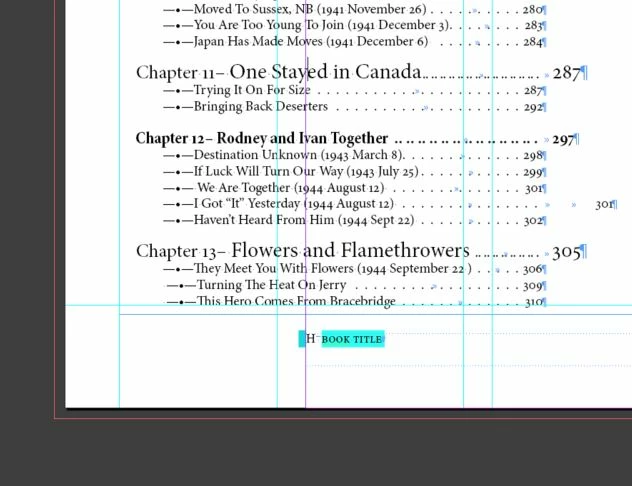
I have the same Para Style applied on all Chapter Number lines in text. And a different style for the Chapter title. When I generate the TOC this one entry ends up in a different style. I have tried removing and retyping, tried paste without format, and all day with zero success.

It is as if the two styles become one when making the TOC, but I purposely made two different styles. I the first is not included in the TOC, the second has a numbered list as part of its TOC entry style with prefix of "Chapter"

The TOC entry style shows as correct when I check it in the TOC creation section. There are no character styles applied to either line in the body text. I hope someone has seen this before. I'm almost ready to give up.

This topic has been closed for replies.
Correct answer muskoka lake

Thank you Barb Binder and @vladan saveljic. 

That was an instant fix. I actually changed them all to be none for Character style. So in the TOC they are now bold. I think it makes the overall page more readable to have some headings bold and some not. I hope there is no convention against that!

I am so grateful for the persisence and patience of Forum members. Sorry it took me so long to get Dropbox organized, the trials of low bandwidth in the country over a DSL dryloop.

Thank you everyone, my day just got 1005 better.

30 replies

muskoka lake
Inspiring
October 26, 2020

I removed the nested style. When I update or replace the existing TOC it does not change the error.

To begin with I tried to use a nested style to have the Chapter number line and the chapter name line be on one entry in the TOC. I think I gave up on that when someone on the forum suggested using a numbered list. That seemed to work great. I just left the Chapter number line out of the TOC entry and included Chapter as a prefix to the numbering.  Problem is still there though, should I start all over?

Barb Binder
Community Expert
Community Expert
October 26, 2020

Hi @muskoka lake:


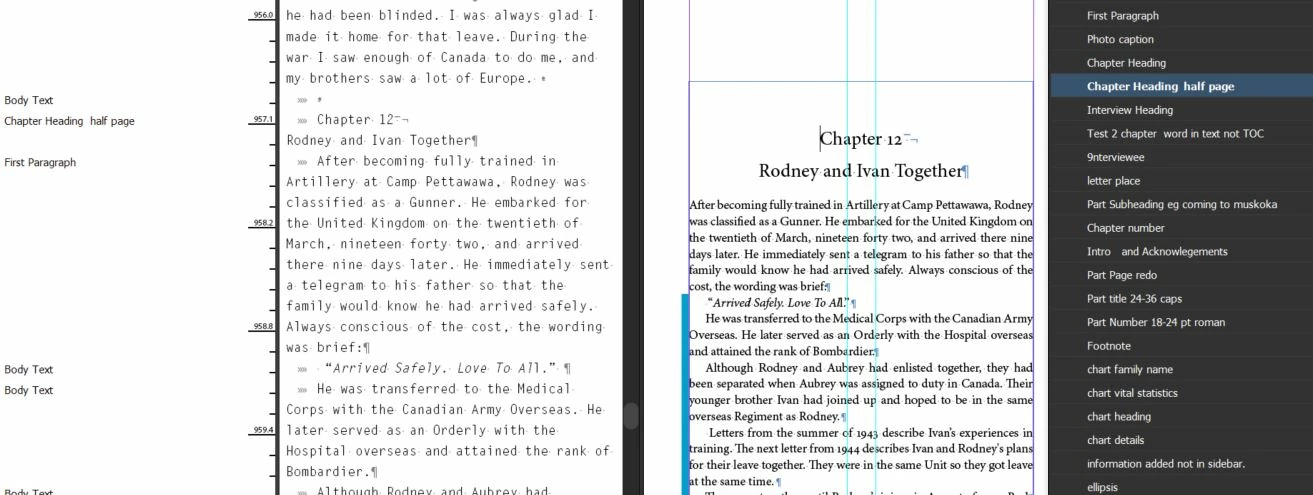
Looking at the last screen shots... there is a character style applied to" Chapter Title Half Page". It's a nested character style called "TOC chapter name" and is assigned up to the first tab character. There isn't a tab character on the line, so it is impacting the entire paragraph. Why is that there? 


~Barb 


~Barb at Rocky Mountain Training
muskoka lake
Inspiring
October 26, 2020

I posted the body text with Paragraph style showing. Here is the info for that style in edit mode.

muskoka lake
Inspiring
October 26, 2020


muskoka lake
Inspiring
October 25, 2020

I will drive to town tomorrow and try to send from there. Internet is not working well here in the boondocks.


Barb Binder
Community Expert
Community Expert
October 25, 2020

Hi @muskoka lake:


Be sure to reply in the browser and not your email. Use the Insert Photos button at the top of your reply.


~Barb 

~Barb at Rocky Mountain Training
muskoka lake
Inspiring
October 25, 2020

Yah! It was exciting to see that one problem disappear.

I made  the screenshot with the cursor on the line  "Rodney and Ivan." I can't see how to add it in this message. Drag and drop did not work, even when I reduced the image size for web. Attach is looking for a link. When I first posted there was an icon for a photo but not here. Do I need to post a new inquiry to be able to add the screenshot? I'm so sorry to be befuddled by such a simple thing.


Barb Binder
Community Expert
Community Expert
October 25, 2020

Hi @muskoka lake:


One down, one to go!


In the first (new) screen shot, your cursor is on the first line of the title. Would you mind clicking on the second line "Rodney and Ivan Together" and then repost?


~Barb 

~Barb at Rocky Mountain Training
muskoka lake
Inspiring
October 25, 2020

Thanks Barb, you were right about the extra tab. that fixed that part of it.

I have tried to download Dropbox but the connection times out. So I will try to use the drag and drop here. thank goodness that works. 

When I copied and pasted the body text and TOC into a new file the Chapter 12 line in text was highlighted, and the " in the TOC was highlighted. Identifies the problem area I guess but does not give a solution alas.


Rodney and Ivan "

Barb Binder
Community Expert
Community Expert
October 25, 2020

Hi @muskoka lake:


It actually looks like you took a small step forward in the second screen shot, in that now "Chapter 12—" is no longer bold. If you don't want to share your file (and I am also happy to look at it on dropbox, if you are comfortable with that), then will you click on the words "Rodney and Ivan Together" on page 297 and show us a screen shot with both the paragraph and characters styles panel visible?


In the TOC, your first screen shot shows an extra tab between the text and the page number. I suspect that it is at the end of the subhead on page 301, before the hard return. Try deleting it and update the TOC.


...(1944 August 12) >>


~Barb

~Barb at Rocky Mountain Training