muskoka lake
Inspiring
October 23, 2020
Answered

Paragraph style error in one entry of TOC
  • October 23, 2020
  • 30 replies
  • 1683 views


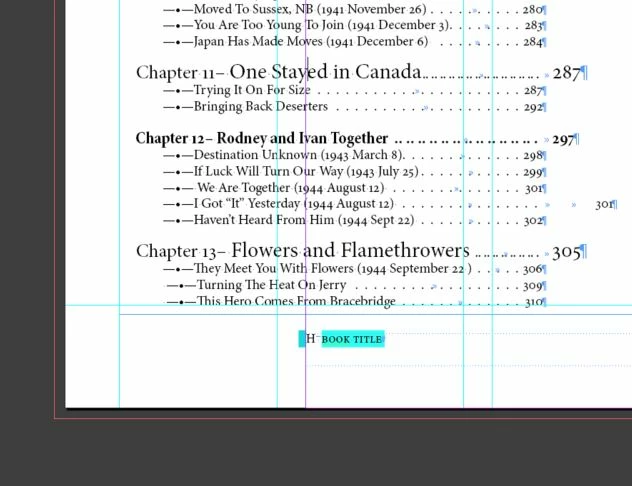
I have the same Para Style applied on all Chapter Number lines in text. And a different style for the Chapter title. When I generate the TOC this one entry ends up in a different style. I have tried removing and retyping, tried paste without format, and all day with zero success.

It is as if the two styles become one when making the TOC, but I purposely made two different styles. I the first is not included in the TOC, the second has a numbered list as part of its TOC entry style with prefix of "Chapter"

The TOC entry style shows as correct when I check it in the TOC creation section. There are no character styles applied to either line in the body text. I hope someone has seen this before. I'm almost ready to give up.

This topic has been closed for replies.
Correct answer muskoka lake

Thank you Barb Binder and @vladan saveljic. 

That was an instant fix. I actually changed them all to be none for Character style. So in the TOC they are now bold. I think it makes the overall page more readable to have some headings bold and some not. I hope there is no convention against that!

I am so grateful for the persisence and patience of Forum members. Sorry it took me so long to get Dropbox organized, the trials of low bandwidth in the country over a DSL dryloop.

Thank you everyone, my day just got 1005 better.

30 replies

vladan saveljic
Inspiring
October 25, 2020

You should upload on dropbox, as FRIdNGE asked you before, the page of the toc and the page that contain Chapter Title 12 and share the link with us.

muskoka lake
Inspiring
October 25, 2020

No character style. I tried checking under the text box even to see if something was hidden there. All my attempts to fix this are making it worse. Now I have a runaway leader in the same section, even though it has the same TOC style as all the rest. It is the sae problem with that bolded entry. I tied a different style and all the rest reverted but that one did not. The style comes up the same but is not working. I tried regenerating the TOC too.

muskoka lake
Inspiring
October 24, 2020

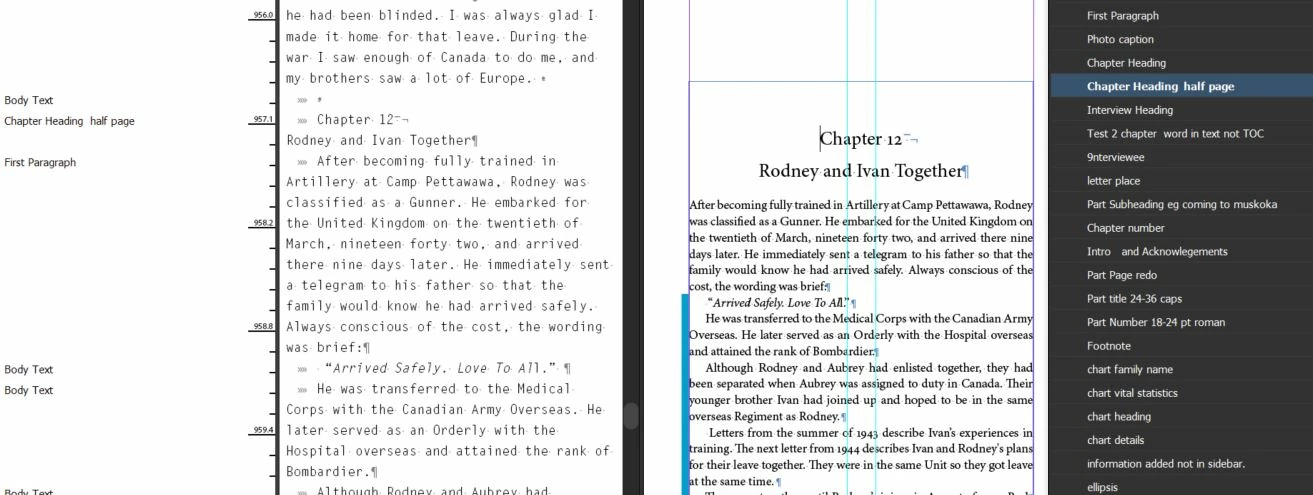
thanks for the explanation. Unfortunately I am on a very limited bandwidth here 2mb/s and can not send large files from here. for some reason though i can drag and drop onto this wonderful site. So I will make another two screen shots, one of the problematic TOC entry and one of the text page. 

I see another glitch has crept in on the same area of the TOC. One of the tab leaders has run away, even though it has the same TOC entry style and I have cleared all overrides.

Community Expert
October 24, 2020

Why private? Please share. Could help others.

Barb Binder
Community Expert
Community Expert
October 24, 2020

Hi @muskoka lake :


That one title doesn't accidently have a character style assigned, does it? 


~Barb

~Barb at Rocky Mountain Training
FRIdNGE
October 24, 2020

I just need a copy-paste of the text (TOC and current page) containing the part about the chapter 12, in a new InDesign file you will send me by email I'll give you in private!

muskoka lake
Inspiring
October 24, 2020

Sounds great to get the help, although the "if you want to live" scared me at first.

I am a newbie at ID so do not know how to extract just a page or just the TOC file. Do I copy and paste them into another file?

I see where to change the file type to idml but I do not know how to get just part of the file.

FRIdNGE
October 24, 2020

Hi!

Contact me in private "if you want to live"! [extracted from "Terminator" movie]

I will help you if you send me .idml file (TOC + Chapter 12 current page)


(^/)  The Jedi

muskoka lake
Inspiring
October 24, 2020

Help, still there. I tried that but it does not change the glitch in the TOC.

Are there any other options?

Would it help if I recreate the paragraph style and apply it to all chapters?

I have checked all other chapters. sorry I included the screennshot where I tried the Forced Line break, that was just desperation.

So at present have two lines with two different styles applied that work on all TOC except this one entry.

TᴀW
Legend
October 23, 2020

Look carefully at your screenshot for Chapter 12. It ends with a forced line break, not a regular paragraph break. So, for this chapter, both the number and the title are, in effect, a single paragraph.

Change the forced line break to a paragraph break and the problem should go away.

HTH,

Ariel

id-extras.com | InDesign tools & scripts for typesetters, form designers, and translators