

Chris Tammar
Participating Frequently
January 23, 2024
Answered

Persistent Error in Adobe InDesign: ‘There Was an Error Updating the Artifact

  • January 23, 2024
  • 34 replies
  • 26732 views

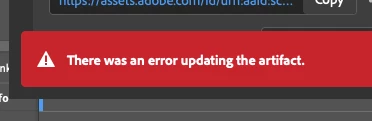
When I go to update a review link in InDesign, I keep getting this error message "there was an error updating the artifact". After that, the link does not work for most people. I am signed in to Adobe. Everything is up-to-date.... But this issue still persists. Can Adobe please fix this issue? It's emarassing when I go to send the review link to my leaders and they just get an error message when they try opening it.
 

<Title renamed by moderator>

Correct answer NOcreationsBE

@Rishabh_Tiwari They originally opened with Chrome. Which did not work. But they just refreshed the link, and it now works. So i think what is happening, is that there's some sort of lag or delay with the file updating, creating an error message. It must be some sort of Adobe server issue. Other's have noticed this too.... The link won't work right away, but when they try again, it works.


I would like to add that my clients usually do not experience any problems opening the file with the link (even if I get the error message), but sometimes they do. Refreshing the page does do the trick in most cases if that happens. Now usually they are 'slow' in reacting on my update messages, so it is possible that they only experience problems opening the file when they react right away. I will keep an eye on that now, to be sure. So I support the idea of a lag/delay in the update process.

34 replies

Participant
November 20, 2025

I have also been having this issue with one of my files for the past 2 days. I've tried many of the things suggested here, am using 21.01.1 Indesign and macOS Tahoe 26.1. For one of my cloud files, after I updated the review link it no longer opened and crashed Indesign every time I tried. I was able to duplicate the file and continue working in that version, but every time I try to update the link it has the 'There was an error updating the artifact' error message, and the updates don't push through. The only thing that seems to work is deleting the link and generating a new one, but that is extremely disruptive for our process (and embarrasing). I have tried packaging and using the indml which I then convert to indd, and that also ends up having the same issue.

Participant
November 20, 2025

Coming back to share something interesting after a few years. Seems my PC will update the file, even when it says it can't. My Mac, however, says it cannot update the artifact, and does not update the file. *le sigh* I'm tired.

NOcreationsBE
Inspiring
November 20, 2025

@user8773624 that is very interesting indeed! I work only on a pc these days and it always updates the file (error or not). This could explain why some users report that the online file does not update while others don't have that problem.
Adobe, @Abhishek Rao, here's an important clue!

curranh53626830
Participant
November 19, 2025

I am having the same problem here from InDesign. I updated to the latest version too.

philippepetitpas
Participant
November 19, 2025

Medidos de noviembre 2026 y este problema es peor que antes. En Indesign 2025, usualmente aparecía este mensaje, pero el contenido sí se actualizaba. Desde que cometí el error de actualizar a Indesign 2026, cada documento que comparto (y en mi work flow comparto muchos documentos todos los días con colaboradores y clientes) aparece este error. La única manera es crear un nuevo enlace. Pero qué pasa con los comentarios hechos por mis colaboradores? Es una verguenza que Abode lance productos a medio terminar. Realmente el monopolio le ha hecho muy mal a esta compañía. 

Participating Frequently
November 19, 2025

It's so incredibly bad that this isn't fixed by Adobe. I use this feature in all my InDesign projects and it creates an incredible amount of more work for me. This is something I pay to have work and it has been messing around on and off for many years. Time to get Adobe to step up and deliver.

Participant
November 18, 2025

I am now getting this error for the first time. Why is this still an issue??

e.e.DeGroot
Participating Frequently
November 13, 2025

Well, it's now 2025 and I'm on version 21.0, Sequoia 15.6.1, and I'm still getting the artifact error. When it used to do this in previous versions, I could usually get it to update at least twice but now it's only letting me do the initial link creation file update. I have to make a whole new file to any any further updates to post, losing my editors' comments. The previous version of INDD was actually fairly stable and I didn't get any errors that I recall over the past several months. It was kind of awesome and my clients were so happy not to have to deal with this!

Thoughts, suggestions?

Participant
November 17, 2025

I am also getting this error! It won't update the link. I have tried restarting, reinstalling the software, trying different documents and its the same thing. Can't update the link. 

Participating Frequently
November 12, 2025

Still getting the error also

Participating Frequently
November 11, 2025

This issue deffinately has not been resolved. Im having this same issue with multiple files still

Participant
November 11, 2025

Can the admins please unmark this issue as solved based on the latest feedback? This seems to be a major bug impacting many users, clearly this is not resolved yet.

J E L
Community Expert
Community Expert
November 11, 2025

Yes, I am still getting the artifact error!