Participating Frequently
September 16, 2021
Answered

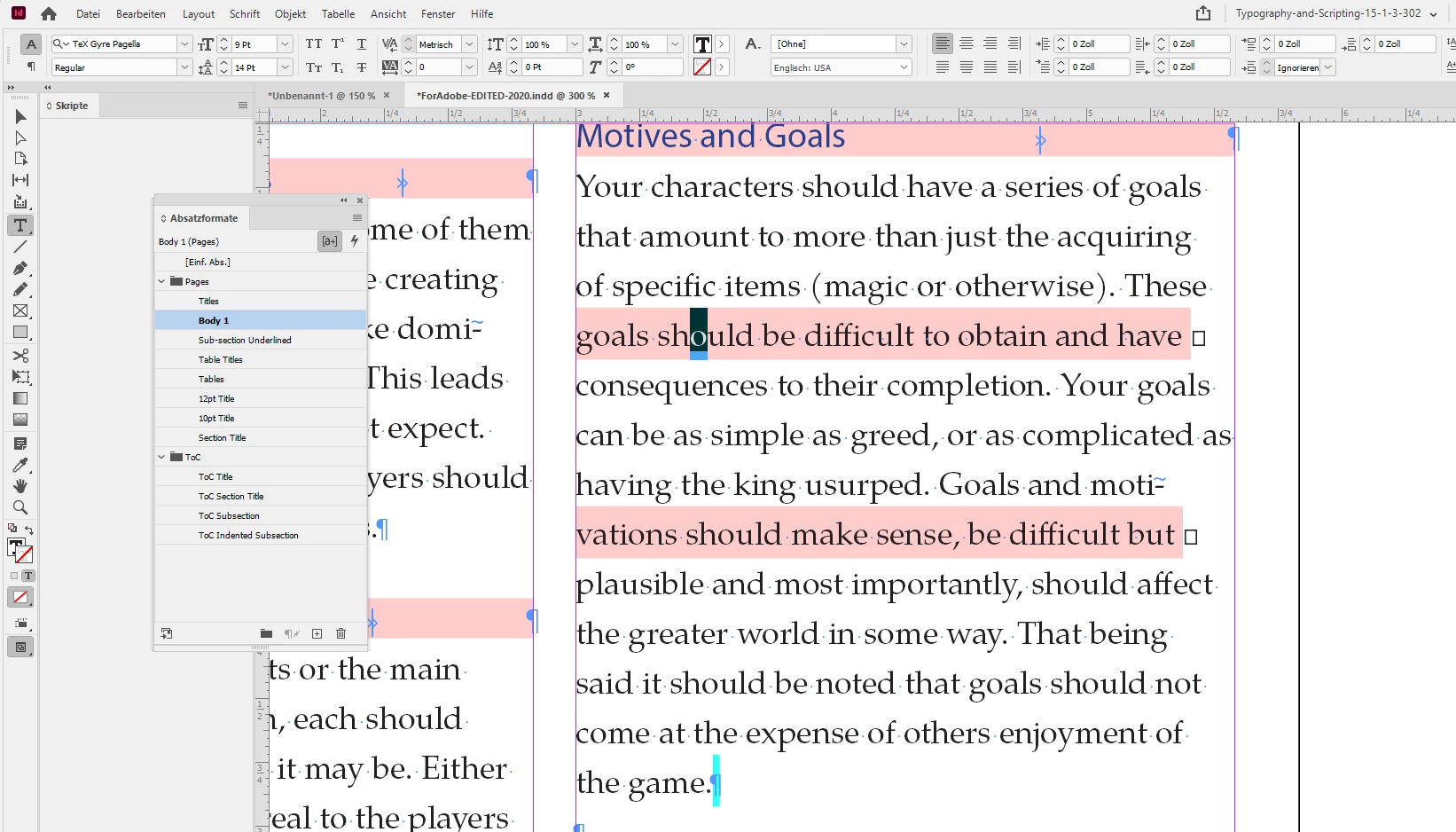
Portions of text are highlighted pink w/ tiny squares next to them

  • September 16, 2021
  • 12 replies
  • 8320 views

Hello,

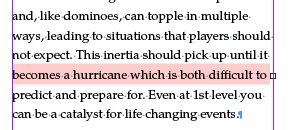
I'm trying to cut and paste from my main document (in OpenOffice) to InDesign. I'd say that 98% of the text is fine but occasionally I get random sections of text highlighted in pink with tiny squares next to them (see attached pic below). I don't believe this to be a missing font issue because I will have an entire paragraph with this particular font be perfectly fine. While another has roughly 3/4 of the text normal and the other 1/4 highlighted in this way. I can't simply change the font because I need that font I have for the body text. So far rewording the text has worked (to an extent) but after a certain point it will randomly highlight again. Any help would be greatly appreciated. Thanks
This topic has been closed for replies.
Correct answer Laubender

Your link is working very well.

Also downloaded the missing font family TeX Gyre at:

https://ctan.org/pkg/tex-gyre-pagella?lang=en


Made the fonts available through a Document fonts folder and see the same issues like you do in your InDesign document:


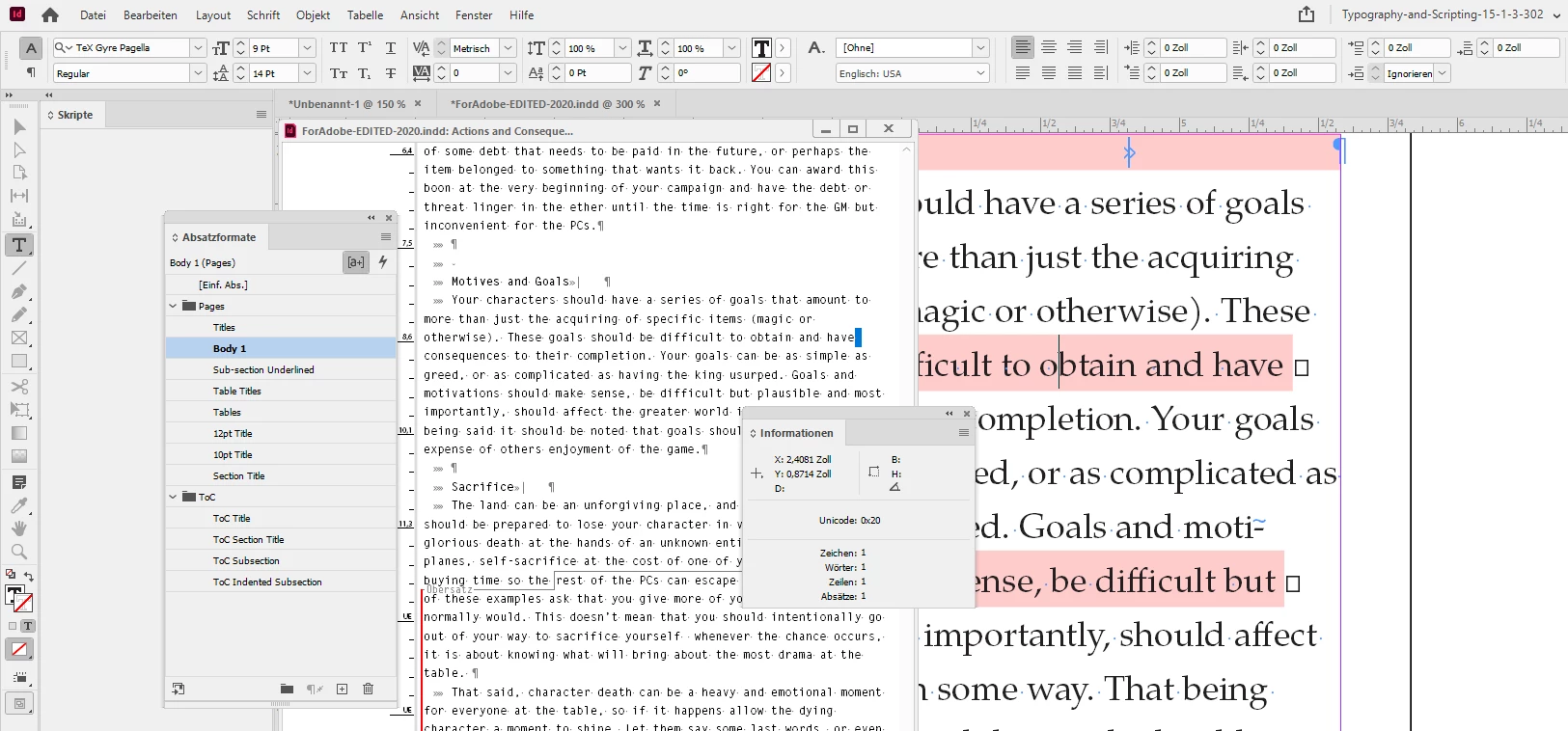
There is no style override with characters or the paragraph in this line of text.

I have Style Override Highlighter enabled. Also invisible characters; where InDesign already has issues to render the little widgets for the blank characters if you look closely. The character at the end of the line is a mystery. Let's use the Story Editor window and the Info panel to detect what it is:


Info says it's a plain blank character at codepoint 0020.

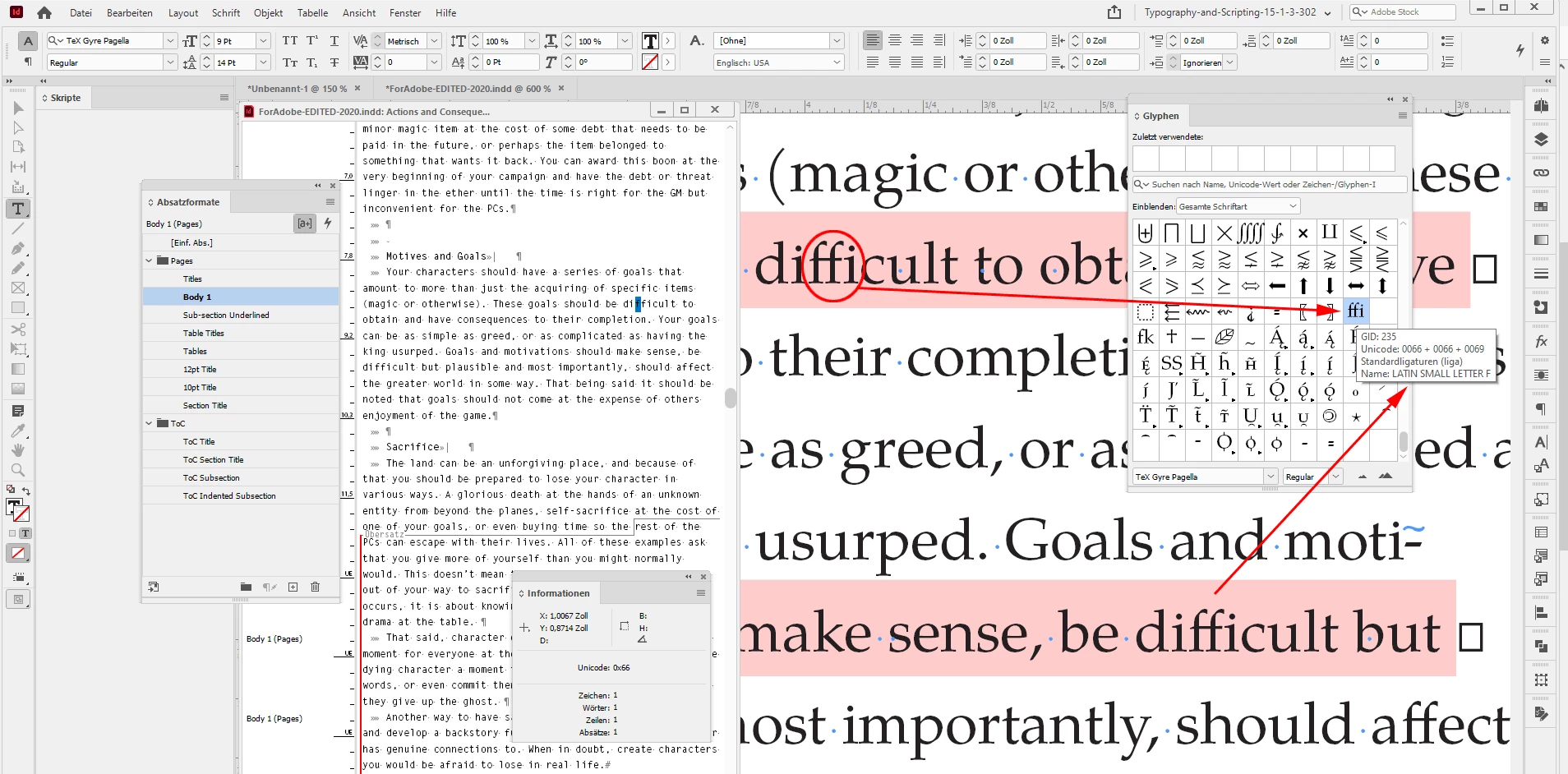
The weirdness begins if I open the Glyphs panel and inspect every single character of the word "difficult". Nothing unusual when I start with the "d", the "i", but then with the selected "f" InDesign becomes a bit strange. Something's wrong with that ligature "ffi" in that OpenType font:


And you may notice that the same happens a few lines below. Also with the word "difficult" and the following blank characters.


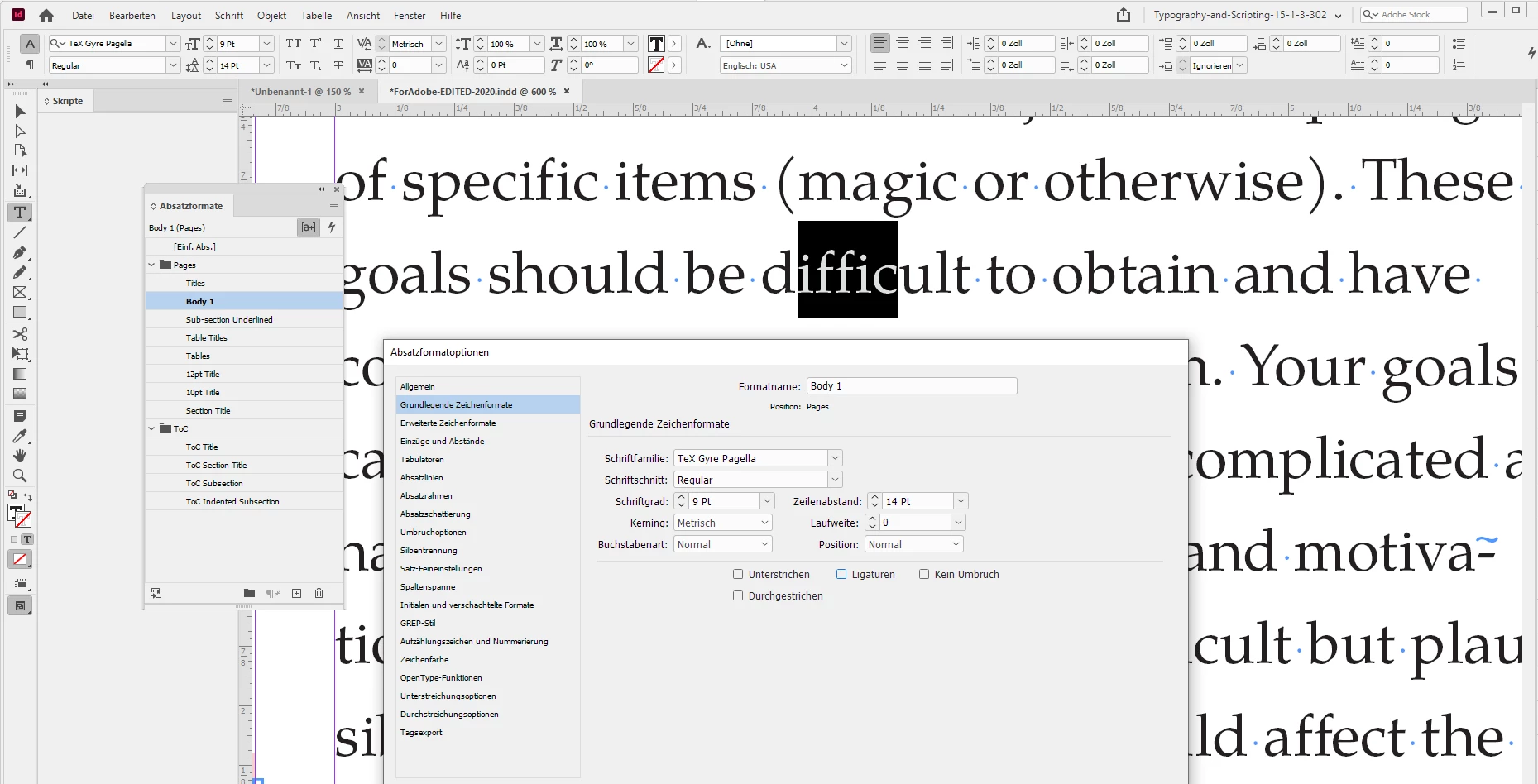
Can we fix the issue if we turn off Ligatures in the applied paragraph style? Yes!


So that's it. A bug in the font.

I would contact the makers of the font and report that InDesign has issues with ligatures.

Especially with ligature "ffi".


Regards,
Uwe Laubender

( ACP )

12 replies

Community Expert
September 22, 2021

Hi Mycelian,

also checked a minimized document with just one paragraph with InDesign's Preflight.

A missing glyph error is showing up with glyph SPACE:


So we have at least four issues here:


[1] An optical missing fonts warning where there is no missing font. Preflight does not detect a missing font.
[2] A preflight warning of missing glyphs with character SPACE that is misleading.
[3] Obviously an issue with that font and the ligature ffi.

[4] A non-def character at the end of every line that comes out of nowhere and is also exported to PDF.


Ah. And just another one.

[5] Wrong positions of the invisible characters for the spaces right after the ffi glyph in the text:


Regards,
Uwe Laubender

( ACP )

MycelianAuthor
Participating Frequently
September 21, 2021

Thanks to everyone who put in their $0.02 into this problem of mine. I know time is precious, so I'm grateful a lot of you took your time to help me. This is an awesome community.

Community Expert
September 21, 2021

Well, all that said:

Of course there is a small difference using the ligature of "ffi" vs not using it.

But I do not think it's worth the trouble. If you want to minimize the visual effect you could use a GREP style for pattern

ffi

that disables ligatures and uses a tracking value of -70 perhaps.


Regards,
Uwe Laubender

( ACP )

Community Expert
September 21, 2021

And yes, you have to do that for all of your paragraph styles that work with that font.


Regards,
Uwe Laubender

( ACP )

Community Expert
September 21, 2021

In the case of the "ffi" ligature of this font I see no degradation of quality.

Just compare the shapes of the ligature glyph with the letters ffi when ligatures is turned off.


If you want to reduce the effect of turning off ligatures and only turn it off for ligature "ffi" you could use a GREP style in your paragraph styles that works with the pattern:

ffi

and an applied character style that turns off ligatures for that special combination of characters.


Regards,
Uwe Laubender

( ACP )

LaubenderCommunity ExpertCorrect answer
Community Expert
September 21, 2021

Your link is working very well.

Also downloaded the missing font family TeX Gyre at:

https://ctan.org/pkg/tex-gyre-pagella?lang=en


Made the fonts available through a Document fonts folder and see the same issues like you do in your InDesign document:


There is no style override with characters or the paragraph in this line of text.

I have Style Override Highlighter enabled. Also invisible characters; where InDesign already has issues to render the little widgets for the blank characters if you look closely. The character at the end of the line is a mystery. Let's use the Story Editor window and the Info panel to detect what it is:


Info says it's a plain blank character at codepoint 0020.

The weirdness begins if I open the Glyphs panel and inspect every single character of the word "difficult". Nothing unusual when I start with the "d", the "i", but then with the selected "f" InDesign becomes a bit strange. Something's wrong with that ligature "ffi" in that OpenType font:


And you may notice that the same happens a few lines below. Also with the word "difficult" and the following blank characters.


Can we fix the issue if we turn off Ligatures in the applied paragraph style? Yes!


So that's it. A bug in the font.

I would contact the makers of the font and report that InDesign has issues with ligatures.

Especially with ligature "ffi".


Regards,
Uwe Laubender

( ACP )

MycelianAuthor
Participating Frequently
September 21, 2021

Will I need to go through each instance of this to shut off the ligatures or will it correct all of the instances if I apply it to the Paragraph styles? Also, will turning off ligatures affect print quality should I get this work published?

Community Expert
September 18, 2021

Hi Mycelian,

showing the two screenshots is ok, but I think we should be able to look into the documents to solve that riddle. One InDesign document with that frame, one file with the contents of the frame in an OpenOffice document. Best put the files on Dropbox or a similar service and post the link.


Thanks,
Uwe Laubender

( ACP )

MycelianAuthor
Participating Frequently
September 21, 2021

hXXps://www.dropbox.com/sh/3yayli9hhpl5hku/AACtwrXffq3gTQemxIIIAiv1a?dl=0
Replace the X's with t's

I'm new to DropBox, so if I missed something please let me know how to correct it for you.

Jumpenjax
Community Expert
Community Expert
September 17, 2021

I agree with Jmlevy. It is a missing font. You may want to try to change the font. Take a look to see if the highlighted area has is fixed. If it is fixed you can see if it is in a italic or bold. Then  change the font back to original and see if thatclears it up. I have done that in the past and it seem to fix the issue. 💁🏼‍♀️

Lee- Graphic Designer, Print Specialist, Photographer
Community Expert
September 17, 2021

Hi Mycelian,

please post one sample of the InDesign document.

Also one sample of the OpenOffice file.


This is a rather strange issue; I'd like to see into it.


Thanks,
Uwe Laubender

( ACP )

MycelianAuthor
Participating Frequently
September 17, 2021

Left is InDesign, Right is OpenOffice

John Mensinger
Community Expert
Community Expert
September 17, 2021

Yeah those little squares are curious. What does that look like in Story Editor?

John Mensinger
Community Expert
Community Expert
September 16, 2021

I doubt it's "random". Almost nothing truly is.

Is your Clipboard Handling > Paste preference set to Text Only, or All Information?

I suspect it's possible the text you're pasting includes hidden markup language from OpenOffice.

For a workflow like this, it's best to paste Text Only into a frame (or thread of frames), to which a Paragraph Style is pre-applied. You'll never have this problem.

MycelianAuthor
Participating Frequently
September 16, 2021

It is currently set to "Text Only"

jmlevy
Community Expert
Community Expert
September 16, 2021

It is currently set to "Text Only"

What do you mean?

As Mike suggest, I would create at least one paragraph style using the regular typeface you need, apply this style to your text and create character style(s) as bold, italic, bold italic that you could apply locally.