
Participating Frequently
January 29, 2009
Answered

Print/Export book as spreads

  • January 29, 2009
  • 12 replies
  • 195140 views
It is possible to make a InDesign book print or pdf as spreads. But the last page of an document/chapter and the first page of the next document/chapter are always single pages! Therefore many dtp-ers choose not to use the InDesign book option, but make the complete book in one document.

I would love to send my complete InDesign book as pdf in spreads for email review. Please let the first and last page of the book documents be exported as spreads, as if it was made in one document.
Correct answer DavidMatos

A bit tricky indeed but definitely the way to go! Thanks ///

EDIT

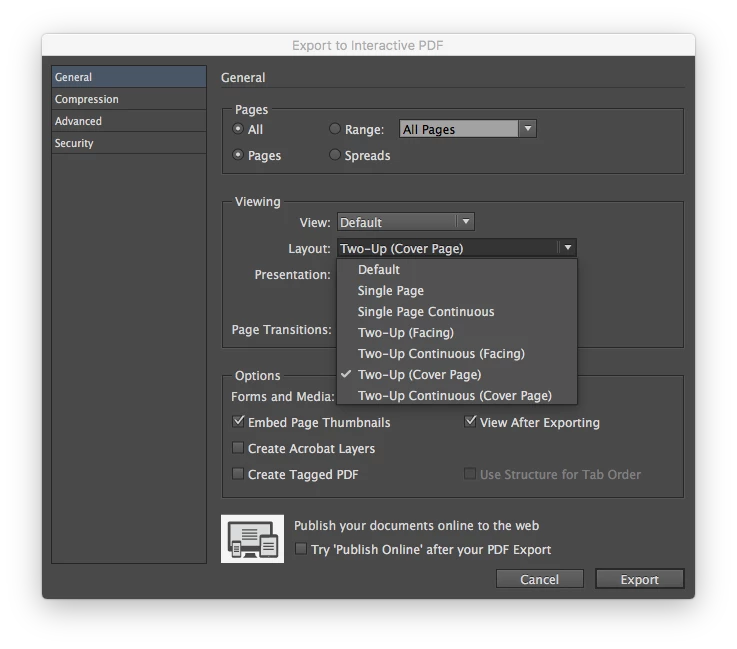
You can actually do this directly from Id now using the Export PDF panel:

12 replies

Participant
December 18, 2014

Hello. There is no "trick", when you select File > Export choose Format "Adobe PDF (Print)", click Save, then in the next dialogue box choose the Spreads radio box in the Pages area.

Peter Spier
Community Expert
Community Expert
December 18, 2014

Personally, I think forcing readers to scroll both up/down and left/right to view your document is a big turn-off. I often set the initial view as two-up, but I would never make it impossible for a reader to change that.

Participating Frequently
November 17, 2014

the actual solution to this problem is here: http://indesignsecrets.com/make-it-look-like-a-book-in-the-acrobat-pdf.php

The trick is to export from InDesign as single pages, then let Acrobat handle the two-page display.

DavidMatos
DavidMatosCorrect answer
Inspiring
March 8, 2017

A bit tricky indeed but definitely the way to go! Thanks ///

EDIT

You can actually do this directly from Id now using the Export PDF panel:

Participant
September 10, 2009

I think you might enjoy this:

http://www.adobe.com/designcenter/video_workshop/?id=vid0217

Participating Frequently
September 30, 2009

@forum romanum,

Nice video, nothing new to me and unfortunattely nothing new about print/export book as spreads.

Participating Frequently
February 28, 2009
Found out how to make a PDF in spreads from a InDesign Book document... Also the last page of a document/chapter and the first page of the next document/chapter will be printed as a spread! YEAH...

I do believe there must be a more efficient way to do it, but since nobody could tell me how... I have to do it the inefficient way! This is how i did it:

* Make a single page PDF of the InDesign Book document (indb)
In the menu of the InDesign Book panel/window select
- Export Book to PDF

* Open PDF in Acrobat Professional (PDF 1)

* Delete first page !!!

* Save As... (different name) (PDF 2) !!!

* File Print...

* Print (pop-up window)
- Printer: Adobe PDF 8.0 / 9.0
Copies & Pages (Print submenu)
- Page Scaling: Multiple pages per sheet
- Pages per scheet: Custom: 2 by 1
- Page Order: Horizontal
Layout (Print submenu)***
- Pages per sheet: 2
! ATTENTION: check the page order before printing
in the preview of Copies & Pages submenu!
[Print]

* Save (pop-up window) will pop-up
Save As: ... (documentname)(PDF 3)
Select location on you computer
[Save]

* Open PDF 1
* and open PDF 3
* Select first page off PDF 1
* Drag an drop it in front of the spreads of PDF 3

* Save this PDF (PDF 4)

Now i have a PDF of my book in spread,
except for the first page, which is a single page.

Unfortunately there is a white margin/area around the spreads,
because the Acrobat Print option Multiple pager per sheet does not make the pages Fit/Shrink to Printable Area.

Footnote *** Layout (Print submenu); Pages per sheet: 2
First i did not select this option, Acrobat was mixing up the Pages in the wrong order.
Peter Spier
Community Expert
Community Expert
February 28, 2009
Export or print the book to PDF, then print spreads form Acrobat.
Participating Frequently
February 27, 2009
@Horse Hair Design
I know that it is possible to print spread from an InDesign Document (indd)
But it is not possible JET... too print a InDesign Book (indb) completely as a spread. The last left page and the first right page of the InDesign book document (chapter/section) will stay single... instead of a spread...

But still thanx for your info
;) dtpartner
Participant
February 27, 2009
Go to the Export Adobe PDF window. In the general tab undernieth "All Pages" and "Range", there is a tick box for "spreads". Click it. It should keep the same spread format that you created in In Design.
Peter Spier
Community Expert
Community Expert
January 29, 2009
PlaceMultiplePagePDF.jsx is one of the sample scripts that should have been installed by default. :)
Participating Frequently
January 29, 2009
@Peter thanks for your info Will look for that script (or do you know a script that can do this). Hopefully in the nearby future the complete book as a spread (Export Book option) will be a new feature in InDesign.
Peter Spier
Community Expert
Community Expert
January 29, 2009
In Acrobat, File > Document Properties > Initial View tab. Set the view to two-up facing pages and set whatever magnification you want them to have when the file opens, then save. Users can change this on their end after they open the file, but it will open however you set it.

You didn't mention you originally that you want them to print the spreads on their end. That's a problem, since Acrobat doesn't have that option. For the time being, if you need them to have printable spreads you need to get things into a single document. One way to do this is to export the book to PDF, then open a new ID document and use the script to place the PDF into multiple pages, then export that as spreads. It's not terribly convenient, but it's not too onerous, either, with a script.

Peter
lymanw69802718
Participant
January 20, 2016

I'd like to save my doc as a PDF but InDesign doesnt' give me the option. It is grayed out

Peter Spier
Community Expert
Community Expert
January 20, 2016

Not sure what you mean here.