Participant
Feb 15, 2022 12:04 PM UTC
Answered

Printing indd to composite grey PDF: 100% black turns 92%

I want to print (or export) a coloured indd to a grayscale PDF (InDesign 2022). In the print/output window I set the output color to Composite Grey. The black objets and text must be remain 100% black. But in the produced PDF all black objets become K 92%  - why? I have already tried all settings, switches and pipes... 

This problem appeared some weeks ago, and the two other PC near mine do it well. Some idea?

This topic is closed to new replies. Start a new post to keep the conversation going.
rob day
rob dayCorrect answer
Community Expert
Feb 15, 2022 2:14 PM UTC

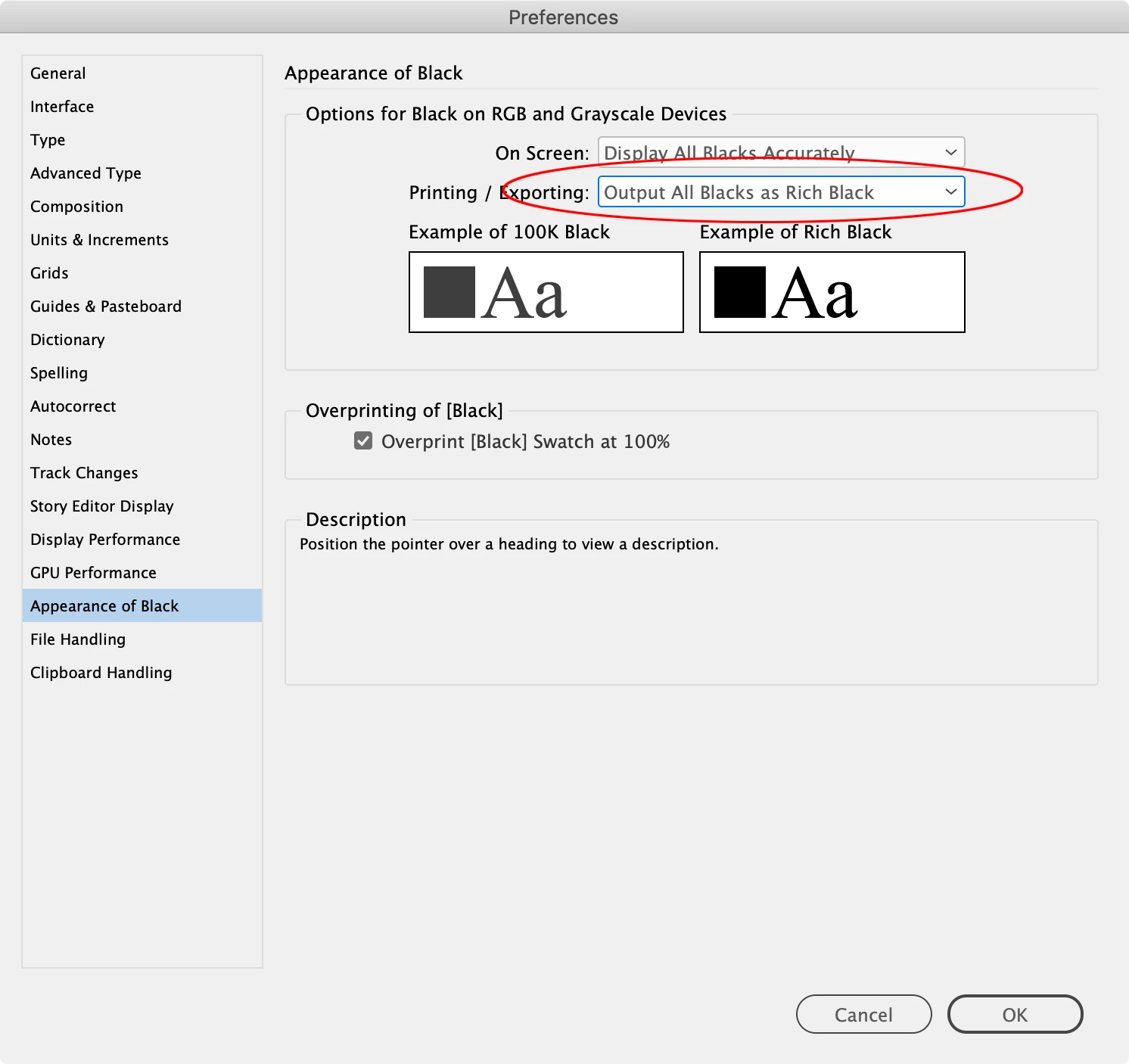
If you are Exporting to a Gray Destination Profile, set your Appearance of Black Exporting Preference to Output All Blacks as Rich Black


5 replies

rob day
Community Expert
rob dayCommunity ExpertCorrect answer
Community Expert
Feb 15, 2022 2:14 PM UTC

If you are Exporting to a Gray Destination Profile, set your Appearance of Black Exporting Preference to Output All Blacks as Rich Black


Translate
vargabyAuthor
Participant
Feb 24, 2022 1:05 PM UTC

Thousand thanks, it works.  G

Translate
Peter Spier
Community Expert
Community Expert
Feb 15, 2022 2:09 PM UTC

Reset the Appearance of Black settings in your prefs to Output All Blacks as Rich Black:


Because rich blacks are darker than 100%K grayscale devices reserve solid black output for rich blacks. Changing the prefs solves that and has no effect on color output.

Translate
vargabyAuthor
Participant
Feb 24, 2022 1:05 PM UTC

Thousand thanks, it works. G

Translate
Geоrge
Legend
Feb 15, 2022 12:24 PM UTC
Remember, never say you can't do something in InDesign, it's always just a question of finding the right workaround to get the job done. © David Blatner