

speedy way to get pages content into indesign
Hi all,
So I have a 200 odd page document, it's a reference type book so all the pages have the same layout, same title, same sub title, same starting word/category for each bullet point and then different wording to finish each paragraph with the relevant information. Example below:
- Title is it's own paragraph syle
- cat 1-5 their own styles
- sub title it's own style
- cat 6-11 it's own style
Then all the styles are connected so I can apply title then next style and it formats the whole page.
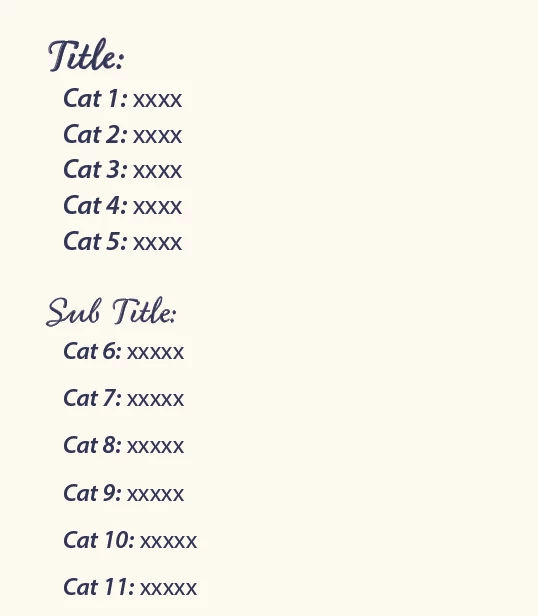
Now, the problem, the client has sent the content for each page, in individual Pages documents - ie 200 odd separate Pages documents, not 1 Pages document with 200 odd pages.
It's badly formatted has tons of multiple returns etc. I know I can remove multiple returns with find and replace but how can I get all of this info into indesign without spending hours copying and pasting not only every single page but then also highlighting every page and applying title then next style? The Pages docs also don't have the Title, only the Subtitle, AND the "xxxx" content is of varying lengths, sometimes over 2 lines, so the text box is set to auto resize (upwards because of other elements) to accommodate which means I don't think I can put the title on the master page.
If I copy and paste into excel, it does give each line it's own cell, BUT the cells go down rather than across and I'm still copying and pasting 200 odd times and then removing all the titles and categories.
The only thing I could think of was combing all the pages docs into a single PDF with the combine documents thing, then converting that to a word doc, importing that into indesign as a single story and putting the title as the next style of cat 6-11 so it might cycle round until it does the whole document?
BUT acrobat doesn't support pages as a file type it can combine into a PDF... Pretty sure it was going to have very mixed results even if it had worked.
Any other ideas you wonderful people? Was a bit too complex for chat GPT to understand or give a solution.
Thanks in advance!
 AdChoices