
Participant
September 23, 2025
Answered

Trouble with fonts not exporting to pdf properly

  • September 23, 2025
  • 4 replies
  • 378 views

Hi, 

I'm having an issue where my fonts look correct in the InDesign document, but when I export to PDF, some fonts, seemingly at random, will change to other ones. I have had this issue on a few different documents in the past, and have been able to just create outlines of the type to deal with it, but it's becoming frustrating. I have the most up-to-date version and have attached visuals of what happens. Appreciate any help!


after export
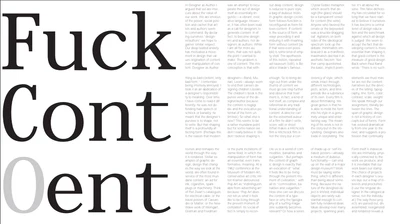
 before export
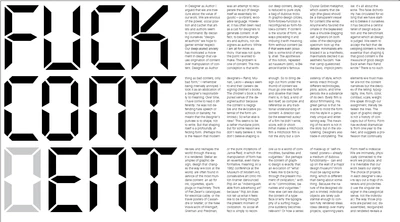
 before export
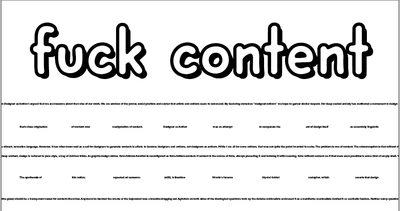
after export
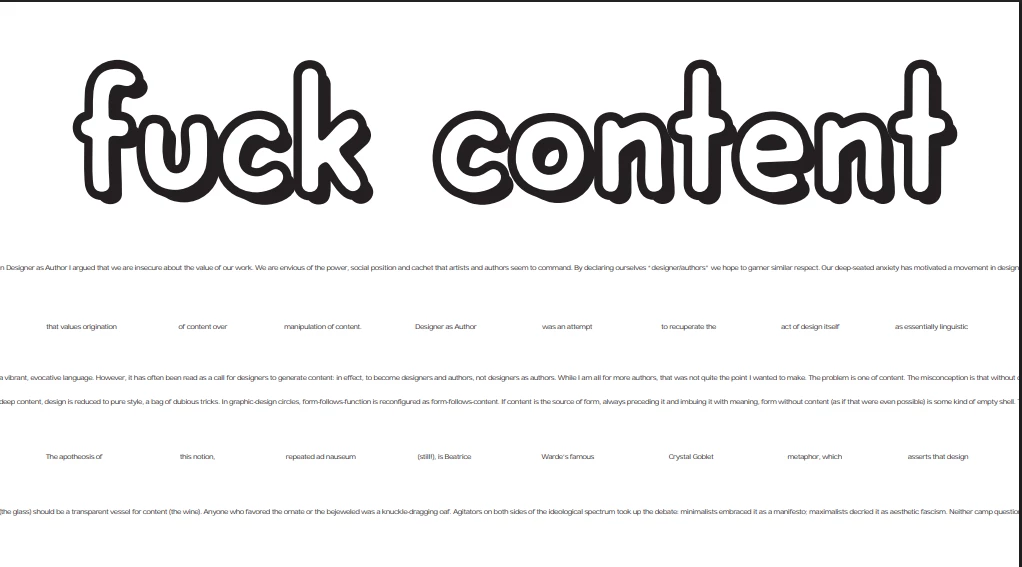
  

Correct answer Libby G.

I signed out and signed in again, then reset the cache. After that, my fonts weren't showing up in InDesign or Creative Cloud. I followed the instructions here to get them to show up again. All is good now; it looks like this was an underlying sync issue that wasn't showing up without further research. Thank you for your help!

4 replies

Willi Adelberger
Community Expert
Community Expert
September 24, 2025

WbT PDF setting and standard do you export?

Do you have the same font installed?

Do you have this font installed as TTF as TTF can have a flag which does. not allow embedding fonts?

Brad @ Roaring Mouse
Community Expert
Community Expert
September 23, 2025

In Acrobat, what does it say in the Document Fonts section of Properties?

Can you share a PDF?

Participating Frequently
September 23, 2025

If the fonts are not open type face or cloud base, they can cause issues. If you absolutely need that font, you can change the font to a graphic in photoshop or illustrator. TT fonts (adobe) sometimes causes what you are explaining.

BobLevine
Community Expert
Community Expert
September 23, 2025

I'm sorry, but that's just nonsense.

Libby G.Author
Participant
September 23, 2025

I forgot to add that all of the fonts I'm using are from adobe fonts and are installed properly.

Abhishek Rao
Community Manager
Community Manager
September 23, 2025

Hi @Libby G.,


Thanks for the screenshots. I can see why that's so frustrating. To help us narrow this down, could you tell me which version of InDesign you're running and the exact OS and version on your machine? Also let me know whether this happens only in that one file or across multiple documents, and whether it's only happening with one Adobe Font or with several fonts.

Please try signing out of the Creative Cloud Desktop app, then sign back in, and reset the InDesign/Adobe font cache following the steps here: https://adobe.ly/3KgzdiO. After that, confirm the fonts are active in Adobe Fonts, restart InDesign and export again. As a temporary workaround you can convert critical text to outlines before export to preserve appearance, but please try the sign-out/sign-in and cache reset first.

Give those steps a try and let me know what you see. 


Looking forward to hearing back.

Abhishek 

Libby G.AuthorCorrect answer
Participant
September 24, 2025

I signed out and signed in again, then reset the cache. After that, my fonts weren't showing up in InDesign or Creative Cloud. I followed the instructions here to get them to show up again. All is good now; it looks like this was an underlying sync issue that wasn't showing up without further research. Thank you for your help!