Participating Frequently
May 28, 2025 11:18 AM UTC
Answered

Wandering text across columns when using decimals in line height or space after

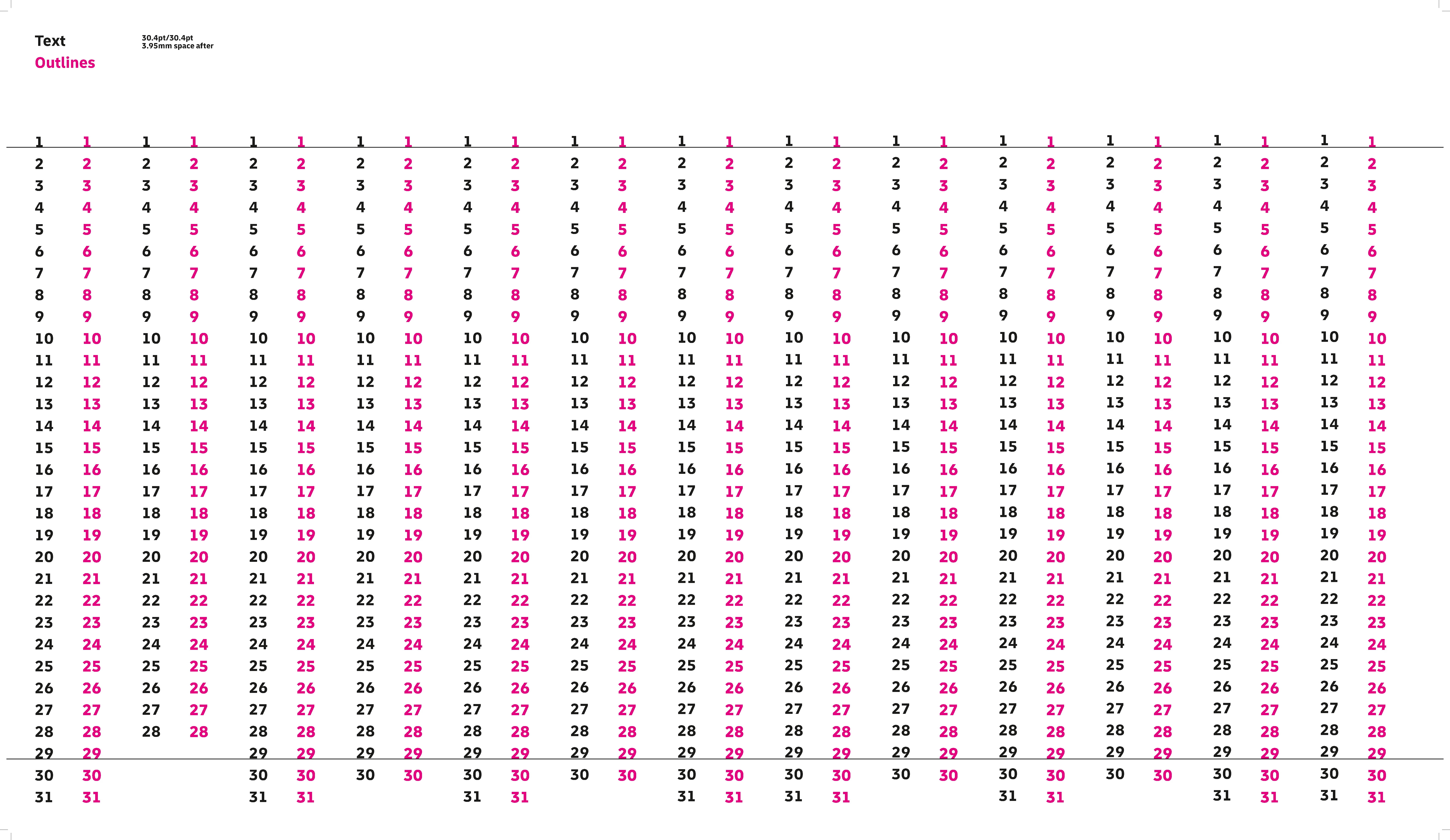
A colleague was working on a calendar and when I checked I noticed something strange, the text was slowly wandering up a little by little with every column you go to the right. I created a new file to figure out what was wrong and te same thing happened. Anyone have an idea what is going on here, apparently you can only use whole points for vertically spacing text otherwise this happens?

Tried different Indesign versions 19.x and 20.x and fonts. The only thing that fixes it, is either using whole points for all values or create outlines, then the alignement is fixed.


I added an Indesign file with a generic font so you can replicate what happens.
Eugene TysonCorrect answer
Community Expert
May 28, 2025 1:10 PM UTC

I tested it with different settings


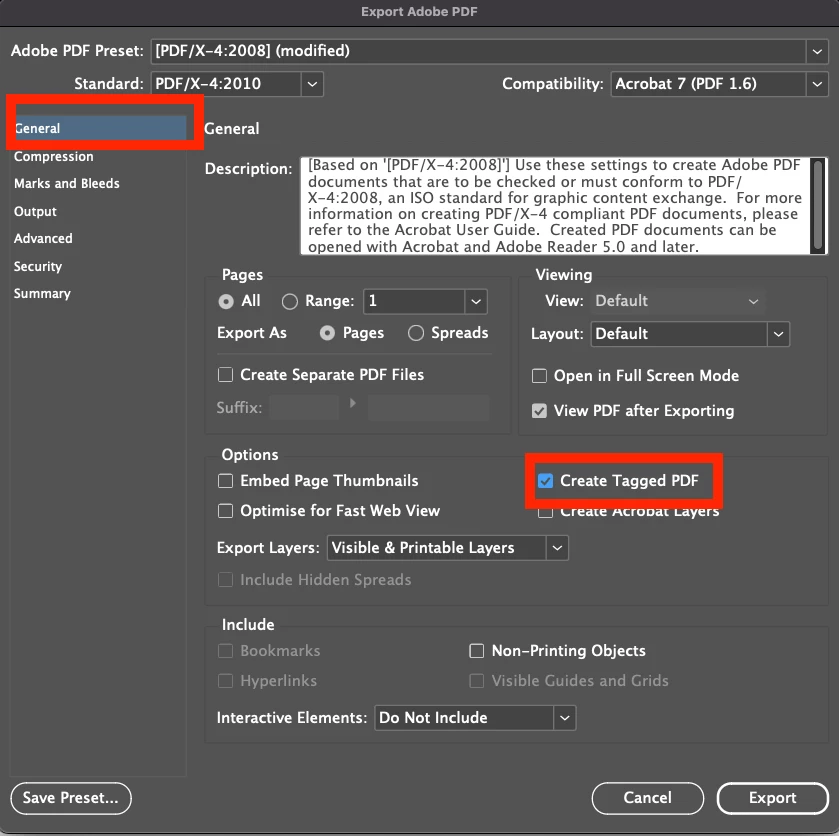
When create with tagged pdf is not selected the issue occurs


When i tick this option the problem is no longer there


25 replies

Community Expert
May 28, 2025 3:55 PM UTC

Hi @sndrmllr ,

well, yes, it's a known bug with InDesign.

What's your exact version of InDesign and your operating system?


The issue was certainly discussed here in the forum some years ago.


At first glance it seems to be the bug described in the thread I linked to below; maybe there is the same root cause:


Text in tables not aligned after exporting to PDF
Laubender, Apr 28, 2025

https://community.adobe.com/t5/indesign-discussions/text-in-tables-not-aligned-after-exporting-to-pdf/m-p/15293336#M622507


But your document is showing no InDesign table but more a "tabular" object, a text frame with 13 columns. The more columns, the more paragraphs are running through the text frame's columns, I think, the more the bug is visible.

Also for this kind of object the bug in PDF Export is known. I have to go back some years perhaps to find the relevant thread here in the InDesign forum. Ah, finally found the one from November 2021:


Problems with PDF Export in Indesign
maehrchen, Nov 05, 2021

https://community.adobe.com/t5/indesign-discussions/problems-with-pdf-export-in-indesign/m-p/12501088#M451973


See my test files still available on Dropbox:

https://community.adobe.com/t5/indesign-discussions/problems-with-pdf-export-in-indesign/m-p/12501527#M452019


Discussed in English:

https://community.adobe.com/t5/indesign-discussions/problems-with-pdf-export-in-indesign/m-p/12501851#M452043


And indeed, the solution (the workaround) was to export to PDF with the option "Tagged Text" enabled.


Regards,
Uwe Laubender
( Adobe Community Expert )

Translate
Dave Creamer of IDEAS
Community Expert
Community Expert
May 28, 2025 3:58 PM UTC

>>>... the solution (the workaround) was to export to PDF with the option "Tagged Text" enabled.

Which, IMHO, should always be on unless there is a really good reason not to have it on.


Translate
David Creamer: Community Expert (ACI and ACE 1995-2023)
Community Expert
May 28, 2025 4:09 PM UTC

Hi Dave,

indeed. Well, I can remember a bug with the Adobe World Ready Paragraph Composer, have to look up the details, where turning off "Tagged Text" was the solution. So sometimes you cannot escape situations…


Regards,
Uwe Laubender
( Adobe Community Expert )

Translate
Dave Creamer of IDEAS
Community Expert
Community Expert
May 28, 2025 1:26 PM UTC

I output it on my Mac as a PDF/X-1a with tagged on and off. Did not see any drifting. 

Can you upload a screen shot of the problem PDF just to be sure what we are looking for?

Also, what was the original font? Did you try it with your generic font?


Translate
David Creamer: Community Expert (ACI and ACE 1995-2023)
sndrmllrAuthor
Participating Frequently
May 28, 2025 1:48 PM UTC

I just did the same. For me when I export a PNG, it looks like it looks in Indesign, and the PDF does not

Translate
Community Expert
May 28, 2025 1:54 PM UTC

I just used High Quality Setting only difference is the Create Tagged PDF setting  


Not Tagged


Tagged

Translate
Mike Witherell
Community Expert
Community Expert
May 28, 2025 12:50 PM UTC

I tried your test file, and the output to PDF was perfect. I tested on Windows 11, InDesign 20.3.1.

Translate
Mike Witherell
sndrmllrAuthor
Participating Frequently
May 28, 2025 12:58 PM UTC

So it seems it's a Mac issue..., too bad most designers in our office use Macs. I'll check with a PC colleague when I'm back in the office. Thanks for the info 🙂

Translate
Eugene TysonCommunity ExpertCorrect answer
Community Expert
May 28, 2025 1:10 PM UTC

I tested it with different settings


When create with tagged pdf is not selected the issue occurs


When i tick this option the problem is no longer there


Translate
BobLevine
Community Expert
Community Expert
May 28, 2025 12:38 PM UTC

Someone else reported a similar problem a while ago. 

Translate
sndrmllrAuthor
Participating Frequently
May 28, 2025 12:52 PM UTC

I searched before posting and didn't find anything, could you point me in the direction of their post? 

Translate
BobLevine
Community Expert
Community Expert
May 28, 2025 1:37 PM UTC
No. I only remember it but I don't even remember if it was here.
Translate
Community Expert
May 28, 2025 11:51 AM UTC

Looks fine when I open it. 


What is supposed to happen and how do I trigger it?

Translate
sndrmllrAuthor
Participating Frequently
May 28, 2025 12:03 PM UTC

Hi, I know it looks fine in Indesign, export as a PDF to see the issue.

Translate
Willi Adelberger
Community Expert
Community Expert
May 28, 2025 11:47 AM UTC

I had no time to search the problem, but very important: NEVER outline any text in InDesign!

Translate
sndrmllrAuthor
Participating Frequently
May 28, 2025 12:09 PM UTC

I'd rather not, but it seems Indesign is otherwise incapable of working with text across columns unless you use whole numbers, which is completely unacceptable for a professional layout program...

Translate