
Participant
February 6, 2025
Answered

What character is this?

  • February 6, 2025
  • 2 replies
  • 224 views


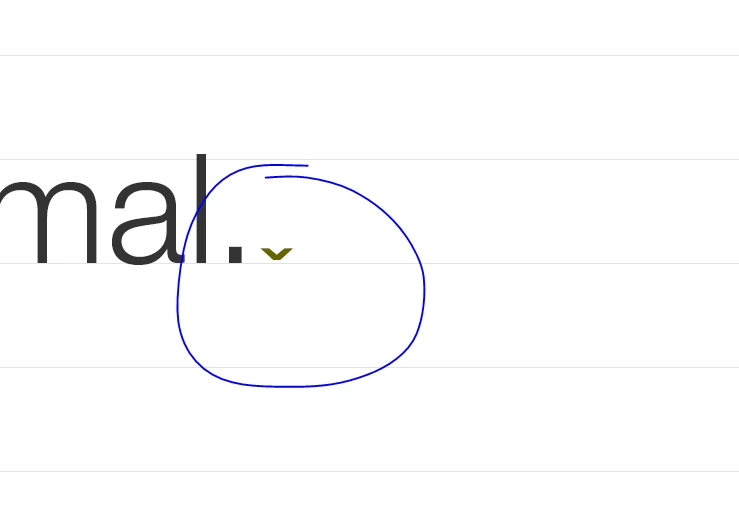
I'm working on an existing InDesign document in my company with a lot of text and text frames. I've seen this useful character that pushes text to the next text frame created, but I can't seem to figure out what it is or where I can find it. I've been just copying and pasting it as needed.

 

Correct answer Mike Witherell

That is the Column Break character, part of the world of non-printing hidden characters in typesetting in InDesign.

https://helpx.adobe.com/indesign/using/editing-text.html

A shortcut for it is to press Enter on the numeric keypad You can also press and hold Fn while pressing Return on a laptop that does not have the extended numeric keypad.


Don't you wish there was a 1-page list of all symbolic onscreen characters used in InDesign? 😉

2 replies

Mike Witherell
Community Expert
Mike WitherellCommunity ExpertCorrect answer
Community Expert
February 6, 2025

That is the Column Break character, part of the world of non-printing hidden characters in typesetting in InDesign.

https://helpx.adobe.com/indesign/using/editing-text.html

A shortcut for it is to press Enter on the numeric keypad You can also press and hold Fn while pressing Return on a laptop that does not have the extended numeric keypad.


Don't you wish there was a 1-page list of all symbolic onscreen characters used in InDesign? 😉

Mike Witherell
Robert at ID-Tasker
Legend
February 6, 2025

@Mike Witherell


Links to your website in this thread do not work? 


https://community.adobe.com/t5/indesign-discussions/is-there-an-up-to-date-guide-to-hidden-characters/m-p/14015718#M538568


@john34320988gy88


But link to a PDF there still works. 


Mike Witherell
Community Expert
Community Expert
February 6, 2025

Cześć Robert,

I updated that link on the page you cited. Thank you!

Mike Witherell
Robert at ID-Tasker
Legend
February 6, 2025