
Known Participant
January 29, 2026
Answered

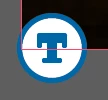
What is this new "T" icon on my images?

  • January 29, 2026
  • 14 replies
  • 3595 views

I have an indesign document with a ton of different images, 1 on each page of the doc. I’ve updated a few of these links today and the newly linked updated images have this icon on the bottom left corner which I’ve never seen before. Any idea what this is or what it means? These are not text boxes, there are no primary text frames in this document and no threaded text.

It is definitely attached to the linked image and nothing else, as it moves around with the image when I move the image. 


    Correct answer Abhishek Rao

    Hi everyone,


    We’re currently investigating the issue where the “Auto-generate Alt Text” option appears greyed out in Preferences and cannot be toggled. We haven’t been able to reproduce this consistently on our end yet.

    If anyone is still facing this issue and would be willing to join a quick debug session with the product team, it would really help us move this forward. Please share your contact number (with country code), email address, and your availability via DM so I can coordinate this further.


    Appreciate your help on this.

    Abhishek

    14 replies

    Participant
    May 14, 2026

    I’ve disabled this option in my settings, and the T is still all over my files.

    leo.r
    Community Expert
    Community Expert
    May 14, 2026

    Did you disable this:


    Participant
    May 7, 2026

    OMG please Adobe provide a way to hide these badges, whether the feature is on or not! Working on a 76 page book with hundreds of images and it’s SUPER irritating.

    Abhishek Rao
    Community Manager
    Community Manager
    May 13, 2026

    Hi ​@Fitz_rt,


    Sorry for the frustration around this. Could you please try toggling View > Extras > Show/Hide Alt Text Badge and check if that helps reduce the visual clutter from the badges?

    Also, please make sure the Auto-generate Alt Text options are disabled under Preferences > Generative AI, then completely restart InDesign and reopen the document to test again.


    Let us know how it goes after trying this.

    Abhishek 
     

    Inspiring
    April 29, 2026

    it would be far better if this feature was disabled by default, and it was an active process to switch it on - rather than the other way around. If you asked your users “do you want inDesign to add AI generated copy to your document, which will not be proofread, may not be accurate, and may put you into litigation with your client” The answer would universally be ‘NO’

    Abhishek Rao
    Community Manager
    Abhishek RaoCommunity ManagerCorrect answer
    Community Manager
    April 29, 2026

    Hi everyone,


    We’re currently investigating the issue where the “Auto-generate Alt Text” option appears greyed out in Preferences and cannot be toggled. We haven’t been able to reproduce this consistently on our end yet.

    If anyone is still facing this issue and would be willing to join a quick debug session with the product team, it would really help us move this forward. Please share your contact number (with country code), email address, and your availability via DM so I can coordinate this further.


    Appreciate your help on this.

    Abhishek

    Mike Witherell
    Community Expert
    Community Expert
    April 28, 2026

    Don’t forget this View setting switch:

    View > Extras > Show/Hide Alt Text Badge.

    This should be hidden if you turn off the Generative AI Alt Text feature at the end of Preferences

    Mike Witherell
    Inspiring
    April 30, 2026

    The problem isn't the visibility of the badge - the problem is inDesign doing this in the first place. 

    Mike Witherell
    Community Expert
    Community Expert
    April 30, 2026

    You are so right! Did you read this whole thread?

    Mike Witherell
    Participant
    April 1, 2026

    what an obnoxious feature - especially one enabled without user notification or the ability to opt-out before it’s turned on. By all means offer it, but DO NOT EVER alter my work without permission.

    nickmartello
    Participant
    March 24, 2026

    How do I delete out all the garbage alt text that was applied to my document without my permission? Do I have to comb through every single image?

    leo.r
    Community Expert
    Community Expert
    March 25, 2026
    nickmartello
    Participant
    March 25, 2026

    Thanks!

    Known Participant
    March 19, 2026

    It’s absurd that this was enabled for every user by default

    Abhishek Rao
    Community Manager
    Community Manager
    February 26, 2026

    Hi everyone,


    Thank you all for sharing your observations and experiences around the new “T” icon. I understand that for some of you this has been confusing or frustrating, especially when it appears unexpectedly or when the preference seems locked.

    To clarify, the “T” badge was introduced in InDesign 21.2 as part of the Auto-generate Alt Text feature. It indicates that the placed image is associated with accessibility and alt text handling. You can learn more about how this works and how to manage it here: https://helpx.adobe.com/indesign/using/alt-text-generation.html

    We’re aware of reports where the Generative AI preferences appear greyed out, the badge remains on existing objects, or performance lag occurs when placing or relinking images. Bugs have been logged, and the product team is actively investigating both the greyed-out preference behavior and the related performance concerns. A separate thread tracking this is available here: https://community.adobe.com/questions-671/adobe-indesign-auto-alt-text-enabled-by-default-and-slows-performance-1550780?postid=7506220#post7506220

    As the team continues to work through this, they’d like to confirm one more thing. Please completely quit InDesign, then restart your system. After the reboot, launch InDesign again and check whether the Auto-generate Alt Text option becomes active in Preferences.

    if the issue still persists, please share a short screen recording showing your workflow, including the Generative AI preferences and when the icon appears or regenerates. Additionally, it would help if you could confirm your Adobe ID type (individual, enterprise, etc) via Plans, let us know how other Generative AI features are working such as Text to Image, and share the UXP logs from your machine. On Mac, the logs are located at /Users/{USER}/Library/Logs/Adobe/Adobe InDesign 2024. On Windows, they can be found at C:\Users{USER}\AppData\Roaming\Adobe\InDesign\Logs. If possible, we can also arrange a quick session with any impacted user to troubleshoot further. 

    Thank you again for your patience and detailed feedback. I’ll continue to share updates as soon as I have more information.


    For better visibility and to keep the latest updates consolidated, I’m marking this response as correct. Thank you again for your patience and detailed feedback. I’ll continue to share updates as soon as I have more information.


    Looking forward to hearing back.

    Abhishek

    Abhishek Rao
    Community Manager
    Community Manager
    April 13, 2026

    Hi everyone,


    Thank you all for sharing your feedback and experiences around the Auto-generate Alt Text feature. I wanted to share a quick update.

    We’re aware of reports where the Auto-generate Alt Text option appears greyed out in Preferences and cannot be toggled. In some cases, users have also reported that alt text continues to generate even when the option looks disabled. These behaviors are currently being investigated.

    Regarding performance, recent checks have not shown any consistent delays when placing images. However, if you’re still seeing slowdowns, please do let us know.

    To help us investigate further, it would be really useful if you could share:

    • Your InDesign version and OS details
    • Whether this happens in specific files or across multiple documents
    • A short screen recording of the workflow, if possible
    • A packaged sample file (File > Package)
      If confidential, you can share it via DM using any file-sharing service

    We understand how this can impact your workflow and appreciate your patience and detailed feedback.


    I’ll continue to share updates here as we learn more.

    Abhishek

    Inspiring
    April 13, 2026

    The bigger problem for me is by default, this ‘feature’ can end up modifying a legal report / legal document design - which typically goes through 10 rounds of due diligence with lawyers, and then InDesign spits it out with a bunch of AI generated nonsense which won’t be picked up by existing workflow checks. It’s more than annoying - it presents a real legal risk for your users.

    Mike Witherell
    Community Expert
    Community Expert
    February 24, 2026

    Hey all,

    An interesting thing I just noticed in this new feature of Generative AI alt tagging: If you have it on, and place a graphic that is already alt-tagged in metadata … the Generative AI ignores it and writes its own. Not very intelligent (although it does remind me of … me.)


    Another thing that surprises me is that the generic alt text that this new feature writes is only in the Alt Text tab; not the Tagged PDF alt text tab!

    Mike Witherell