


Known Participant
Jan 29, 2026 5:14 PM UTC
Answered

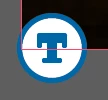
What is this new "T" icon on my images?

I have an indesign document with a ton of different images, 1 on each page of the doc. I’ve updated a few of these links today and the newly linked updated images have this icon on the bottom left corner which I’ve never seen before. Any idea what this is or what it means? These are not text boxes, there are no primary text frames in this document and no threaded text.

It is definitely attached to the linked image and nothing else, as it moves around with the image when I move the image. 


    Abhishek Rao
    Abhishek RaoCorrect answer
    Community Manager
    Apr 29, 2026 9:59 AM UTC

    Hi everyone,


    We’re currently investigating the issue where the “Auto-generate Alt Text” option appears greyed out in Preferences and cannot be toggled. We haven’t been able to reproduce this consistently on our end yet.

    If anyone is still facing this issue and would be willing to join a quick debug session with the product team, it would really help us move this forward. Please share your contact number (with country code), email address, and your availability via DM so I can coordinate this further.


    Appreciate your help on this.

    Abhishek

    73 replies

    Known Participant
    Apr 29, 2026 10:19 AM UTC

    it would be far better if this feature was disabled by default, and it was an active process to switch it on - rather than the other way around. If you asked your users “do you want inDesign to add AI generated copy to your document, which will not be proofread, may not be accurate, and may put you into litigation with your client” The answer would universally be ‘NO’

    Translate
    Abhishek Rao
    Community Manager
    Abhishek RaoCommunity ManagerCorrect answer
    Community Manager
    Apr 29, 2026 9:59 AM UTC

    Hi everyone,


    We’re currently investigating the issue where the “Auto-generate Alt Text” option appears greyed out in Preferences and cannot be toggled. We haven’t been able to reproduce this consistently on our end yet.

    If anyone is still facing this issue and would be willing to join a quick debug session with the product team, it would really help us move this forward. Please share your contact number (with country code), email address, and your availability via DM so I can coordinate this further.


    Appreciate your help on this.

    Abhishek

    Translate
    Mike Witherell
    Community Expert
    Community Expert
    Apr 28, 2026 12:59 PM UTC

    Preferences > Generative AI > turn off both switch checkboxes. And ...

    Don’t forget this View menu setting switch:

    View > Extras > Show/Hide Alt Text Badge.

    By the way...

    We recently developed an Accessibility Alt-Text Assistant that is non-AI to help this workflow.

    Translate
    Mike Witherell
    Known Participant
    Apr 30, 2026 6:48 AM UTC

    The problem isn't the visibility of the badge - the problem is inDesign doing this in the first place. 

    Translate
    Mike Witherell
    Community Expert
    Community Expert
    Apr 30, 2026 1:20 PM UTC

    You are so right! Did you read this whole thread?

    Translate
    Mike Witherell
    Known Participant
    Apr 12, 2026 3:10 PM UTC

    I don't normally add to these forums, as responses are often rude, dismissive and condescending, nevertheless, this reckless addition by Adobe is noteworthy.

    This is without doubt the most reckless thing Adobe has added. Case in point - we work on legal framework and reporting documents for a number of FTSE100 and blue chip clients. Every word of copy needs to be run through their respective legal departments, often involving further review by retained counsel. Adobe has taken it upon itself to add, frankly stupid copy to images which are tagged in these documents. This has now been switched off, but the problem we experienced was if a picture box, at any time had an AI tag generated, the picture box would retain this attribute, even if the image was deleted and re-imported. The only fix we had was to delete the affected picture boxes and re-create them - quite a task as they were custom shapes.

    It should be turned off by default, and Adobe should stop adding potentially litigious copy generation 

    Translate
    Participant
    Apr 1, 2026 1:38 PM UTC

    what an obnoxious feature - especially one enabled without user notification or the ability to opt-out before it’s turned on. By all means offer it, but DO NOT EVER alter my work without permission.

    Translate
    nickmartello
    Participant
    Mar 24, 2026 9:24 PM UTC

    How do I delete out all the garbage alt text that was applied to my document without my permission? Do I have to comb through every single image?

    Translate
    leo.r
    Community Expert
    Community Expert
    Mar 25, 2026 12:47 AM UTC
    nickmartello
    Participant
    Mar 25, 2026 12:57 AM UTC

    Thanks!

    Translate
    Known Participant
    Mar 19, 2026 4:28 AM UTC

    It’s absurd that this was enabled for every user by default

    Translate
    Abhishek Rao
    Community Manager
    Community Manager
    Feb 26, 2026 2:32 PM UTC

    Hi everyone,


    Thank you all for sharing your observations and experiences around the new “T” icon. I understand that for some of you this has been confusing or frustrating, especially when it appears unexpectedly or when the preference seems locked.

    To clarify, the “T” badge was introduced in InDesign 21.2 as part of the Auto-generate Alt Text feature. It indicates that the placed image is associated with accessibility and alt text handling. You can learn more about how this works and how to manage it here: https://helpx.adobe.com/indesign/using/alt-text-generation.html

    We’re aware of reports where the Generative AI preferences appear greyed out, the badge remains on existing objects, or performance lag occurs when placing or relinking images. Bugs have been logged, and the product team is actively investigating both the greyed-out preference behavior and the related performance concerns. A separate thread tracking this is available here: https://community.adobe.com/questions-671/adobe-indesign-auto-alt-text-enabled-by-default-and-slows-performance-1550780?postid=7506220#post7506220

    As the team continues to work through this, they’d like to confirm one more thing. Please completely quit InDesign, then restart your system. After the reboot, launch InDesign again and check whether the Auto-generate Alt Text option becomes active in Preferences.

    if the issue still persists, please share a short screen recording showing your workflow, including the Generative AI preferences and when the icon appears or regenerates. Additionally, it would help if you could confirm your Adobe ID type (individual, enterprise, etc) via Plans, let us know how other Generative AI features are working such as Text to Image, and share the UXP logs from your machine. On Mac, the logs are located at /Users/{USER}/Library/Logs/Adobe/Adobe InDesign 2024. On Windows, they can be found at C:\Users{USER}\AppData\Roaming\Adobe\InDesign\Logs. If possible, we can also arrange a quick session with any impacted user to troubleshoot further. 

    Thank you again for your patience and detailed feedback. I’ll continue to share updates as soon as I have more information.


    For better visibility and to keep the latest updates consolidated, I’m marking this response as correct. Thank you again for your patience and detailed feedback. I’ll continue to share updates as soon as I have more information.


    Looking forward to hearing back.

    Abhishek

    Translate
    Abhishek Rao
    Community Manager
    Community Manager
    Apr 13, 2026 3:44 PM UTC

    Hi everyone,


    Thank you all for sharing your feedback and experiences around the Auto-generate Alt Text feature. I wanted to share a quick update.

    We’re aware of reports where the Auto-generate Alt Text option appears greyed out in Preferences and cannot be toggled. In some cases, users have also reported that alt text continues to generate even when the option looks disabled. These behaviors are currently being investigated.

    Regarding performance, recent checks have not shown any consistent delays when placing images. However, if you’re still seeing slowdowns, please do let us know.

    To help us investigate further, it would be really useful if you could share:

    • Your InDesign version and OS details
    • Whether this happens in specific files or across multiple documents
    • A short screen recording of the workflow, if possible
    • A packaged sample file (File > Package)
      If confidential, you can share it via DM using any file-sharing service

    We understand how this can impact your workflow and appreciate your patience and detailed feedback.


    I’ll continue to share updates here as we learn more.

    Abhishek

    Translate
    Known Participant
    Apr 13, 2026 3:50 PM UTC

    The bigger problem for me is by default, this ‘feature’ can end up modifying a legal report / legal document design - which typically goes through 10 rounds of due diligence with lawyers, and then InDesign spits it out with a bunch of AI generated nonsense which won’t be picked up by existing workflow checks. It’s more than annoying - it presents a real legal risk for your users.

    Translate
    Mike Witherell
    Community Expert
    Community Expert
    Feb 24, 2026 6:37 PM UTC

    Hey all,

    An interesting thing I just noticed in this new feature of Generative AI alt tagging: If you have it on, and place a graphic that is already alt-tagged in metadata … the Generative AI ignores it and writes its own. Not very intelligent (although it does remind me of … me.)


    Another thing that surprises me is that the generic alt text that this new feature writes is only in the Alt Text tab; not the Tagged PDF alt text tab!

    Translate
    Mike Witherell
    stephen_daviesDorset
    Participant
    Feb 24, 2026 5:53 PM UTC

    This is driving me *crazy*. I have many several hundred page documents saved on a network server. Every time I open one, this tag is generated for *every* image. It takes forever and the only way to get rid of them is to manually delete it by alt-clicking and deleteing the text.

    Yes, I’ve disabled it in preferences. Both with a doc open and not. Indesign developers deserve a kick in the shins for this. No-one asked for this!

    Translate
    Mike Witherell
    Community Expert
    Community Expert
    Feb 24, 2026 6:29 PM UTC

    Hi Stephen,

    I tested on my end.

    If I turn off the Preferences > Generate AI, and then open a document, it does not generate anything alt text for me.

    If I have the 2 preferences turned on under Preferences > Generative AI, and open an existing document that has correct links, then it opens and does not make Alt-Text blue icons.

    But if the document opens and has broken links, and I re-connect the linked images, then it does generate the little blue icon at the bottom left corner.

    So try it again, and make sure you restart InDesign before opening a document, just to be on the safe side.

    Translate
    Mike Witherell
    stephen_daviesDorset
    Participant
    Feb 25, 2026 8:53 AM UTC

    I turned everything off and on again, packaged the file, downloaded from the server, double-checked it was all turned off and opened locally and some little T icons are still appearing - now with red dots showing nothing’s even been generated (I assume).

    Now manually getting rid of them all. I still want to kick the Indesign dev team in the shins. Not for the first time. Canva Affinity beckons.

    Translate
