


Known Participant
January 29, 2026
Answered

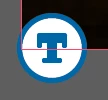
What is this new "T" icon on my images?

  • January 29, 2026
  • 65 replies
  • 5114 views

I have an indesign document with a ton of different images, 1 on each page of the doc. I’ve updated a few of these links today and the newly linked updated images have this icon on the bottom left corner which I’ve never seen before. Any idea what this is or what it means? These are not text boxes, there are no primary text frames in this document and no threaded text.

It is definitely attached to the linked image and nothing else, as it moves around with the image when I move the image. 


    Correct answer Abhishek Rao

    Hi everyone,


    We’re currently investigating the issue where the “Auto-generate Alt Text” option appears greyed out in Preferences and cannot be toggled. We haven’t been able to reproduce this consistently on our end yet.

    If anyone is still facing this issue and would be willing to join a quick debug session with the product team, it would really help us move this forward. Please share your contact number (with country code), email address, and your availability via DM so I can coordinate this further.


    Appreciate your help on this.

    Abhishek

    65 replies

    Abhishek Rao
    Community Manager
    Community Manager
    January 29, 2026

    Hi ​@Isoneryum,


    Thanks for reaching out. What you’re seeing is expected behavior in InDesign 21.2. This is a new feature introduced to support generating alt text for placed images, and the ‘T’ icon indicates that the image is associated with accessibility and alt text handling. 

    You can learn more about how this works and how to manage it in this article, which walks through the feature in detail: https://helpx.adobe.com/indesign/using/alt-text-generation.html
    What’s New: New and enhanced features | Latest release of InDesign

    Please let me know if this clears things up or if you’re seeing anything unexpected with these images.


    Looking forward to your update.

    Abhishek

    stonepier
    Participating Frequently
    February 16, 2026

    I wish we could turn it off. I never asked for it to be turned on and now Adobe has decided I need to see it. I can’t even see where you could adjust the tags if you wanted it on. I mean what purpose does this serve when working on a print document.

    Frans v.d. Geest
    Community Expert
    Community Expert
    February 17, 2026

    You can turn it off in Preferences ;-)
