robertop44610429
Inspiring
February 12, 2020
Answered

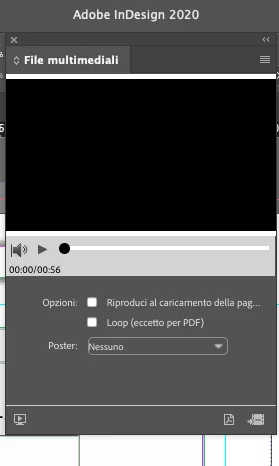
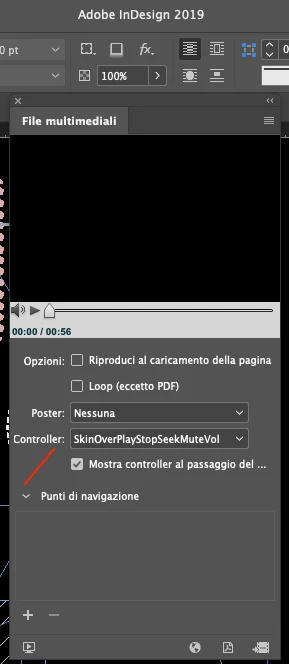
where are the controllers????

  • February 12, 2020
  • 14 replies
  • 19505 views

Good morning,

in indesign 2019 there are controllers in the multimedia files menu. in indesign 2020 they are gone. where did they go?

this is not possible..... 
This topic has been closed for replies.
Correct answer Dave Merchant

Free InDesign script to give you back the controller menu in a dialog box: https://www.uvsar.com/blog/indesign-mediapanel-controller


The Media Panel might be borked, and Adobe on UserVoice shows no sign of wanting to do a thiing about it, but all the SWF helper files required for interactive PDF export, and Flash-native export, are still part of the ID2020 (15.0.2) installation - on Windows look in Program Files\Adobe\Adobe InDesign 2020\Presets\multimedia. Once the controllerSkin / showController properties are set on a movie object, InDesign 2020 will embed the skin SWF into the PDF's Rich Media Annotation and it will work properly in Acrobat/Reader. The choices are saved in the INDD file just as they always were.


Adobe may have decided they now hate Flash, but they made it core to the PDF ISO 32000/EL3 specification for Rich Media, so until PDF/2.0 comes around and replaces it, they are stuck with supporting SWFs inside Acrobat. The InDesign and Acrobat programmers don't talk to one another about ISO standards, so we get borkage that Adobe then claims as "policy". It's nothing of the sort.

14 replies

Community Expert
May 25, 2020

Hi together,

I gave Dave Merchant the correct answer, because he has a direct solution for the missing controls in InDesign 2020.

His script is working very well. Tested this with InDesign 2020 version15.0.3.425 on Windows 10.


Well, let's see, could be that the workflow Roberto was aiming at will not work anymore after December 2020.

But that would also be the case when going back to InDesign CC 2019 ( my suggestion before ) .


Regards,
Uwe Laubender

( ACP )

Frans v.d. Geest
Community Expert
May 29, 2020

What is the use for the script bringing back the controllers if it is Flash and Flash is gone, dead, deceased, gone to meet its maker, this is a dead  parrot Flash...

No use at all.

Brainiac
May 30, 2020

Because Flash Player, in its role as the Rich Media engine for ISO-compliant PDF files, is not dead.


Adobe lost control of PDF years ago, they do not get to suddenly say that feature X is "wrong", they only get to say "we no longer provide a standards-compliant PDF renderer".


There is no replacement for the Flash Player multimedia engine in Acrobat/Reader and no sign there will be one anytime soon. No vendor - not Adobe, Apple nor anyone else - can suddenly decide that RMAs should contain HTML5 or Quicktime, so until ISO release PDF/3.0 (which will happen long after we're all dead) creating and viewing a PDF with a SWF-based Rich Media annotation remains 100% standards-compliant. Someone in Adobe has thrown up all these obstacles for purely political reasons, they intend to make people so annoyed by the popups that we stop using PDFs for multimedia seven months before the actual deadline.


If I want to create a document today, and show it to an audience tomorrow, what may or may not happen in December is absolutely irrelevant. By all means show a warning to the author inside InDesign but don't mess with what the readership sees, especially not if the document is in full-screen.


Imagine trying to buy a 2020 calendar and finding that every copy now has "DANGER: EXPIRES IN DECEMBER" printed over each page.


Community Expert
May 22, 2020

Hi Roberto,

you may find this one interesting ( just discovered, did not test yet ) :


Thorium Reader for e.g. EPUB


Quote from their site:

"Thorium Reader is the EPUB reader of choice for Windows 10, MacOS and Linux.

This EDRLab application is in constant development and aims at becoming a reference for accessing EPUB 3 publications in reflow or fixed layout format, visual narratives (DiViNa), audiobooks and even LCP protected PDF documents."


Source: https://www.edrlab.org/software/thorium-reader/


Regards,
Uwe Laubender

( ACP )

robertop44610429
Inspiring
May 25, 2020

we hope they can quickly improve the interactive part.


For this price.............

Community Expert
May 22, 2020

Oh, Roberto, just another thing:
The link(s) below the movie item point to a rather strange target and not to a web page ( if you intended that ) :


Regards,
Uwe Laubender

( ACP )

Community Expert
May 22, 2020

Roberto said: "…but not with Safari, for mac ..."


Hi Roberto,

as far as I can tell it will only work with Acrobat Pro or Adobe Reader on Mac OS X or Windows.

And only if the Flash player is installed.


Downloaded your sample PDF, opened it with Acrobat Pro on Windows and my experience was that:

Acrobat asked me if I would trust the document. I said "yes", this time. Then another message came up that informed me that this kind of element will only work by using Flash Player which will no longer be supported after December 2020:


I opted for "Ask me later" and had to close the PDF and open it again to see the movie running:


So, I do not think, that you want this experience for your customers.

And the message from Acrobat could point to the fact that it will not work past December this year; perhaps for security reasons.


Regards,
Uwe Laubender

( ACP )

robertop44610429
Inspiring
May 22, 2020

Ok thanks, in fact, I don't want to. I want it to work ... and well

Community Expert
May 22, 2020

Hi Roberto,

as already discussed here or elsewhere in the forums, the alternative would be to use Publish Online.

But one cannot host publish online contents. It's always hosted on an Adobe server.


If you want to host the files on your own web server or the customer's web server, invest in and use an InDesign plugin like in5 to create the interactive contents. If you still want to distribute PDFs, set a hyperlink to a hosted movie file on a web page.


FWIW: Fixed layout EPUB is currently no option, because we miss a decent reader for all devices for years now.

The one you could rely on is from Apple and only working in an Apple only ecosystem of devices.


Regards,
Uwe Laubender

( ACP )

Community Expert
May 22, 2020

Version of Acrobat Pro:

Continuous Release | Version 2020.009.20065 on Windows 10.


Regards,
Uwe Laubender

( ACP )

robertop44610429
Inspiring
May 22, 2020
robertop44610429
Inspiring
May 22, 2020

but not with Safari, for mac  ...

Community Expert
May 22, 2020

Hi together,

the following has nothing to do with Dave's script:


Added a mp4 movie file to a page in InDesign CC 2019. Exported with PDF Interactive.

Opened the PDF with Acrobat Pro.


A message came up: "3D content has been disabled. Enable this feature if you trust this document." > Options

"3D content" ? Why "3D content"? There is just a movie.

Ok, I thought, let's trust this document that I exported from InDesign:

Options > Trust this document one time only


Next thing was, that Acrobat tried to establish a "connection". No idea why and what's the target:


And then Acrobat Pro crashed.


No idea what changed between today and January or February this year when I tested the last time and it worked.


Regards,
Uwe Laubender

( ACP )

Brainiac
May 22, 2020

What's your Acrobat version? An update this week seems to have broken multimedia even more than it was.

Dave MerchantCorrect answer
Brainiac
May 16, 2020

Free InDesign script to give you back the controller menu in a dialog box: https://www.uvsar.com/blog/indesign-mediapanel-controller


The Media Panel might be borked, and Adobe on UserVoice shows no sign of wanting to do a thiing about it, but all the SWF helper files required for interactive PDF export, and Flash-native export, are still part of the ID2020 (15.0.2) installation - on Windows look in Program Files\Adobe\Adobe InDesign 2020\Presets\multimedia. Once the controllerSkin / showController properties are set on a movie object, InDesign 2020 will embed the skin SWF into the PDF's Rich Media Annotation and it will work properly in Acrobat/Reader. The choices are saved in the INDD file just as they always were.


Adobe may have decided they now hate Flash, but they made it core to the PDF ISO 32000/EL3 specification for Rich Media, so until PDF/2.0 comes around and replaces it, they are stuck with supporting SWFs inside Acrobat. The InDesign and Acrobat programmers don't talk to one another about ISO standards, so we get borkage that Adobe then claims as "policy". It's nothing of the sort.

Brainiac
May 16, 2020

I don’t think Adobe have any intention of supporting SWF in Acrobat after the end of life of Flash Player this December. How would it work with Flash Player gone? I think

Adobe were wise to remove this from InDesign, and your script may just lead people the wrong way... 

JonathanArias
Brainiac
February 12, 2020

correct. anything that had flash based technology is gone in Indesign 2020. if you dont' see it. it had flash in it, so its gone!

Community Expert
February 12, 2020

Hi Pickory,

property controllerSkin is still available with InDesign 2020.

Had no problem to change the value for controllerSkin using ExtendScript.


The only issue is:

I found no way to export a sample movie to PDF Interactive with the controller skin intact.

Tried this with InDesign CC 2015 and 2020. Same negative result with both versions.


So I enabled the skin with Acrobat Pro after installing the Flash Player.

That worked as expected.


Regards,
Uwe Laubender

( ACP )

Community Expert
February 12, 2020

Hi Roberto,

you could add the controls with Acrobat Pro DC. Just did this with a sample movie I placed on an InDesign page and exported to PDF Interactive. Think, that Flash Player must be installed to do this.


Regards,
Uwe Laubender

( ACP )


BobLevine
Community Expert
February 12, 2020
Flash player must be installed to add it and to view it.

Again, giant waste of time.