Participant
March 9, 2019
Answered

Where are the menu bars

  • March 9, 2019
  • 3 replies
  • 830 views

Hi All,

I just installed the newest version of inDesign, I came from 5.5 version so loads of stuff has changed. However not to the point of where there is no menu bar at the top...surely!! All I currently have is a black workspace and a type, pointer and a couple of other tools on the right and about 5 tools on the left. Along the top is file, save, and name of document and that's it!! I had an error come up when installing and fixed the error, which i was hoping would give me the menu bar! But alas still nothing, so all i can do is type, save! I know it's something really simple that is probably staring me in the face, but I'm totally perplexed as to what to do!

Thanks for all your help

Alexis
    This topic has been closed for replies.
    Correct answer BobLevine

    BobLevine  wrote

    I have a feeling the OP is looking at the start workspace.

    Maybe, Bob. But does the Start Workspace show the name of the document as hers is?

    Jane


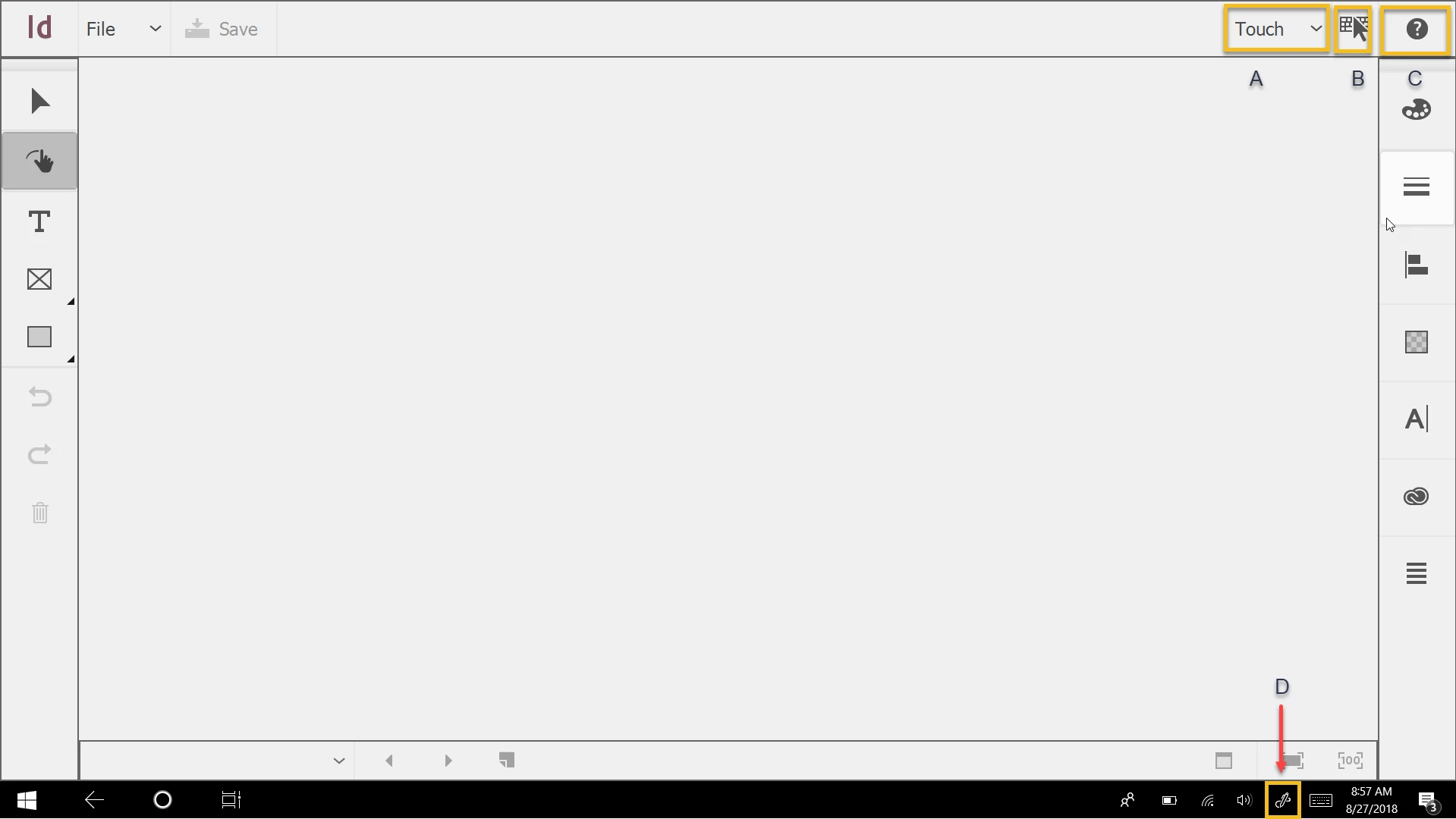
    I just re-read this and now I’m willing to bet the OP has a Windows device with a touch screen.

    In that case the application will default to the touch workspace.

    Ignore the labels I have in there. It's a screenshot I used for an ID Magazine article I wrote a while back.

    3 replies

    jane-e
    Community Expert
    Community Expert
    March 9, 2019

    Hi Alexis,

    The new version ships with the Essentials Workspace, which does not include the Control panel. Look at the screenshot in Derek’s post. While Essentials Classic has the Control panel, you might want to start with Advanced, then add and subtract panels from the Window menu and save your own workspace.

    Go to Window > Workspace to find these commands or use the Workspace switcher.

    Jane

    BobLevine
    Community Expert
    Community Expert
    March 9, 2019

    I have a feeling the OP is looking at the start workspace.

    jane-e
    Community Expert
    Community Expert
    March 9, 2019

    BobLevine  wrote

    I have a feeling the OP is looking at the start workspace.

    Maybe, Bob. But does the Start Workspace show the name of the document as hers is?

    Jane

    Derek Cross
    Community Expert
    Community Expert
    March 9, 2019

    Try resetting your Workspace to see if that helps.

    If that doesn't work reset your InDesign preferences.

    Michael Bullo
    Community Expert
    Community Expert
    March 9, 2019

    Are you looking for the Control bar?

    Menu > Window > Control

    Participant
    March 9, 2019

    Hi Michael,

    Sadly I don't even have anything that says menu!

    Michael Bullo
    Community Expert
    Community Expert
    March 9, 2019

    Sorry for the confusion. Can you see the menu running along the top of the window (not the word Menu)? If so, go to the Window section and choose Control.