


Participating Frequently
January 25, 2023
해결됨

Where is the option to change the height of text-frames in Find and Replace?

  • January 25, 2023
  • 1 답변
  • 358 조회

Hello everybody. In Find/Replace - object -  general options text-frames,  I only found the possibility to change the width, but not the height of the text-frames. Where is the option to change the height? Thanks to anyone who wants to help me.
이 주제는 답변이 닫혔습니다.
최고의 답변: Eric Dumas

Hi,

Can you confirm that you are asking the Find/Change window / Object tab to

  1. locate the text frames controled by an object style? (in that case just update the Object Style itself)
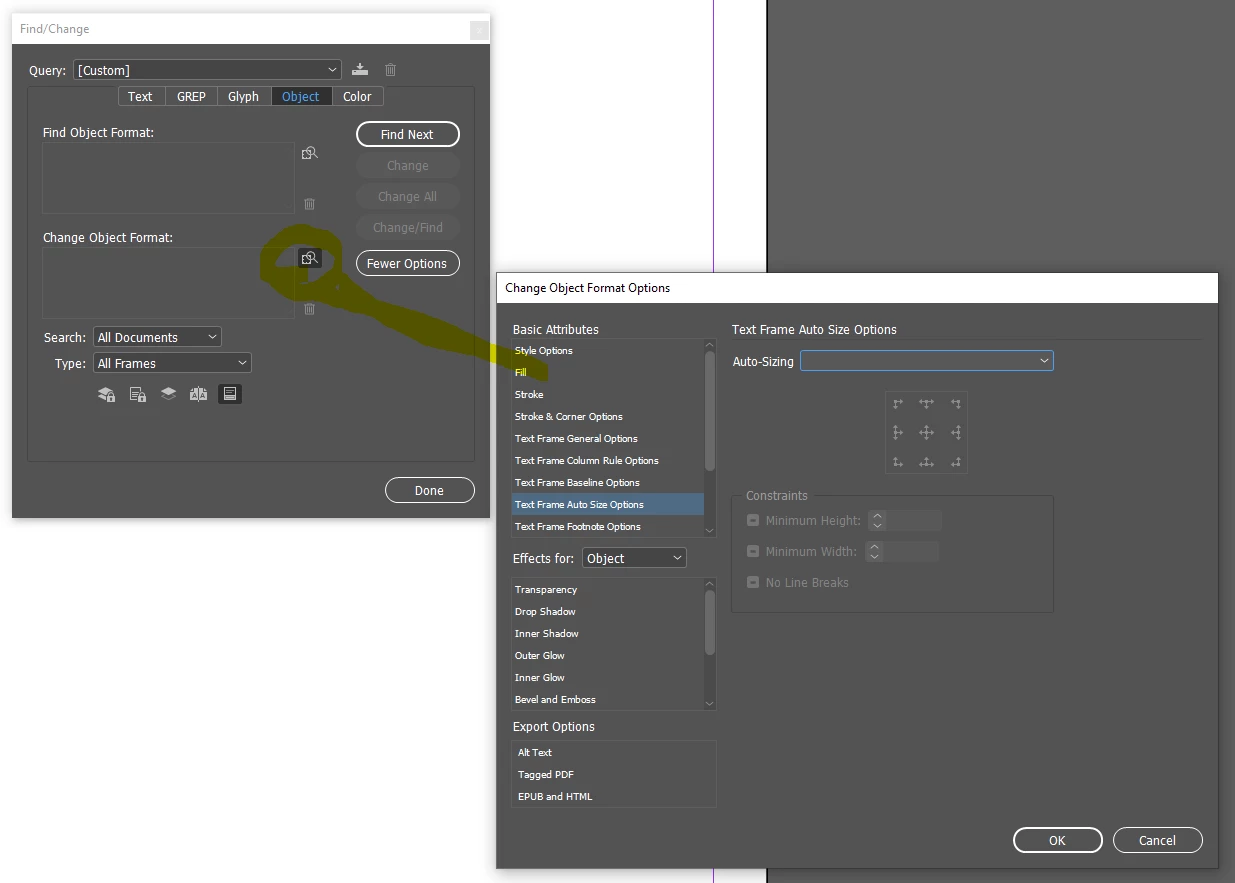
  2. OR you use the search icon (magnifying glass - see screenshot below) to filter the frames that have a specific size. In that case you can use the same window to set the Change To options with the new size. Change the Auto-sizing drop-down to what you need.


I find the Object Styles for text frames so powerful for this very situation.


1 답변

Eric Dumas
Community Expert
Community Expert
January 25, 2023

Hi,

Can you confirm that you are asking the Find/Change window / Object tab to

  1. locate the text frames controled by an object style? (in that case just update the Object Style itself)
  2. OR you use the search icon (magnifying glass - see screenshot below) to filter the frames that have a specific size. In that case you can use the same window to set the Change To options with the new size. Change the Auto-sizing drop-down to what you need.


I find the Object Styles for text frames so powerful for this very situation.


Participating Frequently
January 25, 2023

Hello. Text frames do not have an object style. This is a text document imported directly from Word. I'll use the second option you gave me. Thank you very much!