Participant
June 22, 2015
Answered

Why are there white lines in InDesign preview mode

  • June 22, 2015
  • 12 replies
  • 29226 views

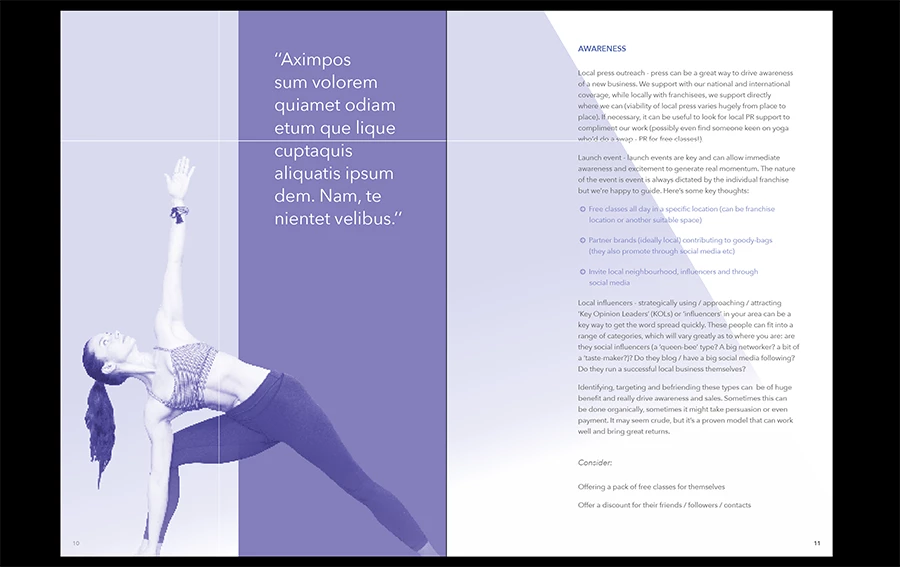
See attached screenshot, these lines appear in the same place on every spread when viewed in preview mode of InDesign CC 2015 - how do I fix this??

Correct answer jeremyjp

Hi @Bim_H -

I came here looking for an answer to the same question, but in tinkering just figured it out.

Turn off Overprint Preview then try presentation mode again.

I had the exact problem you have in the screenshot. I can replicate it repeatedly now. When Overprint Preview is turned on, white lines. Turn it off, white lines gone. You have to do it outside of presentation mode.

12 replies

Manstrup
Participant
August 15, 2023

And still in 2023 the lines is there! I mean the software is not cheap Adobe! Even Affinity does this better! Please fix it

Willi Adelberger
Community Expert
Community Expert
August 15, 2023

It is solved, use PDF/X-4 or any PDF without flattening transparency or with postscript involved.

Manstrup
Participant
August 15, 2023

This is happening in app, not when exporting to pdf

G_Man
Inspiring
April 17, 2023

It IS seriously irritating - and unnecccessary. 

Participant
July 1, 2022

Still not fixed in 2022. Adobe, wtf. Overprint view + preview has a white line.

G_Man
Inspiring
July 1, 2022

Adobe - we know that changing to Presentation Mode (shift + w) removes the white line, but it should be there in the first place. Surely this is an easy fix. Switching to Presentation Mode is NOT a solution.

Inspiring
October 26, 2016

Toggling rulers remove the weird lines for me but this is not a fix to the problem. Is this bug being looked at by @Adobe ?

Inspiring
April 26, 2022

6 years later... Adobe still has not fixed it.

G_Man
Inspiring
April 26, 2022

Yup, same for me in 2022. Pitiful. 

Participant
August 9, 2016

Turning on rules works for me using Overprint Preview. But in Presentation mode don't. Sad...

Steeve Beach
Participating Frequently
July 7, 2016

just for the record—turning on rulers fixed my overprint preview (no lines). Thank you.

Participating Frequently
May 10, 2016

I have had overprint preview bugs for more than a year - and I also have the white lines without rulers. I noticed it originally when using the Separations Preview panel. I have submitted bug reports the Adobe but no feedback. I did a post on this community: There is a link in the post to a video, and I wonder if you can replicate the same garbled results using the same steps as in the video?

aenias
Participant
March 24, 2016

Its still that way. Still disturbing. Come on, Adobe

Participant
December 2, 2015

I'm having the exact same issue right now: white lines appearing all over the document, whether you zoom in or out.

The only temporary solutions I know of are: 1) turning on the rulers, or 2) turning off overprint preview.

Participating Frequently
December 15, 2015

Hi,

The problem remains in InDesign CC 2015.2 (11.2.0.99).

It seems there is a problem with rulers…

Participating Frequently
August 8, 2015

Hi,

I have the same problem when previewing into Adobe InDesign CC 2015.

There is clearly a problem with the output preview mode as you get those thin white lines.

That's a bit boring, let's hope Adobe fix it in next update.

P.S. I've been working 5 minutes with InDesign CC 2015 after installing it and already have issues…

Participating Frequently
August 9, 2015

Hi,

Another problem is the blue lines on text in normal mode (not preview mode) :

So, for the same document, we can have those blue lines in normal mode and white thin lines in preview mode (nice combo !) :

Frans v.d. Geest
Community Expert
Community Expert
August 9, 2015

‌wow! Orange as colour on the background... This text is simply unreadable, very bad design. The lines seems graphic card artifacts to me...