Known Participant
January 24, 2022
Answered

Writing to Table Contents was working... and now it's not?

  • January 24, 2022
  • 1 reply
  • 499 views

Hello all you masters of the InDesign universe...!

I created a fairly extensive script that, in part, writes user-input data into established tables based on the TextFrame label. It was all working completely fine until I moved that "table-writing" component into a Function, and now the script just stops when it gets to this line:

globalFrames[i].contents = jobCustomerText;    

I am using the ".contents" method because I need to read and write with this data.

The jobCustomerText variable is defined outside of the Function after the user inputs that data, and right before the line in question, I can see that the variable does indeed contain the correct data, although the variable type comes in as "undefined."

When I copy this component into its own separate file to run/debug (and forcing the jobCustomerText variable to contain a specific string), it works as expected. 

Previously, I was using this line:

globalFrames[i].contents = jobCustomer.text;  

But I found with moving the component to a Function, I had to store this data differently, so now the variable gets filled as:

jobCustomerText = jobCustomer.text;

I suspect this doesn't given anyone here much to go on, unless there's some overall reason why it might not work (like .contents just doesn't execute properly within a function, or some silliness)... but I'm at a loss, and I'm really hoping to not have to go back to the bare bones of this project!
This topic has been closed for replies.
Correct answer m1b

For anyone facing the same dilemma, however rare it might be... I realize my folly, though I don't understand it at all!

Initially, I'd been given some good advice from this thread but in all my edits and changes and revisions, I'd removed this good advice from my script. When I reinstated the good advice, everything seems to fall back into place.

I don't understand why .contents won't write to the table without this in place, but I suppose my goal is to create something that works, not understand!


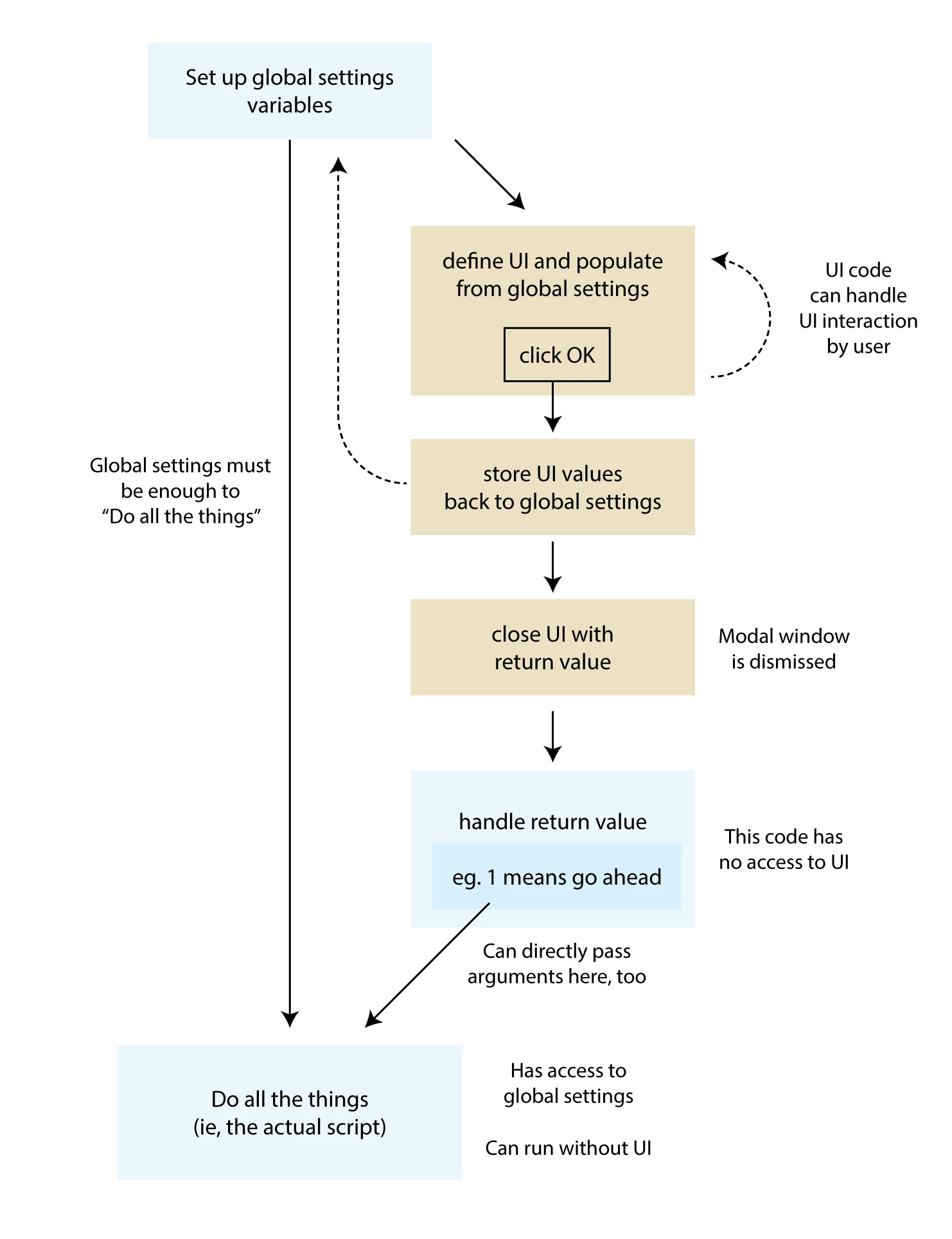
The correct answer of that thread is important. In Indesign, a scriptUI window is modal by default, which means in practice that you can't touch anything else until you've hit the OK button. But this can be difficult to understand due to the way scriptUI dialogs are usually implemented in our code. I recommend setting yourself the puzzle of separating the UI code from the "main engine" code. The test of success in this is if you can call your "main engine" with or without invoking the UI. This is very useful anyway because it means you can re-purpose your script to run in batch mode style, performing many repetitions using parameters that are fed to it via code.


Here's one way to structure this:

Edit: see actual example of this structure on my answer here.

If you're like me, you'll need to experiment with it before you really understand. And I've got *a lot* still to understand.

- Mark

1 reply

m1b
Community Expert
Community Expert
January 24, 2022

You haven't given us much to go on, as much depends on your wider code. However, I think you problem is that the function you've written no longer has access to the jobCustomer variable (which I suspect is a reference to a ScriptUI edit text box).


If you could move the new function definition into the same scope as the jobCustomer object it should work. Does that make sense?


Look at this:

// NOT REAL CODE!
// Just a diagram.

function makeUI {
    var w = new Window();
    var jobCustomer = w.add('edittext');

    function updateJobCustomer() {
        var jc = jobCustomer.text; // should work!
    }
}

function updateJobCustomer() {
    var jc = jobCustomer.text; // won't work!
}


So the problem may be that the function cannot see the jobCustomer variable. But hard to say without more info.

- Mark

brian_p_dts
Community Expert
Community Expert
January 25, 2022

If the data is coming from outside the function, just pass it to the function: 

function updateJobCustomer(jobCustomerText) {
    globalFrame.contents = jobCustomerText; // should work!
}