Participant
April 30, 2023
Question

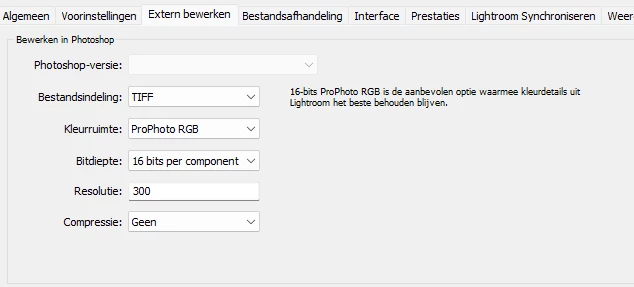
After removing Photoshop Beta I can't switch from lightroom to Photoshop
  • April 30, 2023
  • 2 replies
  • 2736 views

I removed Photoshop Beta, now I can't choose Photoshop if I want to switch from Lightroom classic to Photoshop for editing. I have al lot of plugins and configurations, how can I direct lightroom to the right verion of photoshop wiithout re-installing one of them. I have up to date versions of Photoshop and Lightroom classic

This topic has been closed for replies.

2 replies

TheDigitalDog
Inspiring
April 30, 2023

You may have to reset the LR preferences if you can't select anything from the Photoshop-version dropdown. 

Try resetting your Lightroom preferences:
https://helpx.adobe.com/lightroom-classic/help/setting-preferences-lightroom.html
Also see: https://community.adobe.com/t5/lightroom-classic-discussions/important-steps-for-manually-resetting-preferences-omitted-from-help-article/td-p/12972518

Quit Lightroom Classic.
macOS: Press and hold the Shift + Option keys.
Windows: Press and hold the Shift + Alt keys.
While holding down the keys, launch Lightroom Classic.
When asked, select "Yes". 

Author “Color Management for Photographers" & "Photoshop CC Color Management/pluralsight"
Digima.euAuthor
Participant
April 30, 2023

thnx....re installing PS worked....


JohanElzenga
Community Expert
Community Expert
April 30, 2023

Uninstalling and reinstalling Lightroom Classic should solve this. There is no reason not to want to do this because it is easy. Check the 'keep preferences' option in the uninstall dialog. Your catalog will not be affected anyway.


-- Johan W. Elzenga
Digima.euAuthor
Participant
April 30, 2023

Thnx  for the reply Johan,  I didn't knwo about keeping preferences. uninstalling and reinstalling didn't work however. I stll can't choose Photoshop (grayed out).


JohanElzenga
Community Expert
Community Expert
April 30, 2023

What do you mean it's greyed out? Your original screenshot shows that Photoshop is simply not shown in the external editor preferences. Is that still the case or is it listed now? If you mean that Photoshop is listed in the preferences, but you can't send an image to Photoshop because the 'Edit in Photoshop' menu is greyed out, then the problem is most likely that your image is missing. Maybe you have a smart preview so you can edit it in Lightroom, but you cannot send a smart preview to Photoshop. You must have the original available.


-- Johan W. Elzenga