Inspiring
September 11, 2026
Answered

Current versions of LRC & PS using different versions of ACR

  • September 11, 2026
  • 10 replies
  • 65 views

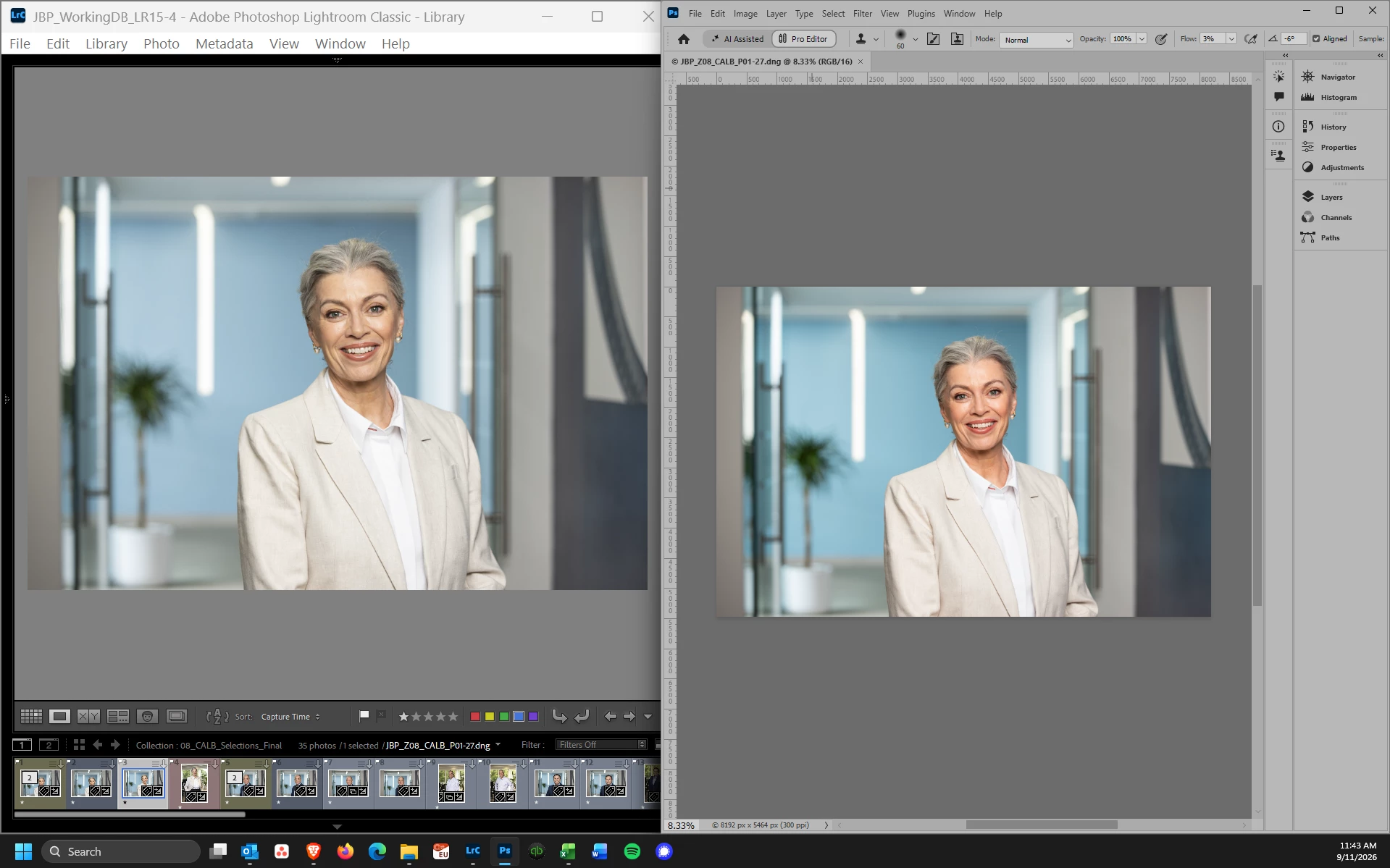
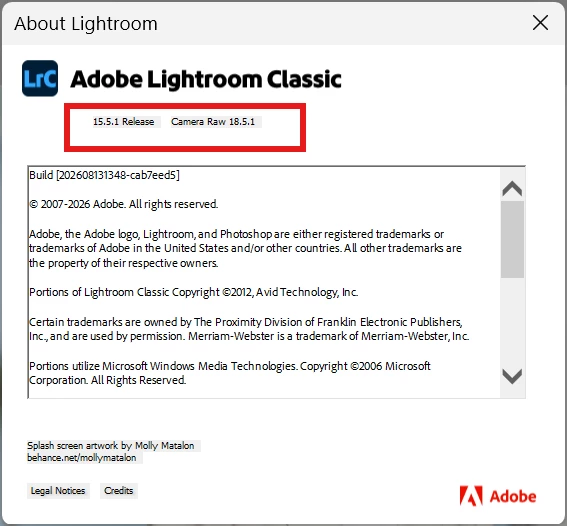
I’m on Windows 11 and using the current versions of both LR classic (15.5.1) and PS (27.10.0), but seeing different color rendering between the two programs. I checked a lot of color settings but eventually noticed that LR is using Camera Raw v18.5.1 and PS is using v18.6.0.2698. I’ve checked Creative Cloud for updates, but none are available. Why wouldn’t LR be using the current version of ACR?
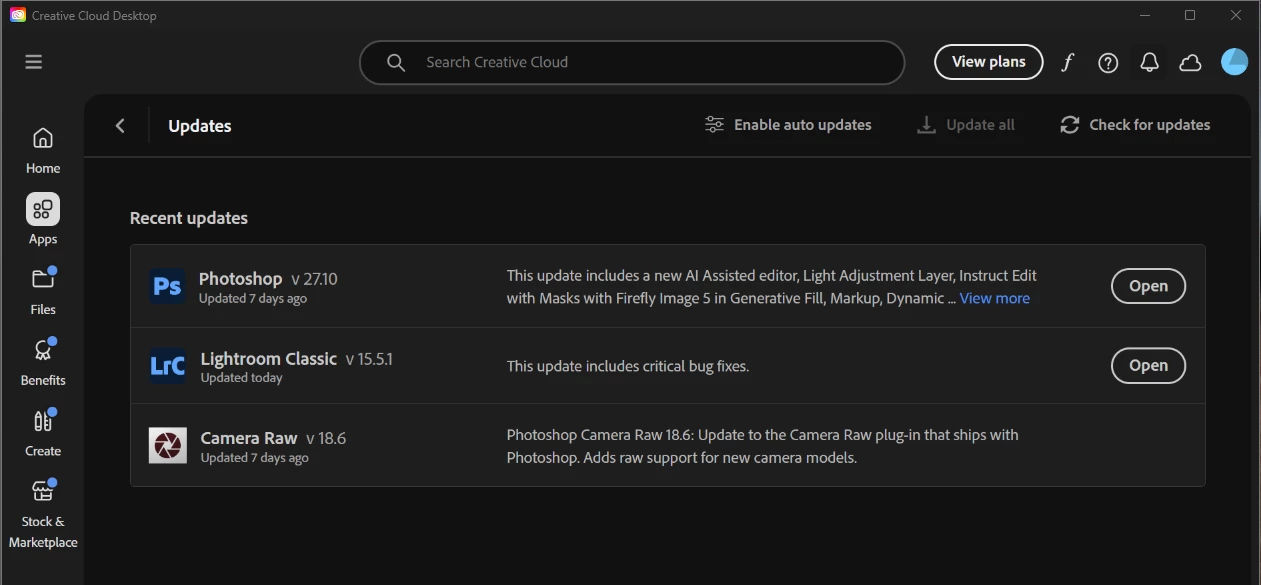
Creative Cloud shows current versions of LRC, Photoshop & Camera Raw
LRC 15.5.1 is using Camera Raw 18.5.1
Photoshop 27.10.0 is using Camera Raw v18.6.0.2698
​​
DNG file opened in Photoshop immediately renders differently on same calibrated monitor


    Correct answer JohanElzenga

    All of a sudden I realized that what you are seeing is probably this bug in Photoshop 27.10.0: 


    10 replies

    JohanElzenga
    Community Expert
    JohanElzengaCommunity ExpertCorrect answer
    Community Expert
    September 11, 2026

    All of a sudden I realized that what you are seeing is probably this bug in Photoshop 27.10.0: 


    -- Johan W. Elzenga
    Inspiring
    September 11, 2026

    Yep, that’s it. I tried turning off the GPU acceleration and restarting Photoshop and the issue goes away. Thank you!

    JohanElzenga
    Community Expert
    Community Expert
    September 11, 2026

    This could still be a monitor profile issue. Photoshop uses ProPhotoRGB, but Lightroom Classic does not. Here’s what Google AI answers if you search on that: Lightroom Classic relies on an internal working space called Melissa RGB, which pairs ProPhoto RGb and Lightroom Classic color primaries with an sRGB tone curve. [1]

    What is Melissa RGB?

    • Definition: Melissa RGB is a proprietary color space created by Adobe for Lightroom.
    • Gamut: It uses the massive color range of ProPhoto RGB.
    • Tone Curve: It applies an sRGB gamma correction curve instead of ProPhoto's standard 1.8 gamma.
    • Purpose: This combination optimizes the histogram display and RGB number readouts so they feel natural and match sRGB-based expectations. [1]

    How it Relates to ProPhoto RGB

    • The Primaries: Both spaces can see and process the same extreme range of vibrant greens, reds, and blues captured by raw camera sensors. [1]
    -- Johan W. Elzenga
    Inspiring
    September 11, 2026

    I confess I don’t really understand what you’re telling me. One, I don’t understand how it could be a monitor profile issue, when I’m looking at the same file rendered without any adjustments by both programs in the same monitor window at the same time. It seems like the only difference is how the two programs handle the same file. But, if the monitor profile is an issue, I’m not sure how I would test that or fix it. I’m using a NEC PA241W wide gamut monitor (I think it can do 98% of Adobe RGB) which I just re-calibrated today.

    Second, it almost sounds like you’re telling me that Lightroom and Photoshop use different color spaces (or different tone curves with the same color space) and therefore render images differently than each other, by design. Am I understanding you correctly? If so, that is bonkers. 

    JohanElzenga
    Community Expert
    Community Expert
    September 11, 2026

    Your monitor profile ‘translates’ the colors from the color space of the image to the color space of the monitor. Because Lightroom Classic and Photoshop do not use the exact same working profile, that translation is different. If the profile is faulty, then that could lead to one image looking different. What you can try to see if this is the explanation is this: temporarily change your monitor profile to sRGB, then look at the images side by side again as in your screenshot. The colors will not be correct, so ignore that. What you should look at is if the images are still different. If they are the same now, then it was indeed your monitor profile.

    -- Johan W. Elzenga
    JohanElzenga
    Community Expert
    Community Expert
    September 11, 2026

    No, it’s not an explanation why ACR and Lightroom Classic would not render color the same. They shouldn’t do that, because color rendering should not be different depending on the ACR version number. It’s only an answer to your question why Lightroom Classic and Photoshop do not use the same ACR versions.

    -- Johan W. Elzenga
    Inspiring
    September 11, 2026

    Thank you. It turns out I misnamed my post because the real issue for me is that my photos look different in Photoshop than Lightroom - but since I had checked most/all of the other settings that I could find mentioned in other posts, I assumed the difference was because of the ACR version. 

    JohanElzenga
    Community Expert
    Community Expert
    September 11, 2026

    ACR is updated at a faster pace than Lightroom Classic, that is why Lightroom Classic does not (always) use the current version of ACR.

    -- Johan W. Elzenga
    Inspiring
    September 11, 2026

    This is one of the most commonly cited reasons why LR & PS don’t render color the same, so I don’t understand why Adobe wouldn’t keep them in sync. But, given that, how do I get PS to render the color the same as LR?

    I’m using the same color space in both (ProPhoto RGB) and preserving embedded profiles, but as soon as I open a DNG file in PS, the color is noticeably more saturated, even side by side on the same calibrated monitor (see screenshot in my original post). Am I missing something?

    Here are my color settings in PS:

    Color settings Photoshop v27.10.0
    LR 15.5.1 External Editing preferences


    Inspiring
    September 11, 2026

    The color is even different within Photoshop between the image itself and the Navigator thumbnail/preview, where Navigator appears to match Lightroom (or at least be closer).