


onlydecious
Participating Frequently
August 8, 2020
Answered

Fetching initial previews takes hours

  • August 8, 2020
  • 6 replies
  • 34351 views

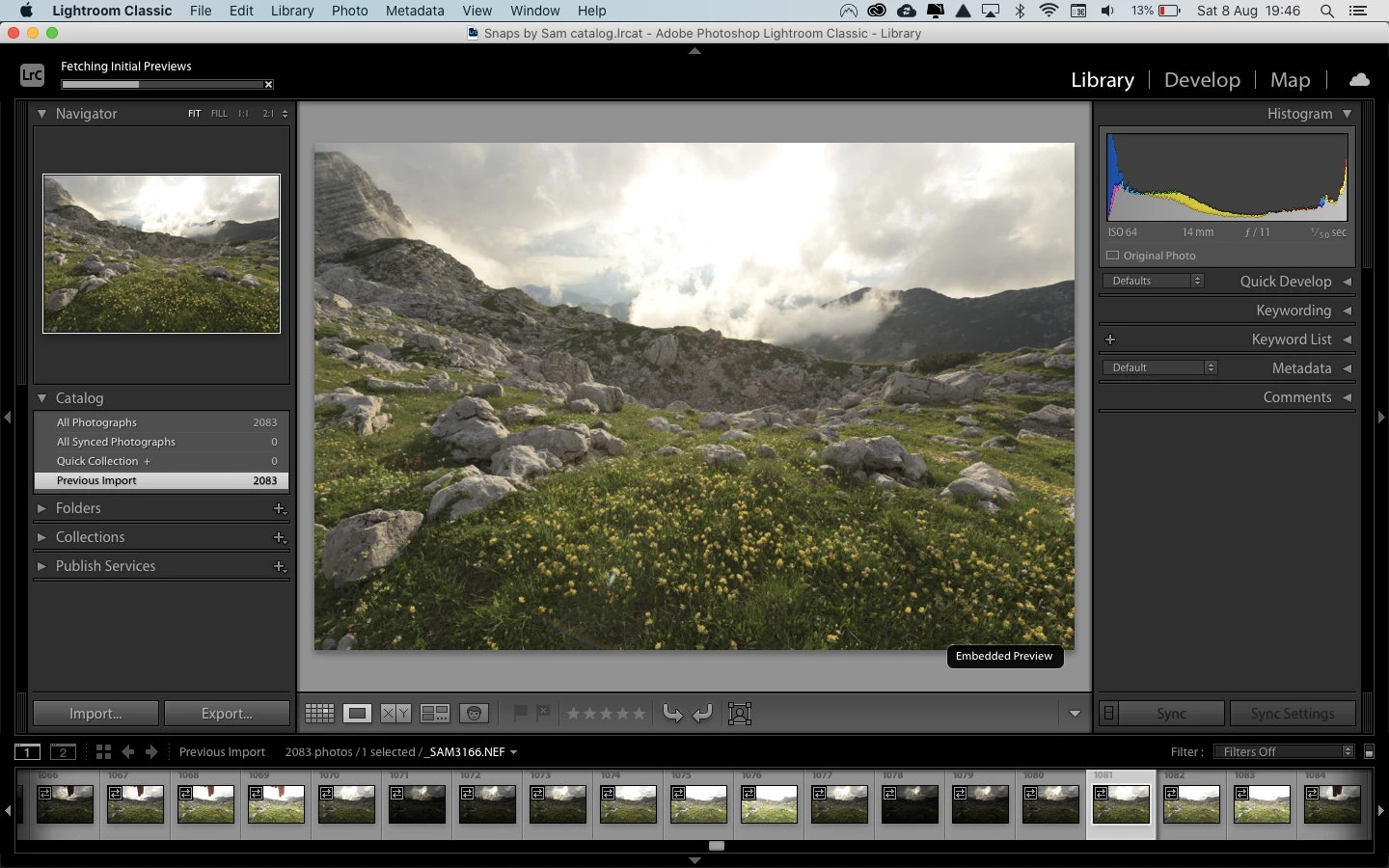
Since a while, after Lightroom is done importing the photos I selected, it starts "Fetching Initial Previews". It takes like forever and I can't figure out what Lightroom is actually doing and how to turn it off. Does anyone know what Lightroom is doing and how to work around this? I didn't have this "issue" before, also not when I imported like 1000+ photos at once. I've added a screenshot, you can see the progress bar I'm talking about in the top left corner.


Thanks!
 

Correct answer JohanElzenga

I've never seen that 'Fetching' message either. It probably cmes up because it does indeed take much more time than usual.


There is a 'Featured' thread here about setting camera defaults: Lightroom Classic: Set defaults for raw file import

6 replies

GoldingD
Legend
August 10, 2020

Ahh, I overlooked that, from DdeGaness

However I have noticed the battery indicater your laptop is pretty low on power and would have halted the process to save power so it does not shut down

Yes, your Laptop will be throttling down on resources, You need to plug it in.


DdeGannes
Community Expert
Community Expert
August 10, 2020

I would say at around 3 sec per image, maybe about 1.75 hours. However I have noticed the battery indicater your laptop is pretty low on power and would have halted the process to save power so it does not shut down. Are you doing copy, copy to dng or move. The computer resources will have the biggest impact on the process.

Regards, Denis: iMac 27” mid-2015, macOS 11.7.10 Big Sur; 2TB SSD, 24 GB Ram, GPU 2 GB; LrC 12.5,; Lr 6.5, PS 24.7,; ACR 15.5,; (also Laptop Win 11, ver 24H2, LrC 15.0.1, PS 27.0; ) Camera Oly OM-D E-M1.
GoldingD
Legend
August 9, 2020

Edited

20833 2083 images being  imported?  Yikes.. Going to take hours. A couple hundred could take an hour


To improve import speed, but st the expense of initial develop speed, alter your import options


Do not create previews

Do not apply presets

Copy from memory card to computer hard drive before importing, and select Add at import.


JohanElzenga
Community Expert
Community Expert
August 9, 2020

2083, not 20833. That should not take hours.

-- Johan W. Elzenga
JohanElzenga
Community Expert
Community Expert
August 9, 2020

You have imported the images with the 'Embedded & sidecar' option for previews. That means that Lightroom initially uses the embedded previews made by your camera. Even though that is faster than letting Lightroom render its own previews right away (it will have to do that eventually), it still takes time to read 1000+ images to get these previews. It could possibly take more time if your hard disk is getting full.

-- Johan W. Elzenga
onlydecious
Participating Frequently
August 10, 2020

Thanks! I noticed my hard disk is getting full, so I will work on that first 🙂 But I can not remember seeing the process of "Fetching Initial Previews" before, or am I wrong?


Once I enter the develop module, it adds a lot of contrast and contrast to my photos, which (I think) look horrible and don't like as a starting point for processing. Is it because of the color profile (Adobe Color)? When I select Adobe Neutral, it looks much better. On my Nikon D810, I've got 'Set Picture Control' on 'Flat' and would like to use those settings (or as close as possible) as a starting point in Lightroom as well. Is there anything else I can do to achieve that? Or to set the Adobe Neutral color profile as default, without having to change it from Adobe Color all the time? But still, with Adobe Neutral, there is more color and contrast added than it shows in the Library module.


Thanks for helping! Still a lot to learn 🙂


JohanElzenga
Community Expert
JohanElzengaCommunity ExpertCorrect answer
Community Expert
August 10, 2020

I've never seen that 'Fetching' message either. It probably cmes up because it does indeed take much more time than usual.


There is a 'Featured' thread here about setting camera defaults: Lightroom Classic: Set defaults for raw file import

-- Johan W. Elzenga
Just Shoot Me
Legend
August 9, 2020

So people don't have to download the image you have attached to your post please Edit your post to remove the Attached screen shot and Include it in the body of the text of your post.

You do that by Clicking the "More..." link at the bottom of your post, Selecting "Edit Message" and then use the "Insert Photos" icon in the tool bar at the top of the Post/Reply/Edit dialog box like this.


Thank you.

ManiacJoe
Inspiring
August 8, 2020

Which version of the Mac OS?

Which version of Lightroom?

Where are the original images located?

Where are the catalog and preview folders located? How much space is left on the drive?

Does the problem continue if you pick "standard" previews?


If you use the Mac process/resource monitors, can you see any obvious bottlenecks?
