Participant
January 29, 2023
Question

Histogram Question

  • January 29, 2023
  • 2 replies
  • 532 views

1. Lightroom Classic 12.1 Release

2. 2019 Macbook Pro OS Ventura 13.1

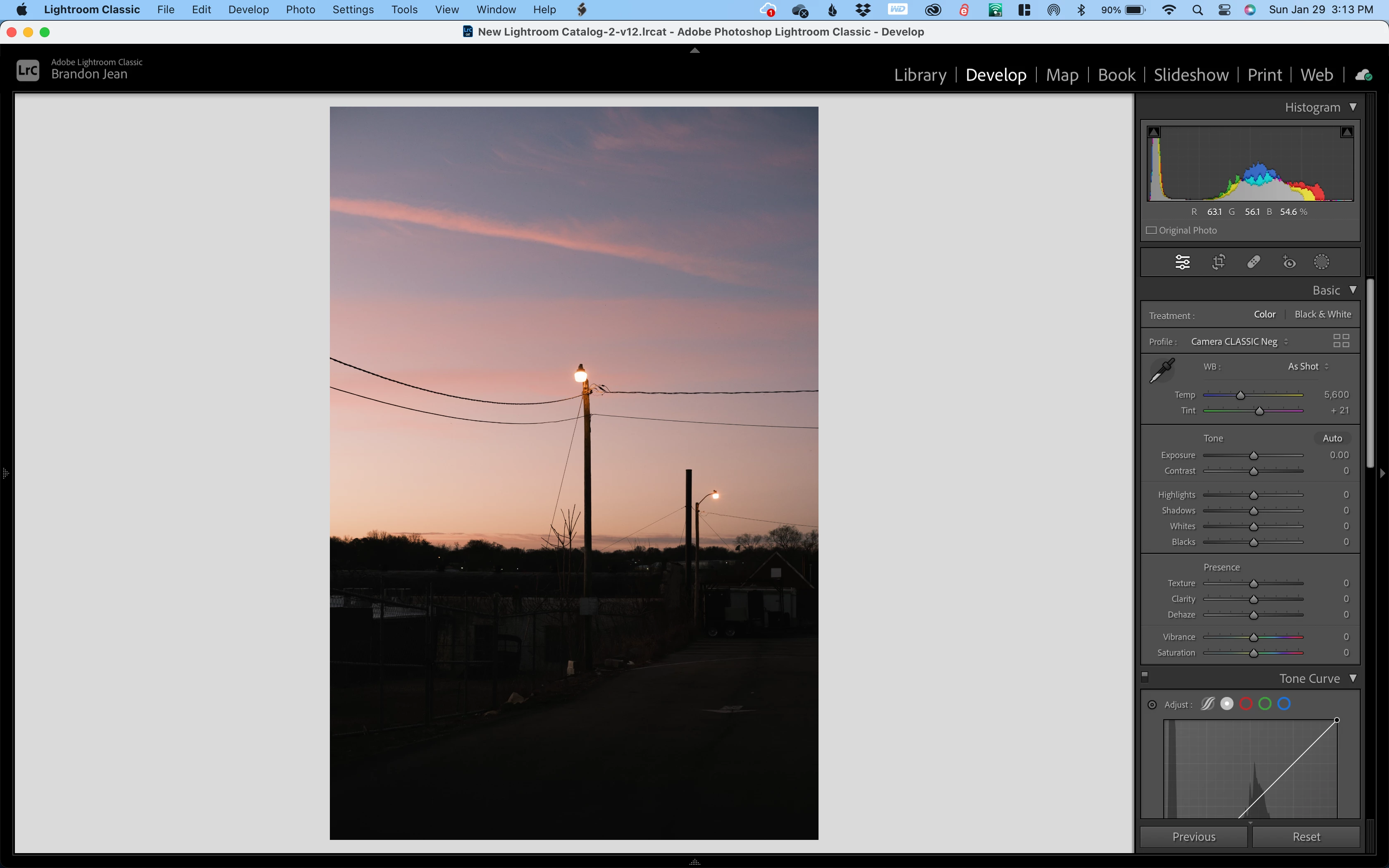
3. First screenshot shows what my histogram looks like. The lines are all vertical and the image looks very pixelated. When I zoom in on the image, it reloads and then the histogram and image go to how they should. However, if I go to another image and back, the same thing happens every time.

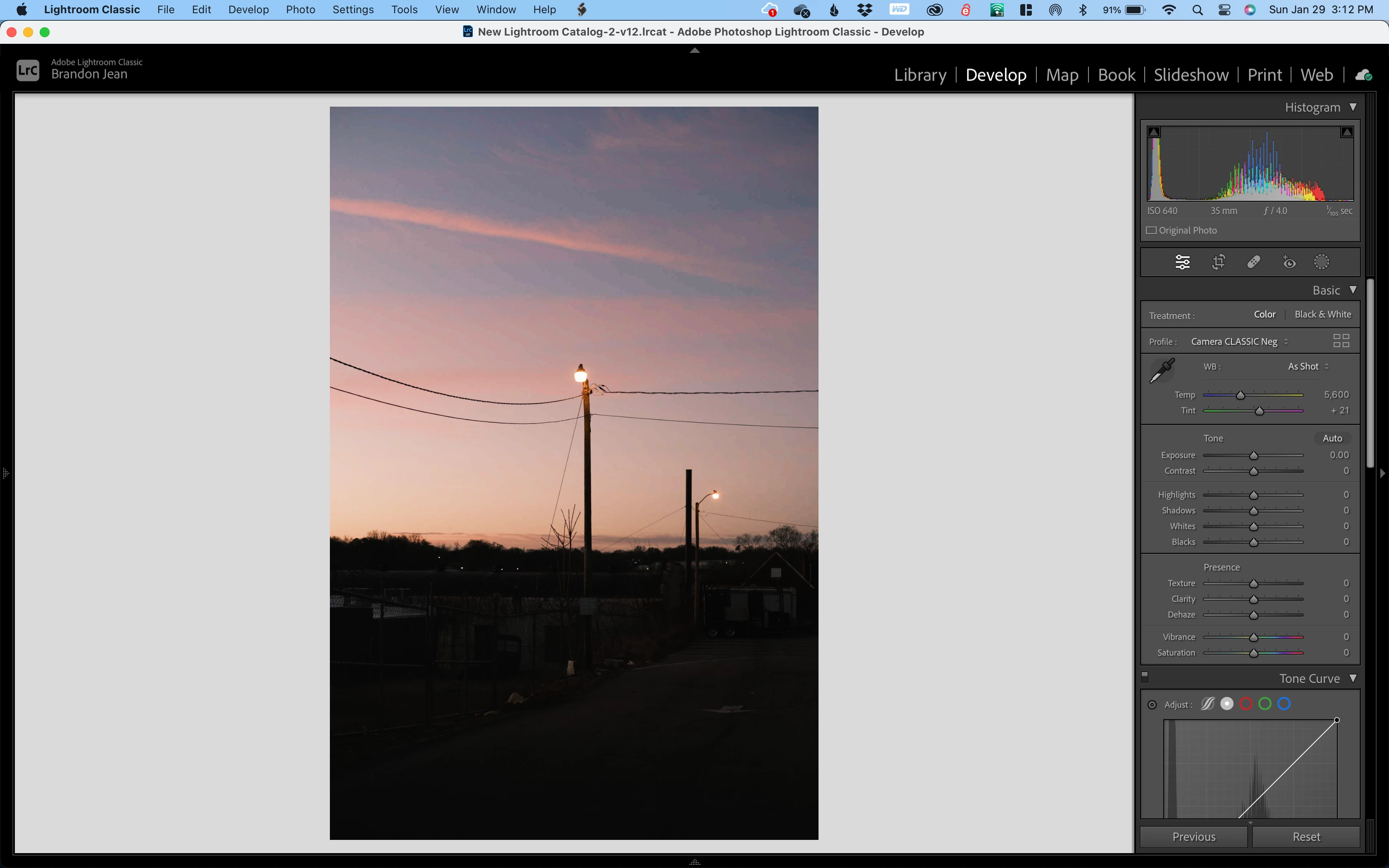
4. The 2nd screenshot is what I expect it to look like every time I go to an image. I shouldn't have to zoom in for it to reload and go to normal. The images are 1:1 previews as well.


Link below is a screen recording of what happens. Any help is appreciated.
https://imgur.com/a/FbUiTzv


This topic has been closed for replies.

2 replies

TheDigitalDog
Inspiring
January 29, 2023

Downloaded, got it into Lightroom Classic. I see those 'spikes' for a split second, then the Histogram updates correctly as you show in the 2nd screen capture. So it seems fine on this end. 

You could try resetting your preferences (see below) or maybe you could convert to DNG or rebuild a new preview (is it 1:1)? Then test. 

Try resetting your Lightroom preferences:
https://helpx.adobe.com/lightroom-classic/help/setting-preferences-lightroom.html
Also see: https://community.adobe.com/t5/lightroom-classic-discussions/important-steps-for-manually-resetting-preferences-omitted-from-help-article/td-p/12972518

Quit Lightroom Classic.
macOS: Press and hold the Shift + Option keys.
Windows: Press and hold the Shift + Alt keys.
While holding down the keys, launch Lightroom Classic.
When asked, select "Yes". 

Author “Color Management for Photographers" & "Photoshop CC Color Management/pluralsight"
TheDigitalDog
Inspiring
January 29, 2023

Oh, I'm on a Mac, too, Ventura. When I move from your image to another in Develop and back, the correct Histogram appears; it doesn't change as you describe. IOW, it is fine on this Mac. 

Author “Color Management for Photographers" & "Photoshop CC Color Management/pluralsight"
Participant
January 29, 2023

Thank you for testing it out on your end. Before I try resetting, do you mind sharing some of your Lightroom preferences/settings and catalog settings? I'm interested to see if anything differs.

TheDigitalDog
Inspiring
January 29, 2023

Does this happen with all or just this one image? 

Can you upload that image to something like Dropbox so we can examine it? 

Author “Color Management for Photographers" & "Photoshop CC Color Management/pluralsight"
Participant
January 29, 2023

Seems to be happening with all my raw files. Here's a dropbox link.

https://www.dropbox.com/s/jjwhdji24i4kiqh/DSCF3334.RAF?dl=0