
Participant
September 11, 2023
Question

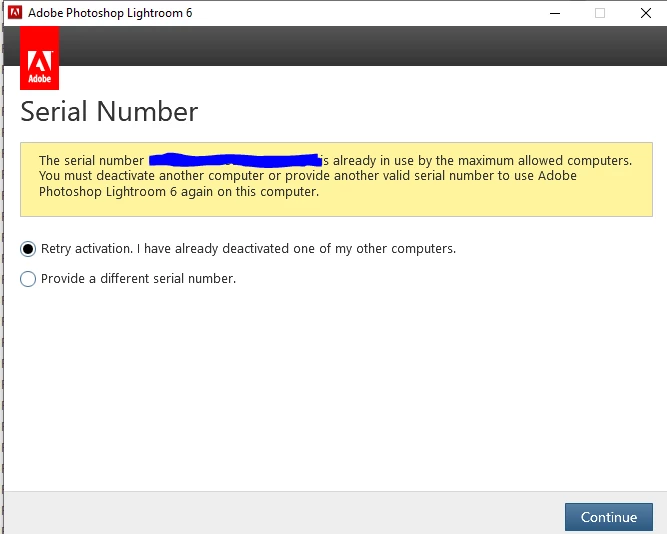
How to clear old activations to allow reinstall of Lightroom Classic 6

  • September 11, 2023
  • 1 reply
  • 141 views

I had a series of computer crashes and so was impossible to deactivate Lightroom Classic, so now when I try to re-install on the reformatted computer, it says too many installs. Yet when I log into my Adobe account, it says no activated software. Do you know how I can get my activation count reset?
 

This topic has been closed for replies.

1 reply

Rob_Cullen
Community Expert
Community Expert
September 11, 2023

You will need to contact Adobe Support by a Chat and ask specifically for an "ACTIVATION RESET".

Do NOT ask for "Support" as you will just be referred back to the forums. (Lr6 is not 'supported' by Adobe)

The Support Agent may say it cannot be done, but persist, and see this forum thread for discussions on this topic-

Activation or Deactivation versions of Lightroom  and one Adobe person with the 'Correct Answer' that was (at that time) was willing to reset activations.

Another forum thread on the topic- ! ACTIVATION SUPPORT TO ADJUST YOUR ACTIVATION C... - Adobe Support Community - 12114152 

Note that even 'Activation' may not be possible after 31/12/2023!

Lightroom 6 End of Support


Regards. My System: Windows-11, Lightroom-Classic 15.1.1, Photoshop 27.3.1, ACR 18.1.1, Lightroom 9.0, Lr-iOS 10.4.0, Bridge 16.0.2 .