Inspiring
April 4, 2020
Question

I get a Server Busy error each time I launch Lightroom 6.14

  • April 4, 2020
  • 2 replies
  • 789 views

I needed to flatten and rebuild my Windows 10 PC with a clean install of Windows 10.  I've installed all Windows 10 updates.

I re-installed Lightroom 6.14 which i've been using successfully for a number of years.  However, after the re-install of Lightroom 6.14, each time I launch Lightroom I get the following error:
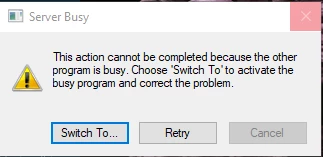
When I click the Switch To button it just opens the Windows 10 menu and sits there for about 2 to 3 minutes eventually going away and Lightroom finished launching.


What is causing this and how do I fix it?

This topic has been closed for replies.

2 replies

Rob_Cullen
Community Expert
Community Expert
April 6, 2020

Try the instructions in the Correct answer at-

https://community.adobe.com/t5/lightroom-classic/error-message-server-busy-during-startup/m-p/6328313#M16405

An old thread but still applicable to your situation.

I note that even the last post in this long thread says "run as administrator".

Regards. My System: Windows-11, Lightroom-Classic 15.3, Photoshop 27.5, ACR 18.3, Lightroom 9.3, Lr-iOS 10.4.0, Bridge 16.0.3 .
Rob_Cullen
Community Expert
Community Expert
April 5, 2020

https://helpx.adobe.com/lightroom-classic/kb/server-busy-error.html

Solution1 will not be any help to you- you cannot update v6.14


Regards. My System: Windows-11, Lightroom-Classic 15.3, Photoshop 27.5, ACR 18.3, Lightroom 9.3, Lr-iOS 10.4.0, Bridge 16.0.3 .
Inspiring
April 5, 2020

That is correct, there is no further update to version 6 than 6.14.

There is no Superfetch under Services.

I have the latest NVidia driver for my GeForce GTX 960.


Same issue is happening.  What server is busy?  What is the Switch To button trying to switch to?


How do I fix this?