
Participant
September 22, 2023
Question

Import button does not appear in Library Module

  • September 22, 2023
  • 3 replies
  • 635 views

All of a sudden, the Import button no longer appears in the Library module.  Additionally, no import functions now appear in the File menu.  It's like LC has lost any functionality to import new files.  I have tried resetting preferences, as suggested in some threads, and also have restarted the computer, but neither has worked.  

Screen shot
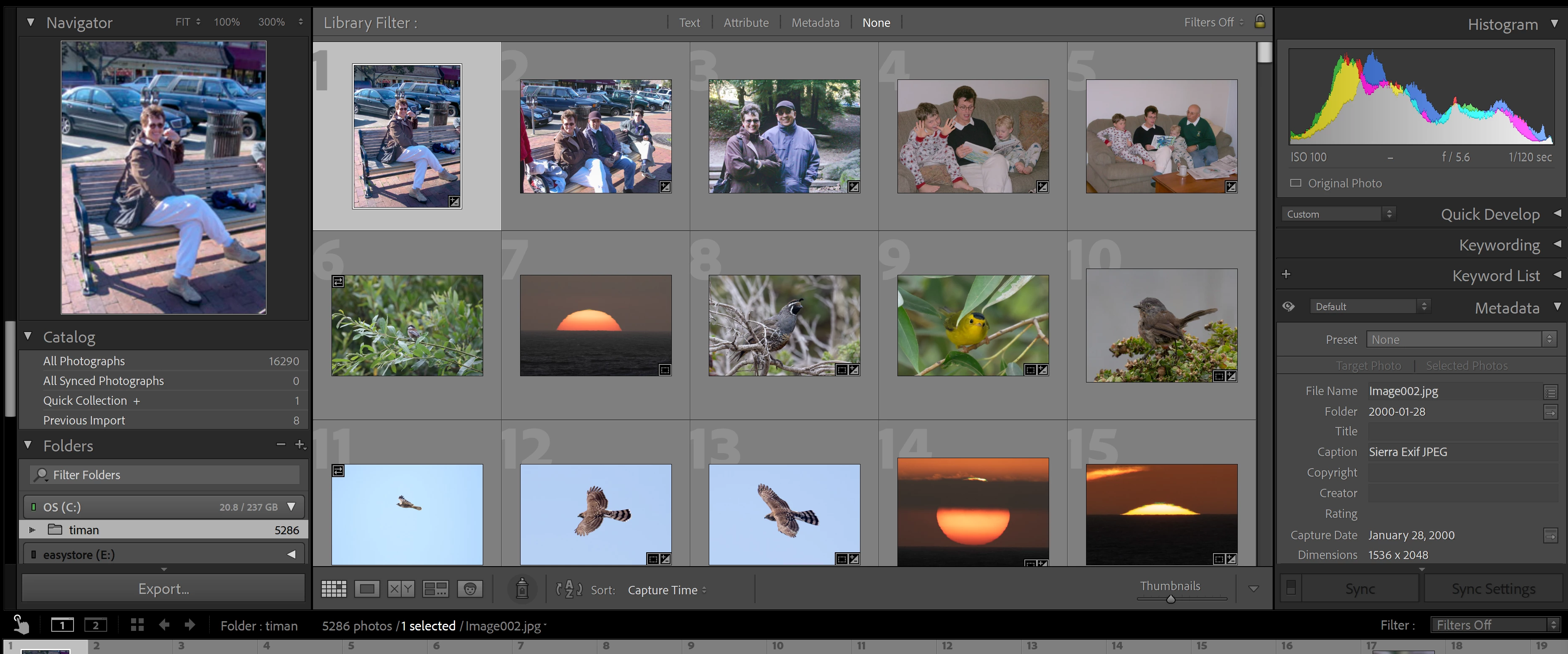


This topic has been closed for replies.

3 replies

JohanElzenga
Community Expert
Community Expert
September 22, 2023

If you look in the lower left corner of your screenshot, then you'll see an icon that I do not recognize. It's like a finger pressing a door bell. Do you recognize it? Could this have something to do with your problem?


-- Johan W. Elzenga
johnrellis
Legend
September 22, 2023
johnrellis
Legend
September 22, 2023

1. Please do the LR menu command Help > System Info and copy/paste the entire contents here so we can see exactly which versions of hardware and software LR thinks you're running and important LR options that are set.


2. If you're not on LR 12.5, update to 12.5. Adobe fixed a bug in LR 12.2 that fixed at least some instances of this issue.


2. Does the Import Photos And Video command appear in the File menu and does it work?


3. Arrange LR and File Explorer so you can see both on the screen at the same time. In LR, do View > Grid to go to grid view. Drag a photo from File Explorer to the center of Grid view -- does that open the Import window with the photo selected?


4. There have been other reports in the past nine months about the Import button and the menu item missing. The standard magic spells of resetting preferences and doing a clean uninstall/reinstall of all creative cloud apps, but no one reported they worked.  You could try those incantations -- who knows, they might help you. 

dj_paige
Legend
September 22, 2023
Keith Reeder
Participating Frequently
September 22, 2023

He's already done that, DJ:


"I have tried resetting preferences, as suggested in some threads, and also have restarted the computer, but neither has worked.  "


Just out of interest, Tim - what happens if you browse to a RAW (not a jpeg) file?

dj_paige
Legend
September 22, 2023

Oops...

Earth Oliver
Legend
September 22, 2023

Which version of Lr is that?

And have you tried logging out/in of your CC account?