

Known Participant
June 2, 2022
Question

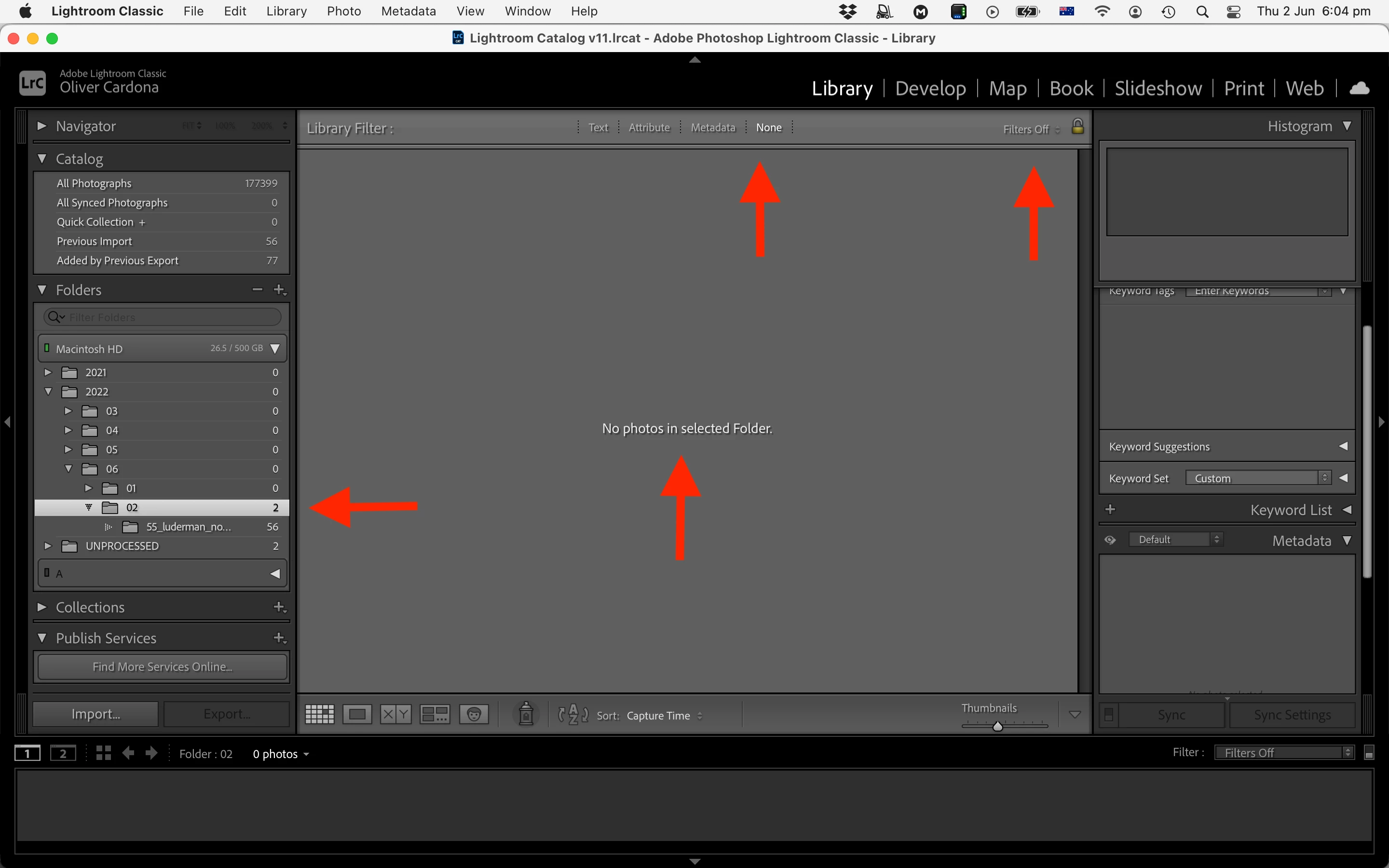
Incorrect number of of photos in folder

  • June 2, 2022
  • 4 replies
  • 2145 views

This bug is annoying me. 


I start with a number of photos in a folder which I just imported. Then I select all and place them inside a folder, within the original folder. Lightroom shows that 2 photos remain in the original folder, while there are none. I double check in the actual folder in Finder to confirm there are none. If I shut down and re-start folder, those phantom two images disappear.

happens all the time. Computer is Mac running latest OS.
 

This topic has been closed for replies.

4 replies

DdeGannes
Community Expert
Community Expert
July 6, 2022
Regards, Denis: iMac 27” mid-2015, macOS 11.7.10 Big Sur; 2TB SSD, 24 GB Ram, GPU 2 GB; LrC 12.5,; Lr 6.5, PS 24.7,; ACR 15.5,; (also Laptop Win 11, ver 24H2, LrC 15.0.1, PS 27.0; ) Camera Oly OM-D E-M1.
FotografuAuthor
Known Participant
July 6, 2022

This issue has come back with the latest release for me. I have Lr Classic 14.4.1. The number of phantom images that stay showing in a folder when I move all photo from one folder to another has now changed for 2, to 5.

Participating Frequently
June 21, 2022

This has been happening to me for several LRC versions too, also on a Mac. Restarting LRC is the only way I know to get the counts to recalculate properly after moving photos between folders. I reported it in April and got the same suggestions.


FotografuAuthor
Known Participant
June 22, 2022

In my case, the number of phantom images is always two, is that the case with you too?

johnrellis
Legend
June 2, 2022

Initial troubleshooting steps:


1. Do Catalog Settings > General > Show, which opens Finder on your catalog folder. Exit LR.  Then, in the catalog folder, delete the file <catalog>Helper.lrdata, being careful not to delete anything else.  LR caches information about your folder structure in the Helper.lrdata file, and sometimes it corrupts the file, causing the Folders panel to act strange. When you restart LR, it will automatically rebuild the file.


2. Try resetting LR's preferences:
https://www.lightroomqueen.com/articles-page/how-do-i-reset-lightrooms-preferences/


LR sometimes soils its preferences file, and resetting it can fix all sorts of wonky behavior. That article explains how to restore the old preferences if resetting doesn't help.

FotografuAuthor
Known Participant
June 7, 2022

Thank you. Looks like that sorted it.

johnrellis
Legend
June 7, 2022

Glad you got it sorted. To help others with similar symptoms, can you please clarify whether it was deleting <catalog>Help.lrdata or resetting preferences that appeared to solve the problem?