
Participant
June 18, 2014
Question

Lightroom 5.5 crashes

  • June 18, 2014
  • 33 replies
  • 19008 views

I just installed the update to 5.5, and in the last hour it has crashed 4 times. I get the error below. never had a problem until I upgraded. Ironically, I updated it because I wanted the bug fixes, but all I got were bugs. Is there actually anything I can do to try to fix it? Running Win 8.1. And like I said, worked fine until I updated.
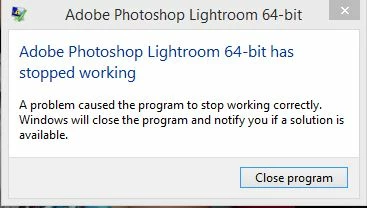
    This topic has been closed for replies.

    33 replies

    Participant
    October 9, 2015

    i have the very same problem…since i updated. is there a solution?

    cullaloe
    Participant
    November 23, 2014

    So, is this it? You pay a ziilion quid for software that crashes on installation and this is the service that's offered? A link to a forum of other losers with the same problem? We've all been shafted by Adobe who have successfully taken our money and whose response is to give us a little playground to talk about it?

    Screwed again. Come the revolution, brother, the computers are going on the bonfire with the books.

    Known Participant
    August 6, 2014

    Just wanted to report that the (updated) fix from tinaTS above DID in fact fix the crashing issue for me.  Additionally, I have since updated to 5.6, and continue to not have an issue (i.e., no crashes).

    Norfolk Mike
    Participant
    August 7, 2014

    I can only say you have been lucky, my 5.5 did not crash but when the update to 5.6 came it started to crash. Like jtr3138 I contacted adobe help line as the chat room was closed, after about 15 minutes they said they had sent me a link that would solve the problem, that link was to this forum! I will try and use Lightroom later today but if it still keeps crashing I guess I will have to go back to using Bridge and Photoshop only until Adobe find a fix.

    cpleblow
    Participant
    July 26, 2014

    Also same problem same error. Crashes repeatedly. 64 bit win 7 tons of memory and i7 processor so its no the rig!

    Norfolk Mike
    Participant
    August 5, 2014

    Had Lightroom 5.5 which worked OK just downloaded the latest 5.6 and guess what? It crashes. Tried the ui.dll fix but lightroom will not start up so am currently removing lightroom and will try a re-install.

    Re-installed, still crashes!!!!!. Architecture info is:

    Lightroom version: 5.6 [974614]

    License type: Creative Cloud

    Operating system: Windows 7 Home Premium Edition

    Version: 6.1 [7601]

    Application architecture: x64

    System architecture: x64

    Logical processor count: 4

    Processor speed: 3.3 GHz

    Built-in memory: 7872.5 MB

    Real memory available to Lightroom: 7872.5 MB

    Real memory used by Lightroom: 289.7 MB (3.6%)

    Virtual memory used by Lightroom: 259.7 MB

    Memory cache size: 115.8 MB

    Maximum thread count used by Camera Raw: 2

    System DPI setting: 96 DPI

    Desktop composition enabled: Yes

    Displays: 1) 1360x768

    Application folder: C:\Program Files\Adobe\Adobe Photoshop Lightroom 5.6

    Library Path: C:\Users\MG\Pictures\Lightroom\Lightroom 5 Catalog.lrcat

    Settings Folder: C:\Users\MG\AppData\Roaming\Adobe\Lightroom

    Installed Plugins:

    1) Behance

    2) Canon Tether Plugin

    3) Facebook

    4) Flickr

    5) Leica Tether Plugin

    6) Nikon Tether Plugin

    Config.lua flags: None

    Adapter #1: Vendor : 8086

        Device : 41e

        Subsystem : 85341043

        Revision : 6

        Video Memory : 256

    AudioDeviceIOBlockSize: 1024

    AudioDeviceName: Speakers (Realtek High Definition Audio)

    AudioDeviceNumberOfChannels: 2

    AudioDeviceSampleRate: 44100

    Build: Uninitialized

    CardID: 1054

    Direct2DEnabled: false

    GPUDevice: D3D

    MaxTexture2DSize: 8192

    OGLEnabled: true

    Renderer: Intel(R) HD Graphics 4400

    ShaderModel: 11.1

    Vendor: Intel

    VendorID: 32902

    Version: 8086:041e:85341043:0006

    Please Please Adobe, sort out this crashing problem, it has now transferred from 5.5 to 5.6 and the ui.dll file does not fix the 5.6 problem.

    Participant
    August 6, 2014

    Having the same issue with 5.5 and now 5.6. Adobe has been absolutely no help with this. I have spent hours on the phone with India over the past week and they won't admit there is a problem with the software. Adobe needs to address this now!

    giuliobagnari
    Participant
    July 25, 2014

    I also tried with the above technote from Tina TS but without results...In my windows 7 Lightroom 5.5 crashes at random, sometimes at startup, some other when I change folder, ALWAYS when I go to Help....Lightroom Online...this ithe windows log:

    Descrizione

    Percorso dell'applicazione che ha generato l'errore: C:\Program Files\Adobe\Adobe Photoshop Lightroom 5.5\lightroom.exe

    Firma del problema

    Nome evento problema: APPCRASH

    Nome applicazione: lightroom.exe

    Versione applicazione: 5.5.0.10

    Timestamp applicazione: 5391f1ae

    Nome modulo con errori: ntdll.dll

    Versione modulo con errori: 6.1.7601.18247

    Timestamp modulo con errori: 521eaf24

    Codice eccezione: c0000005

    Offset eccezione: 0000000000034118

    Versione SO: 6.1.7601.2.1.0.256.48

    ID impostazioni locali: 1040

    Informazioni aggiuntive 1: a36e

    Ulteriori informazioni 2: a36ef00a9d422868e749298269662734

    Ulteriori informazioni 3: 5412

    Ulteriori informazioni 4: 5412da4d38a37aacadff0f1f969e9432

    Can anyone help me pls ???

    AusViper
    Participant
    July 25, 2014

    I can confirm that the above technote fix from TinaTS has fixed my develop module crashing too.

    I feel sorry for all the people experiencing this crashing who don't view forums though...

    Adobe Employee
    July 15, 2014

    My apologies. I've updated the ui.dll in the technote. Please try again.

    tina

    Participant
    July 15, 2014

    Thanks Tina, it now launches and a quick test shows that the selection memory leak appears to have been fixed.

    Adobe Employee
    July 15, 2014

    Please use this technote for this issue:

    Lightroom 5 crashes rating, flagging images | Windows

    Participant
    July 15, 2014

    Have just replaced the ui.dll as suggested in the above link in the appropriate directory (Windows 64 bit) and now Lightroom 5.5 will not start at all.

    Reverted back to the original ui.dll and it starts.

    Just checked the Windows logs and found the following:

    Faulting application name: lightroom.exe, version: 5.5.0.10, time stamp: 0x5391f1ae

    Faulting module name: MSVCR100.dll, version: 10.0.40219.325, time stamp: 0x4df2bcac

    Exception code: 0x40000015

    Fault offset: 0x00000000000761c9

    Faulting process id: 0x1414

    Faulting application start time: 0x01cfa06fbf1b5e0a

    Faulting application path: C:\Program Files\Adobe\Adobe Photoshop Lightroom 5.5\lightroom.exe

    Faulting module path: C:\Windows\system32\MSVCR100.dll

    I double checked that I had correctly downloaded the new 64 bit version ui.dll.

    choucroute
    Participant
    July 8, 2014

    Hi,

    having the same issues.

    WIn 7 Pro 64 bit.Asus Graphic Card.

    I've also seen a Bezel windows error.

    Unfortunately Unusable.

    Need an urgent fix..

    Thanks

    AusViper
    Participant
    July 8, 2014

    Well the random crashes are occurring for me too..

    Win7 64bit system. It usually crashes in the develop module after I have been developing some images, sometimes I can go through 100 images without a problem, but other times its 10-20 and a movement of the slider causes a crash..

    Very frustrating..

    Participant
    July 15, 2014

    I am experiencing the exact same thing on Windows 7. Crashes while playing with sliders in the develop module...