Inspiring
February 25, 2024
해결됨

Lightroom adds Metatag / keyword "Excire (de)" to exported images

  • February 25, 2024
  • 1 답변
  • 836 조회

I don't have Excire Search installed. When I export an image Lightroom adds the Metatag (keyword) "Excire (de)" to the image. How can I get rid of this behavior?

LR-Version: 13.2

Mac-Version: 14.3.1

이 주제는 답변이 닫혔습니다.
최고의 답변: dirkz97066185

Keywords are added metadata, and added metadata are stored in the catalog. The reinstall of your OS is not relevant because even if there were any remaining Excire files, then these could not add keywords anyway. I'm puzzled by your remark "The keyword is only added as soon I have exported the images from Lightroom Classic". Lightroom Classic does not have an option to add keywords during export. Or do you use a special export plugin (LR/Mogrify?) that can do that? The only other explanation is that they must have been in the catalog all along.


Yes, you are right. I know meanwhile what the issue is. I type in my keywords....e.g. NATURE....when I start typing, Lightroom proposes the full word, I type ENTER and NATURE is saved.....but this keyword seems to be derived from a Excire-keyword-list an adds Excire to the keywords. I can only see this when I switch from "Enter Keywords" to "Keywords & Containing Keywords". So, it seems, I have to clean up my keyword list to get rid of these Excire-tags.
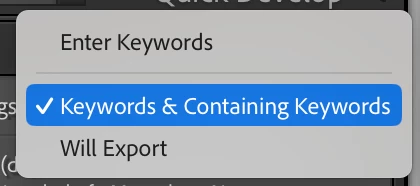
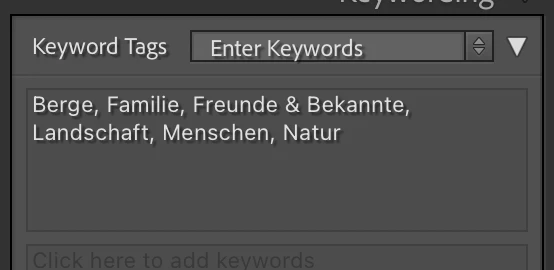
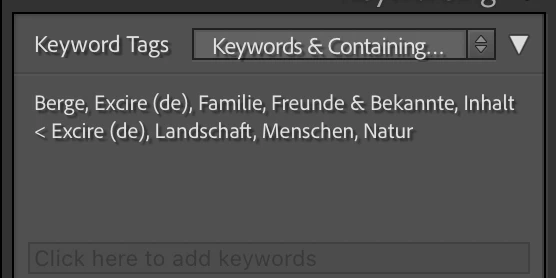
 

Addition....here is the root of the problem.....
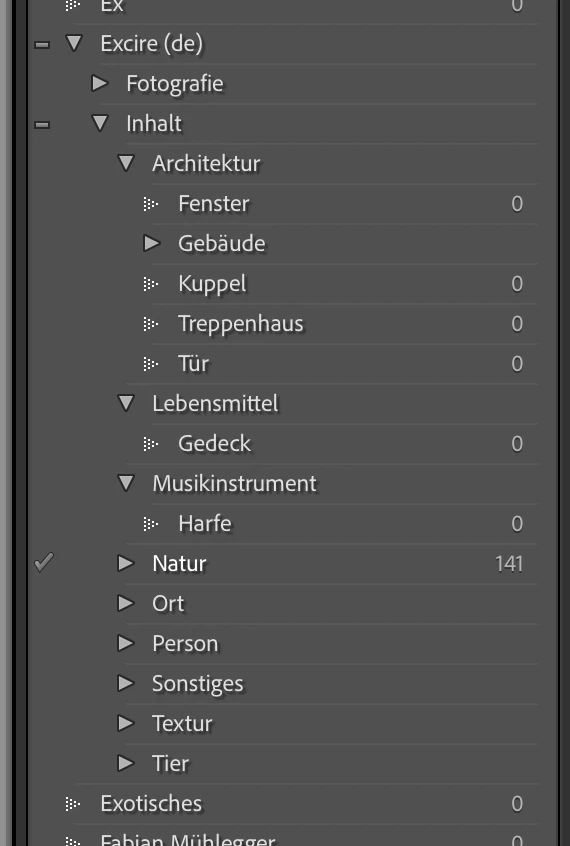


1 답변

JohanElzenga
Community Expert
Community Expert
February 25, 2024

Obviously Lightroom does not do that. Did you try out Excire at any point? Then that is when these keywords were added. Did you import images that you got from somebody else? Then perhaps they use(d) Excire and so the 'Excire' keyword was in the metadata of their images.


-- Johan W. Elzenga
dirkz97066185작성자
Inspiring
February 25, 2024

I have tried out Excire maybe 1,5 years ago. But after that I have installed my operating system from scratch without any restorage of a backup. So there shouldn't be any remaining files of Excire on my system.

I have scanned the images with a slidescanner. The keyword is only added as soon I have exported the images from Lightroom Classic.

JohanElzenga
Community Expert
Community Expert
February 25, 2024

Keywords are added metadata, and added metadata are stored in the catalog. The reinstall of your OS is not relevant because even if there were any remaining Excire files, then these could not add keywords anyway. I'm puzzled by your remark "The keyword is only added as soon I have exported the images from Lightroom Classic". Lightroom Classic does not have an option to add keywords during export. Or do you use a special export plugin (LR/Mogrify?) that can do that? The only other explanation is that they must have been in the catalog all along.


-- Johan W. Elzenga


