
Inspiring
August 13, 2019
Answered

Lightroom Classic CC versions - Windows 8.1 vs Windows 7

  • August 13, 2019
  • 3 replies
  • 35172 views

I have a desktop computer running Windows 7 (64-bit) and a laptop running Windows 8.1 (64-bit). I have been successfully running Lightroom 6 (freestanding license, not CC) on both computers for several years, which is permitted under the terms of the license as long as I only use it on one computer at a time (which I do). I recently decided to cave and sign up for the photographer's LR/PS subscription package so I could upgrade to newer versions. However, it appears that I cannot use the same version of Lightroom Classic CC on both computers.

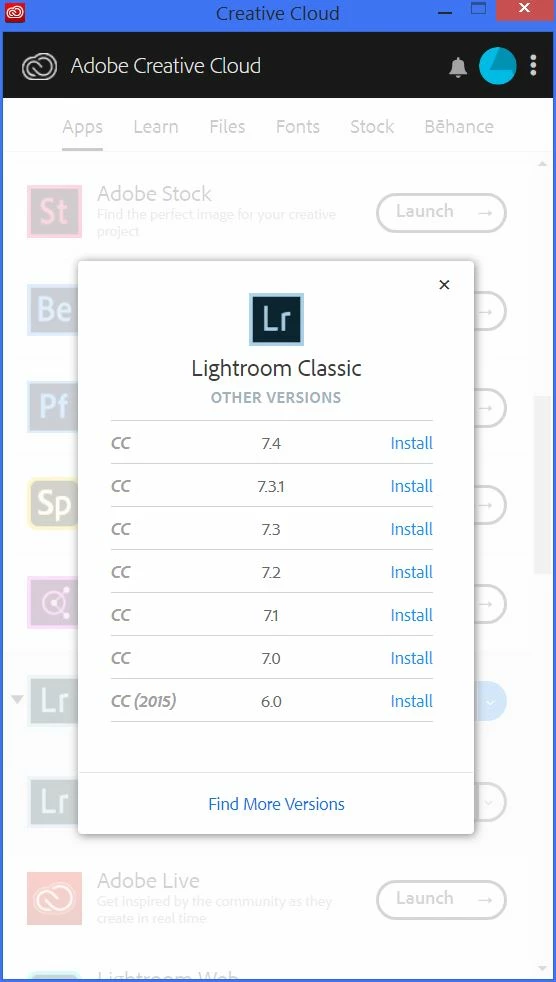
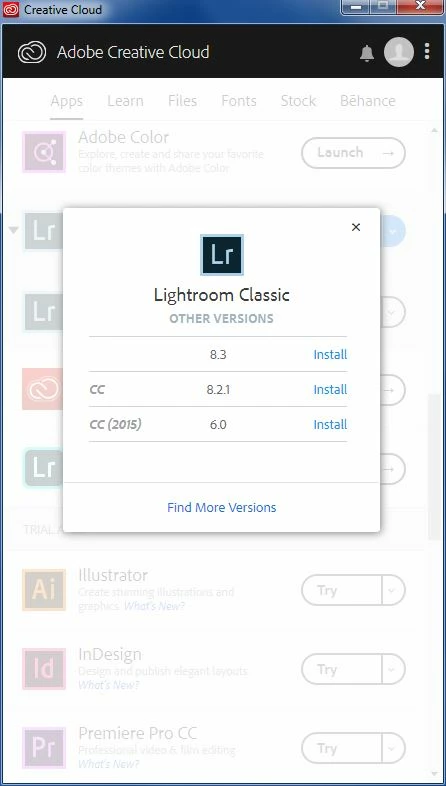
On the Windows 8.1 computer, Creative Cloud shows v7.5 as the most current version (since LR 8.x is not supported for Win 8.1) and the following "other versions" as available: 7.4, 7.3.1, 7.3, 7.2, 7.1, 7.0 and 6.0 (CC 2015). On the Windows 7 computer, Creative Cloud shows v8.4 as the most current version (since LR 8.x is supported for Win 7) and the following "other versions" as available: 8.3.1, 8.3, 8.2.1 and 6.0 (CC 2015) - but not 7.x. See screen shots:

                    Windows 8.1 "Other versions:"
Windows 7 "Other versions:"
The Adobe support page about Lightroom Classic system requirements indicates that both Windows 7 and 8.1 meet the requirements for Lightroom 7.x, so I'm not sure why this would be.

I've tried using the direct download of version 7.0.1, but that version won't support mobile syncing, so I have to upgrade to v7.1 or above - which I can do on the Windows 8.1 computer, but not the Windows 7 computer. There does not appear to be a direct download version of v7.5.

I've also tried uninstalling all Adobe programs from the Windows 7 computer, running the Adobe Creative Cloud Cleaner Tool, and re-installing everything - but I still have the same versions available in Creative Cloud.

So, I guess I have two questions:

- Is LR v7.x supported for Windows 7?

- If so, how the heck do I install it on my computer?

Thanks,

John B.

This topic has been closed for replies.
Correct answer JBenfordPhoto

Here is the official conversation I had with Adobe support:

Bottom line: The only version of Lightroom Classic CC that is compatible with both Windows 7 and Windows 8.1 is Lightroom 7.0.1, which must be installed by direct download on the Windows 7 computer. This version does not support mobile syncing, but there is no way to update it to any other v7.x on the Windows 7 computer.

3 replies

johnrellis
Genius
July 10, 2020

"I do not have the Win 7 & Win 8.1 requirement - Only Win 8.1 -  How do I get: Find & install versions of Adobe Bridge & Lightroom worked on Windows 8.1 - Win 10 not option"


LR 8 and LR 9 do not run on Windows 8.1. LR 7 runs on Windows 8.1, but Adobe no longer makes it available. 


LR 6 runs on Windows 8.1, but you can no longer buy it from a retailer or Adobe. You might be able to find a legitimate version for sale on Ebay or elsewhere with a legal license key, but you have to be very careful that you're not buying pirated software.  


[Use the blue reply button under the first post to ensure replies sort properly.]

Participant
July 25, 2021

"LR 8 and LR 9 do not run on Windows 8.1"


JBenfordPhotoAuthorCorrect answer
Inspiring
August 14, 2019

Here is the official conversation I had with Adobe support:

Bottom line: The only version of Lightroom Classic CC that is compatible with both Windows 7 and Windows 8.1 is Lightroom 7.0.1, which must be installed by direct download on the Windows 7 computer. This version does not support mobile syncing, but there is no way to update it to any other v7.x on the Windows 7 computer.

December 11, 2019

Adobe is clear that they don't support v8.x on Windows 8.1. What is not clear anywhere on their website (that I could find after extensive searching) is that they don't support Lightroom 7.x on Windows 7, even though they do support Lightroom 8.x on Windows 7. 

kglad
Community Expert
Community Expert
August 13, 2019
Inspiring
August 14, 2019

I think this was correctly categorized as a Download and Install issue.

dj_paige
Legend
August 14, 2019

JBenfordPhoto  wrote

I think this was correctly categorized as a Download and Install issue.

I think not.

Lightroom 8 will not run on Windows 8. Lightroom 8 does run on certain versions of WIndows 7. However, the ability to roll back the version of Lightroom from version 8 to version 7 does not exist for users of Windows7 or Windows 10. It is a decision that was made by Adobe to only provide the ability to roll back to a certain number of previous versions — you can't select from ALL previous versions. (And it doesn't really matter if you don't agree with that decision)

If so, how the heck do I install it on my computer?

You can't install Lightroom 7 any more on a Windows7 or Windows10 computer.

And so there are minor problems using Lightroom 8 on one computer and Lightroom 7 on another computer. Some features in Lightroom 8 cannot be used and cannot be seen in Lightroom 7, but the catalogs themselves are compatible.