


Participant
Apr 27, 2025 2:42 PM UTC
Question

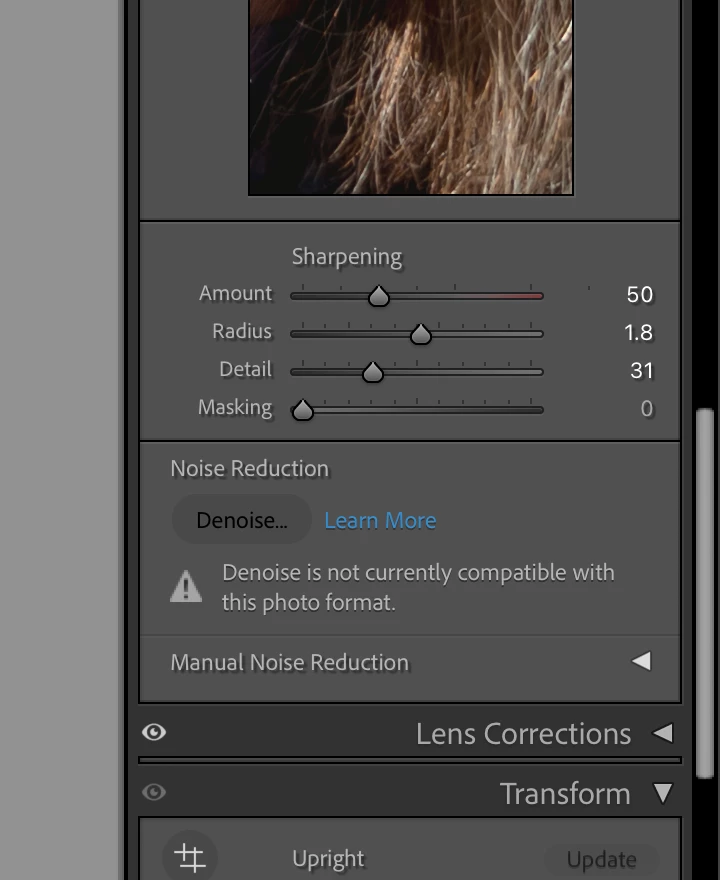
Lightroom classic denoise feature not working on RAW files

As of the past week and a half, my Lightroom Classic denoise feature is claiming not to be compatable with RAW files. It's always worked for me prior to this. Is anyone else having this issue, or just me? I currently work on a Macbook Pro, if relevant. 
 

5 replies

MassC
Legend
May 22, 2025 4:20 PM UTC

Hey @georgiaa43347191, 

I wanted to check in and see if any of the shared suggestions have helped you resolve the issue. If not, could you share more details? @AxelMatt asked exactly what I was going to ask. 🙂 

Best, 
CM

Translate
johnrellis
Legend
Apr 27, 2025 7:08 PM UTC

In addition to the other suggestions, type "i" in Develop to see the file name and verify it is in fact a raw file rather than a non-raw (JPEG, TIFF, etc.).  There are many reports here of people convinced they're editing a raw when in fact they're not -- the default settings in LR hide that from you.

Translate
JohanElzenga
Community Expert
Community Expert
Apr 27, 2025 9:09 PM UTC

One look at the White Balance sliders and you'll know too. If it is not raw, then the sliders are both showing zero in the middle rather than having a Kelvin value for Temperature.


Translate
-- Johan W. Elzenga
JohanElzenga
Community Expert
Community Expert
Apr 27, 2025 3:33 PM UTC

See if the answer marked as correct in this thread solves it: https://community.adobe.com/t5/lightroom-classic-discussions/denoise-stopped-working/td-p/14092087


Translate
-- Johan W. Elzenga
Community Expert
Apr 27, 2025 2:58 PM UTC

Please give us more informations.

Which RAW format from which camera type dp you use?

Which version of Lightroom Classic do you use?

What happened on ypou system before the error occured (software update, patch installation etc.)?

Please provide also a copy of your 'System Info'. This can be get from the LrC Help > System Info menu item. There's a copy button in the System Info dialog. Press this button and paste the info into your next forum post.


In the meantime you can try to reset the preferences of Lightroom Classic:  How to reset Lightroom Classic preferences (adobe.com)

It's recommended to backup your preferences before you reset the preferences to the default settings: 

https://helpx.adobe.com/lightroom-classic/kb/preference-file-and-other-file-locations.html


Translate
My System: Intel i7-8700K - 64GB RAM - NVidia Geforce RTX 3060 - Windows 11 Pro 26H2 -- LR-Classic 15 - Photoshop 27 - Nik Collection 9 - PureRAW 6 - Topaz Photo AI