
Participating Frequently
September 21, 2018
Question

Lightroom Classic doesn't render my Fujifilm RAW file correctly

  • September 21, 2018
  • 2 replies
  • 3065 views

Hi,


I just need your help. It's a real big disappointment for me to see that Lightroom doesnt render my .raf files like my "Windows 10 Photo app" did.

I already applied the Camera Profile that I use in camera like "Provia / Standard". Nothing happens, can I ask for help from you guys if there's a fix on it?


I'm from Nikon system, a new user from Fujifilm. I didnt have this issue before.

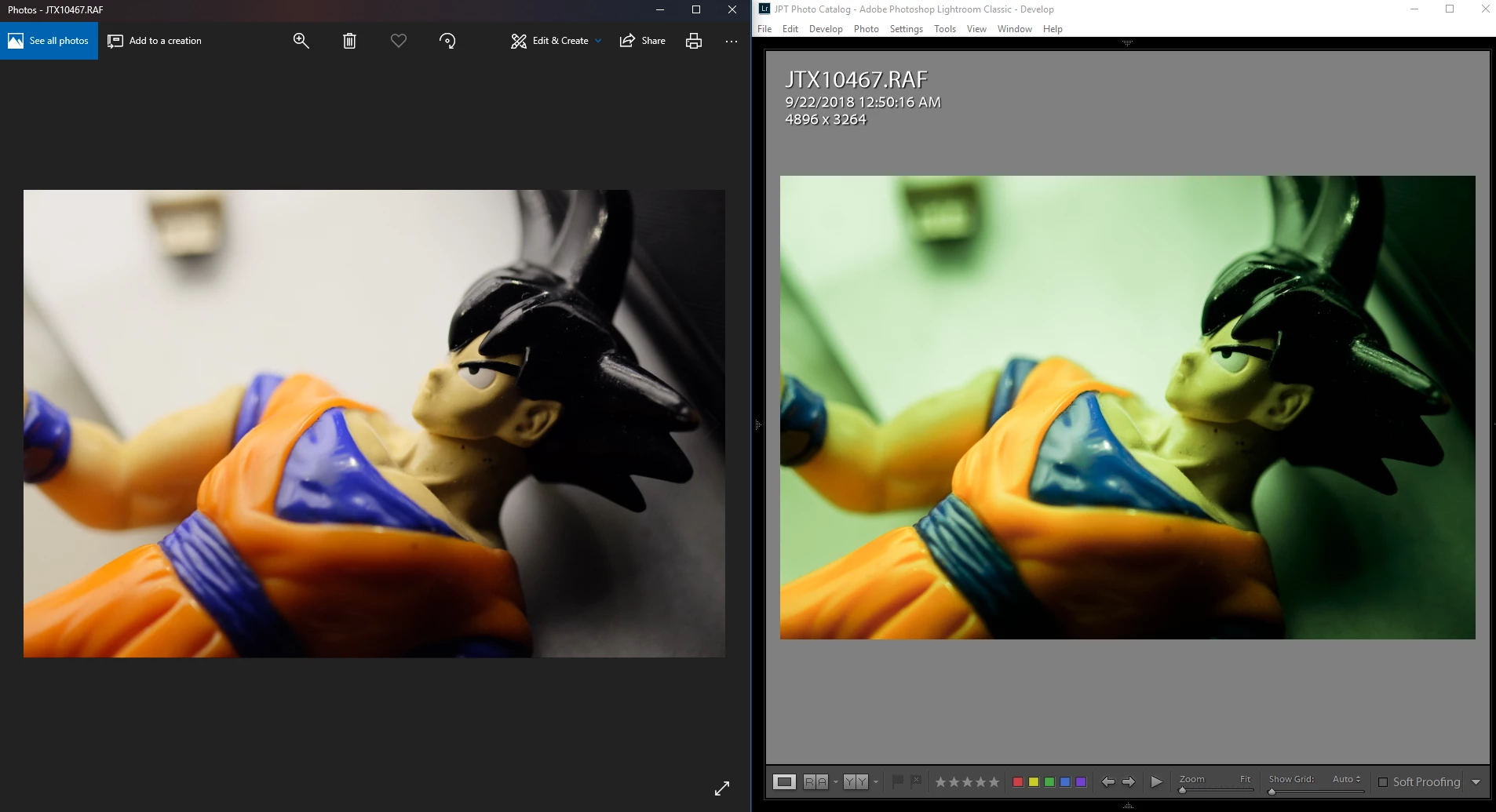
Please see the picture comparison LEFT: Windows 10 Photo App (JPEG File, right colors from my camera) ; RIGHT : Lightroom Classic CC (RAF Files, different on my camera screen says)
 

AdobeSupport


    This topic has been closed for replies.

    2 replies

    Community Expert
    September 22, 2018

    This is almost certainly a case of a bad monitor profile. How are you calibrating your monitor?

    Participating Frequently
    September 22, 2018

    Thank you Jao.

    My monitor is not the issue. you can see the two photos above. that's the same file on different application.

    My point is why Lr doesnt render like the photo on the LEFT which is the same from my camera screen.

    Community Expert
    September 22, 2018

    No the monitor profile is almost certainly the issue. AT least 90% of cases of bad color on windows are due to a bad monitor profile. The reason is that windows photos viewer is not color managed and will not use the monitor profile (but also never ever will show you the correct color). Lightroom is color managed and uses the monitor profile. Unfortunately, many windows driver updates reset the monitor profile to a bad state. This is an endemic problem. The fix for this is to use a monitor calibrator. These are physical devices that measure the monitor's response and create a correct profile that color managed apps use to display the correct color in your images. If you don't have one of these, go into your monitor's preference pane and delete any profile you see associated with the monitor in the color management tab. This will make windows assume your monitor is precisely sRGB. Basically it will turn off color management. This is not ideal but at least it will likely solve your immediate problem. If you do anything with photography on a computer you will need to calibrate your monitor. The only way to do this right is using a hardware calibrator.

    TheDigitalDog
    Inspiring
    September 21, 2018

    Right off the bat, you need to adjust/set your white balance.

    You can't expect LR or any raw converter to render colors like another from a different company OR to expect it to match the camera JPEG. Just not going to happen. And the embedded JPEG you see in the raw is proprietary processing by the camera and doesn't tell you anything per se about the raw. You have to render it as you desire. Probably need to play with some presets but at the very least, the LR image is GREEN so it's probably an issue with 'as shot' White Balance or a need for you to manually adjust it.

    Author “Color Management for Photographers" & "Photoshop CC Color Management/pluralsight"
    Participating Frequently
    September 22, 2018

    Thank you, but how can it be that my Nikon RAW renders the same as jpeg in Lightroom?

    Do you mean that it's just the way it is when it comes to Fuji RAW files? or Adobe doesn't support it?

    Participating Frequently
    September 22, 2018

    By the way, it's the same .RAF are in LEFT and RIGHT in the image above.