
Participating Frequently
October 6, 2019
Question

Lightroom Classic Present changing after selection

  • October 6, 2019
  • 15 replies
  • 891 views

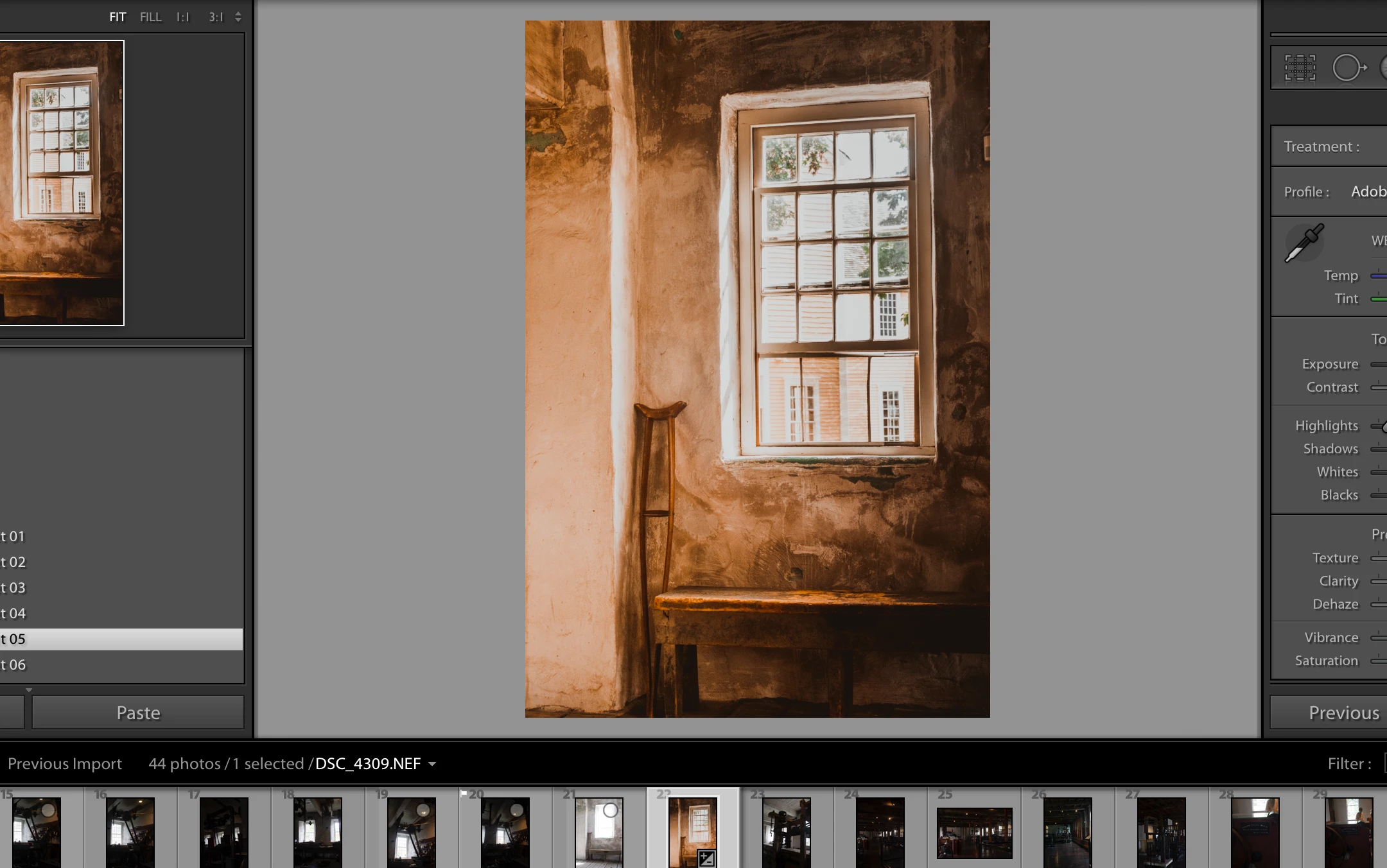
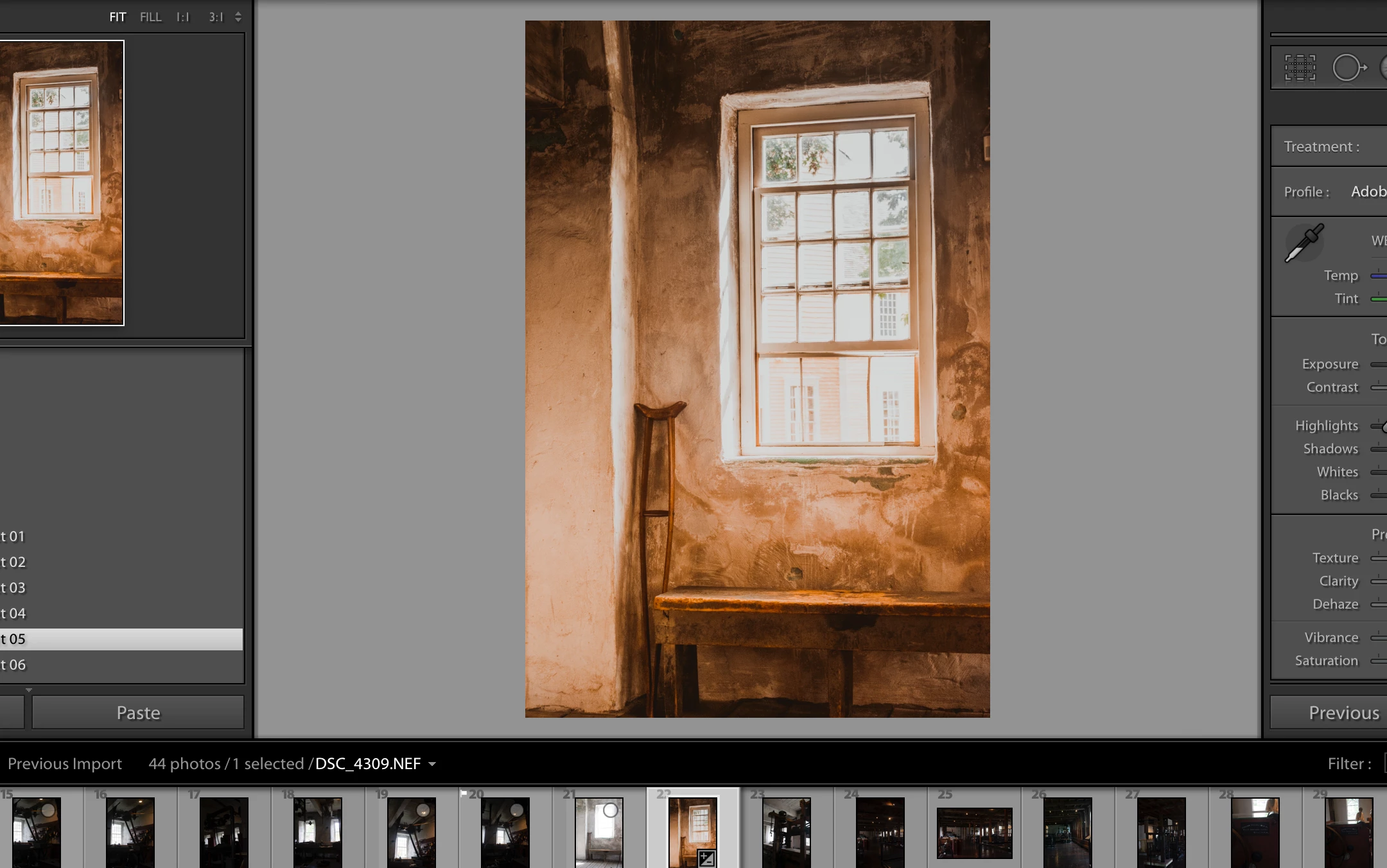
I am selecting one of my presets and with my mouse over the selection it looks like I want it to be but once I roll off the preset window the preset changes its appearance. It almost looks opposite.
 

    This topic has been closed for replies.

    15 replies

    timvcoxAuthor
    Participating Frequently
    October 7, 2019

    I tried messing around with process versions and the settings area and nothing has changed.

    SoiDogPhuket
    Participant
    September 24, 2020

    I wonder if it ever got fixed for you, but I've ran into exactly the same problems and a colleague of mine too. 

    My images seem to be changing colours from cold to warm, just by hovering over to the image in either the preview on the top left or the image ready to be edited in the centre of the screen. Whenever I hover over the image after selecting the preset, it just seems like it changes the blues and yellows (I check the sliders, and they are not moving either!). 

    timvcoxAuthor
    Participating Frequently
    October 7, 2019

    I'm using LR Classic 8.4.1 so I'm not sure if that process effects this, I'll try again. This is so weird.

    Rob_Cullen
    Community Expert
    Community Expert
    October 7, 2019

    I am curious about your problem- and I can see in your screen-clips what you are experiencing.

    I notice that in both examples you have posted (the window, the house) that applying the preset darkens the top-left and lower-right portions of both images which is different to the preset preview. This 'darkening' does not show in the Preset preview.

    Weird! and sorry but I do not have an answer.


    If there is a bug in Lightroom - could it be that the Presets include Gradient adjustments that do not show in the Preset Preview?

    Waiting with interest for more suggestions from others.


    Regards. My System: Windows-11, Lightroom-Classic 15.3, Photoshop 27.5, ACR 18.3, Lightroom 9.3, Lr-iOS 10.4.0, Bridge 16.0.3 .
    GoldingD
    Legend
    October 7, 2019

    Process version?

    https://helpx.adobe.com/in/lightroom-classic/kb/update-develop-presets-to-use-latest-process-version.html


    PLEASE USE THE BLUE BUTTON WHEN REPLYING TO POSTS.
    Helps to show posts in date/time order, improves visibility (as not hidden in a reply to a reply), and is easi to use.


    GoldingD
    Legend
    October 7, 2019

    Looking at building on left, screenshot 2 vs 3, something is wrong. I do see in the history, that preset has been applied.


    PLEASE USE THE BLUE BUTTON WHEN REPLYING TO POSTS.

    Helps to show posts in date/time order, improves visibility (as not hidden in a reply to a reply), and is easi to use.


    timvcoxAuthor
    Participating Frequently
    October 7, 2019

    pics of what I am seeing. Without any preset. Mouse on preset and then scrolled down to history. Can you see how the preset as changed?

    Just Shoot Me
    Legend
    October 7, 2019

    To get the editor window that has the tool bar and thew icon to insert an image you need to eithre click the Blue Reply button on your original post or make a post as a reply to some other post and then use the ... More link to Edit that reply.

    Just Shoot Me
    Legend
    October 7, 2019

    Ok why are you not including a screen shot of the history section of the Develop module right after you select that preset. you seem to know how to include one, you did it in your first post.


    Sorry but I am suspicous as I have asked twice now and I think Dave has also asked. You also state you Right Click to slect the preset. Unless this is the forst time you have used a computer mouse or the track pad on a Mac you never Right cclick to select.

    timvcoxAuthor
    Participating Frequently
    October 7, 2019
    I appreciate any help but you need to chill. What is there to say something is sketchy about? I've posted the new pictures. I didn't say I right clicked at all. I CLICKED on my mousepad which is the left click and then can hold down control for right click but there isn't a reason to do that. If you are a community professional then start acting like it, i just came here for help not to be insulted.
    GoldingD
    Legend
    October 7, 2019

    Ahh, thumb pad, I hate thumb pads, can not tolerate  them, see no reason for this old dog to learn a new trick. Especialy when a perfectly serviceable a Mouse is at hand.


    You do know  that both Steve Jobs and Bill Gates visited Xerox way back when, seperate visits, with staff (well at that time not actualy staff) Observed a tool the Xerox techs were inventing, playing with, and discarding. Asked if they could use it. 


    This tool was not a thumbpad. Perhaps you may want to use a Xerox reject?

    timvcoxAuthor
    Participating Frequently
    October 7, 2019
    HAHAHAHA! yes I love using a mouse but sitting with my laptop in my living room watching TV while editing photos is much more comfortable than sitting at my desk.
    ManiacJoe
    Inspiring
    October 7, 2019

    Yes LR Classic can get a little confused when the mouse is rolling over the list of presets.

    After you select your preset, if the main screen does not look right, just click back and foreward in the edit history to sync the screen to the edits.


    If the preset preview is driving you nuts, you can turn off the option in the settings dialog.