
vollatp476976
Participant
February 10, 2023
Answered

Lightroom : metadata is no longer displayed

  • February 10, 2023
  • 4 replies
  • 3529 views

Lightroom : metadata is no longer displayed in the metadata panel (including the name of the name of the image files) !
The names of the images files nevertheless appear at the bottom of the photo.
T
hank you for helping me !

Lightroom : les métadonnées ne s'affichent plus dans le panneau des métadonnées (y compris le nom des fichiers des images) !
Le nom des fichiers des images apparaît cependant en bas des photos.
Merci de m'aider !
 

    This topic has been closed for replies.
    Correct answer Ian Lyons

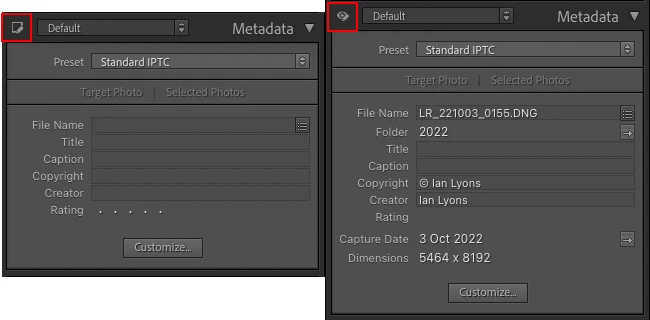
    Does clicking on the little icon at top left of Metadata panel help (see attached screenshot)?


    4 replies

    Ian Lyons
    Community Expert
    Ian LyonsCommunity ExpertCorrect answer
    Community Expert
    February 10, 2023

    Does clicking on the little icon at top left of Metadata panel help (see attached screenshot)?


    vollatp476976
    Participant
    February 10, 2023
    Yes that's it ! I'm ashamed ..
    The icon does not have the shape of an eye when the metadata is not displayed and I did not think to click.
    I apologize again and thank you all
    F. McLion
    Community Expert
    Community Expert
    February 10, 2023

    Please share a screen capture and let us know the exact version of your Lightroom Classic, as well as the OS and version of your computer.

    --- Got your issue resolved? Please label the response as 'Correct Answer' to help your fellow community members find a solution to similar problems. ---
    AxelMatt
    Community Expert
    Community Expert
    February 10, 2023

    What you can try first is to reset the preferences to the default settings. 

    Reset Procedure: 

    • Close Lightroom. 
    • Windows: Hold down [Alt]+[Shift] while restarting Lightroom. 
      Mac: Hold down [Opt]+[Shift] while restarting Lightroom. 
    • Overwrite the Preferences when prompted by the dialog. 
    • Close Lightroom. 
    • Restart Lightroom. 


    It's recommended to backup your preferences before you reset the preferences to the default settings:  

    https://helpx.adobe.com/lightroom-classic/kb/preference-file-and-other-file-locations.html 


    If this doesn't help we need more informations about your environment. 

    Which operating system do you use? 

    Which version of Lightroom do you use? 

    Please post the exact version and not only phrases as "recent", "latest" and so on. 


    Please provide also a copy of your 'System Info'. This can be get from the LrC Help > System Info menu item. 

    There's a copy button in the System Info dialog. Press this button and paste the info into your next forum post. 

    Can you please post a screenshot to make your issue clearer.


    My System: Intel i7-8700K - 64GB RAM - NVidia Geforce RTX 3060 - Windows 11 Pro 25H2 -- LR-Classic 15 - Photoshop 27 - Nik Collection 8 - PureRAW 5 - Topaz Photo
    Participating Frequently
    January 30, 2024

    I'm going to try your suggestion to reset preferences to default setting.  hope it works

    Ged_Traynor
    Community Expert
    Community Expert
    February 10, 2023

    Moved to the Lightroom Classic forum from Using the Community