Participant
February 20, 2022
Question

Lightroom no se inicia, se queda en la pantalla de inicio "leyendo preferencias"

  • February 20, 2022
  • 2 replies
  • 513 views

Lightroom no se inicia, se queda en la pantalla de inicio "leyendo preferencias"

La ultima que me arranca y me funciona bien es la version 10.4

como puedo solucionar este problema?

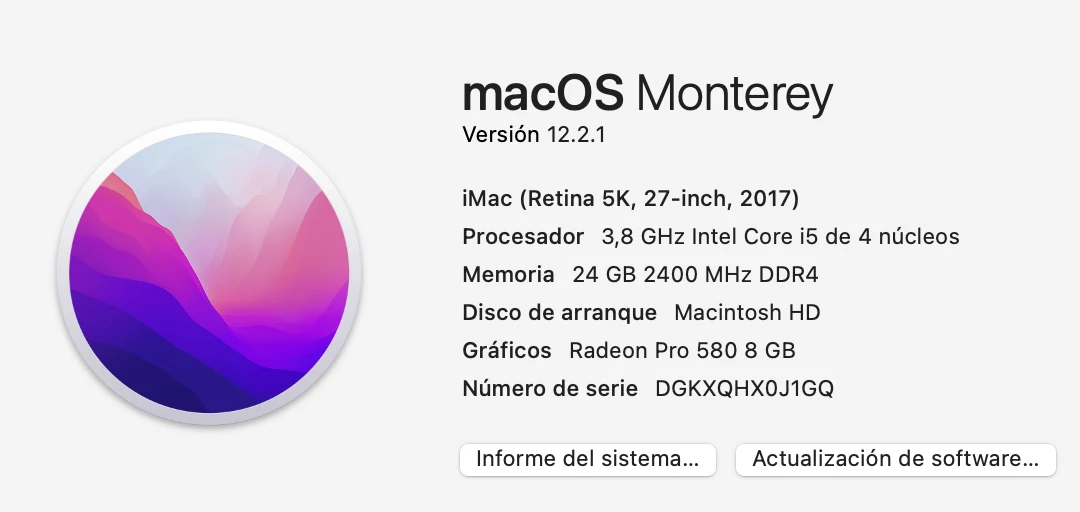
os comparto tambien las especificiaones de mi ordenador

gracias!
This topic has been closed for replies.

2 replies

Rob_Cullen
Community Expert
Community Expert
February 22, 2022

You are not alone with this problem.

Other forum threads-

https://community.adobe.com/t5/lightroom-classic-discussions/lightroom-classic-compatibility-with-macos-monterey/m-p/12470526

https://community.adobe.com/t5/lightroom-classic-discussions/lrc-ver-11-1-won-t-open-on-mac/td-p/12702901

https://community.adobe.com/t5/lightroom-classic-discussions/my-lightroom-classic-will-not-open-it-freezes-on-my-loading-screen/td-p/12020386

I have no knowledge with Mac Monterey.

Any other Mac users that can provide answers?

If 'Reset Preferences' has not worked, another suggestion might be to - Backup catalogs, and clean system of Adobe files, then install Lr-CLassic v11.2.   CLEANER TOOL LINK 


Regards. My System: Windows-11, Lightroom-Classic 15.3, Photoshop 27.5, ACR 18.3, Lightroom 9.3, Lr-iOS 10.4.0, Bridge 16.0.3 .
Rob_Cullen
Community Expert
Community Expert
February 20, 2022

Try-

1) Delete (or rename) the Preferences file. Preferences Reset 

2) Set Full Permissions (as in screen-clip beloew)

3) Re-Boot the computer

4) Install and Restart Lr-Classic v11.2


Regards. My System: Windows-11, Lightroom-Classic 15.3, Photoshop 27.5, ACR 18.3, Lightroom 9.3, Lr-iOS 10.4.0, Bridge 16.0.3 .
Participant
February 22, 2022

Muchas gracias por tu respuesta, pero el programa sigue sin funcionar. Nose donde estará el problema, pero he seguido todos los pasos y no funciona.