

jennafilia21
Participating Frequently
March 1, 2018
Question

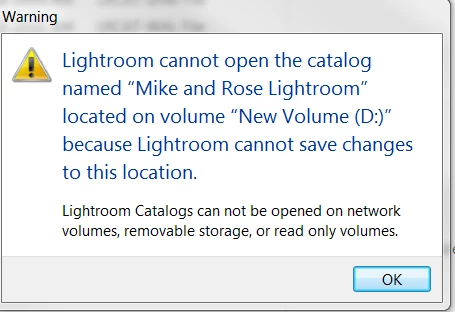
LR catalogues won't open off external hard drive like they used to, getting "Lightroom Catalogs can not be opened on network volumes, removable storage, or read only volumes"

  • March 1, 2018
  • 3 replies
  • 3621 views

Hello, please help!!

I work off my home computer (MAC) and my work computer (PC).

I use an external drive where I store everything, including my catalogs. It has been working out that I can plug my hard drive into either computer and open up a catalog off the drive.

Last night I left work and unplugged my hard drive. This morning I came in and plugged it back in and tried to open. It is now saying what you see in the image below. This has NEVER happened before. I have been quite successful at working off TWO computers with ONE hard drive up until now.

My LR catalogs only open if I drag them from the external drive to the desktop of whatever computer I am using. This isn't how I want to proceed with my work. How do I correct what is going on?

Oh, I also did the most recent LR update thinking that would fix this, but it didn't.


Thanks in advance for any and all help!

Jenna
This topic has been closed for replies.

3 replies

Participant
July 26, 2018

Did you ever figure out what to do? I just ran into the same exact issue. Thanks for any help!

Participating Frequently
March 26, 2023

@vegg1estar  did you ever get this fixed? I'm going through the same issue. 

Rikk Flohr_Photography
Community Manager
Community Manager
March 26, 2023

You’ve posted to a very old thread. It is highly unlikely that the issue described in this thread, though not impossible, is the same issue which you are currently experiencing. Rather than resurrect an old thread that is seemingly similar, you are better posting to a new thread with fresh, complete information including system information, a complete description of the problem and step-by-step instructions for reproduction. 


In the unlikely event the issue is the same, we will merge you back into the appropriate location. 


Thank you!

Rikk Flohr: Adobe Photography Org
JohanElzenga
Community Expert
Community Expert
March 1, 2018

Is this drive a local drive or a network drive? As the dialog says, your catalog cannot be on a network drive, only on a local drive. Images can be on a network drive, though.

-- Johan W. Elzenga
jennafilia21
Participating Frequently
March 1, 2018

It is a hardrive, how can i tell if it is local or network? It is just the same external drive I use all the time.

Just Shoot Me
Legend
March 1, 2018

Is it plugged into the computer you are using? If it is then it is local.

For whatever reason LR is seeing that drive, Volume, as Read Only and your Username does not have Read and Write permissions. In Windows speak Full Control.

Since this is an external drive it also might be that external is not getting the Drive letter D. If you connected some other external drive first then that external that has your images and catalog on it Windows will assign a drive letter after D. Open up File Explorer and check to see if that external has the drive letter D.

Just Shoot Me
Legend
March 1, 2018

It is telling you there is a Permissions problem. Your username doesn't have the proper permissions.

jennafilia21
Participating Frequently
March 1, 2018

But I didn't change anything with permissions? Even when I do go to the folder my lightroom catalogue is in and change permissions to EVERYONE and read/write/etc it still doesn't fix anything.