
djmay6782
Inspiring
February 19, 2024
Answered

LR created a new duplicate path in catalog during import

  • February 19, 2024
  • 1 reply
  • 265 views

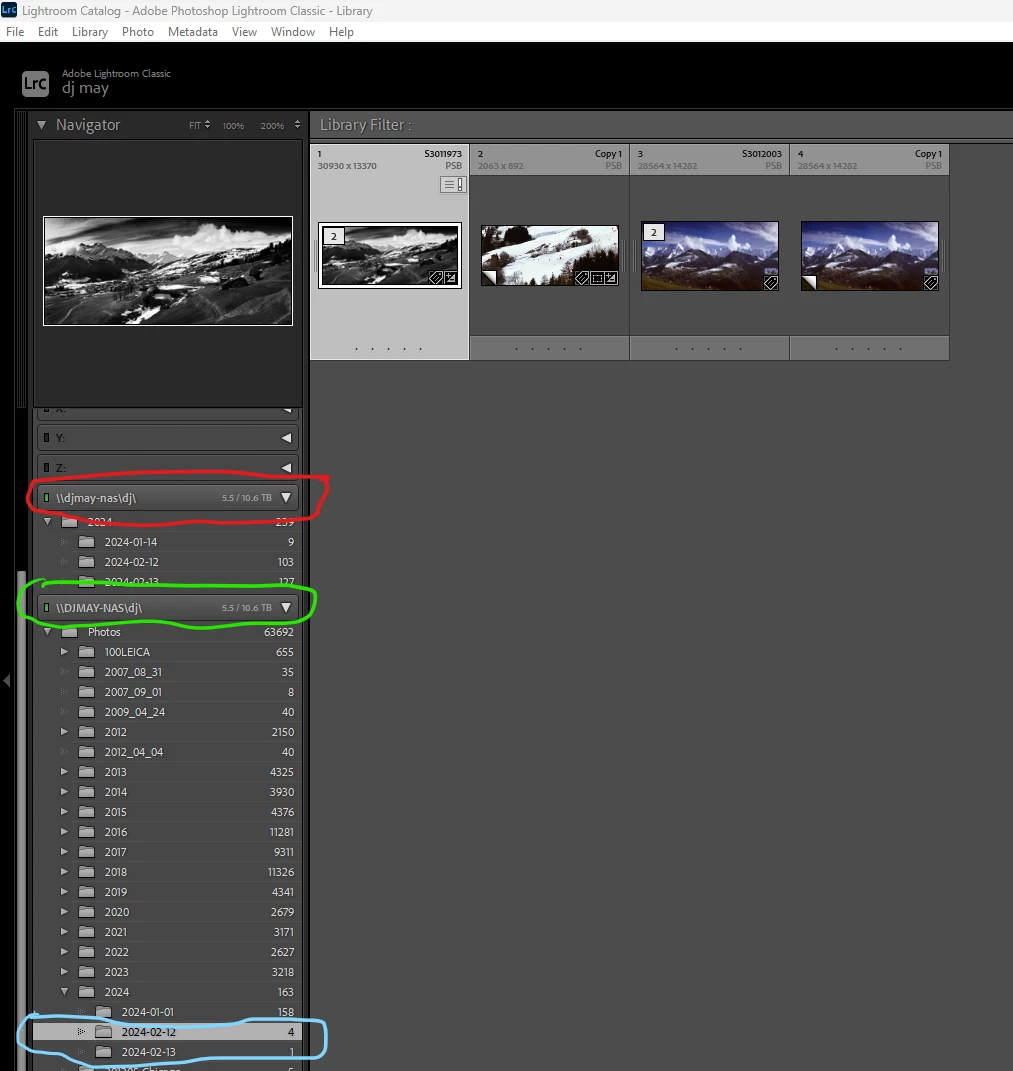
During an import LR created a new path. The original path was all upper case characters. The new path created was all lower case characters.


When I used "edit in Photoshop" and the saved the new psb file, LR showed in the original path.

In the attached screenshot, the original path is shown in green, the new path in red, and the saved psb file in blue.


Obviously, this is unuseable long term. LR  version 13.1.
This topic has been closed for replies.

1 reply

dj_paige
dj_paigeCorrect answer
Legend
February 19, 2024
djmay6782
djmay6782Author
Inspiring
February 19, 2024

@dj_paigethank you for the link. So, once I fix it this time, I can expect it to occur more in the future?

dj_paige
Legend
February 19, 2024
quote

@dj_paigethank you for the link. So, once I fix it this time, I can expect it to occur more in the future?


By @djmay6782


One would hope not, but you have to make sure import to the properly capitalized version, either DJMAY-NAS or djmay-nas, whichever one you pick.