
Participant
June 24, 2026
Answered

LrC 15.4 Red cross symbol with the white "X" on thumbnails

  • June 24, 2026
  • 7 replies
  • 201 views

When I switch to the developement modul, the warning sign in the thumbnails don’t show anymore. When I switch back to Bibliothek, they show again.

How can I get rid of the red symbol with the white "X" on my thumbnails in the bibliothec modul? All pictures are correctly connected on the hard drive; lightroom can show them in the finder. Is it a problem with the new analyzing tool?
 

    Correct answer johnrellis

    [View this post in your web browser. It contains formatting and images that don't appear in email.]


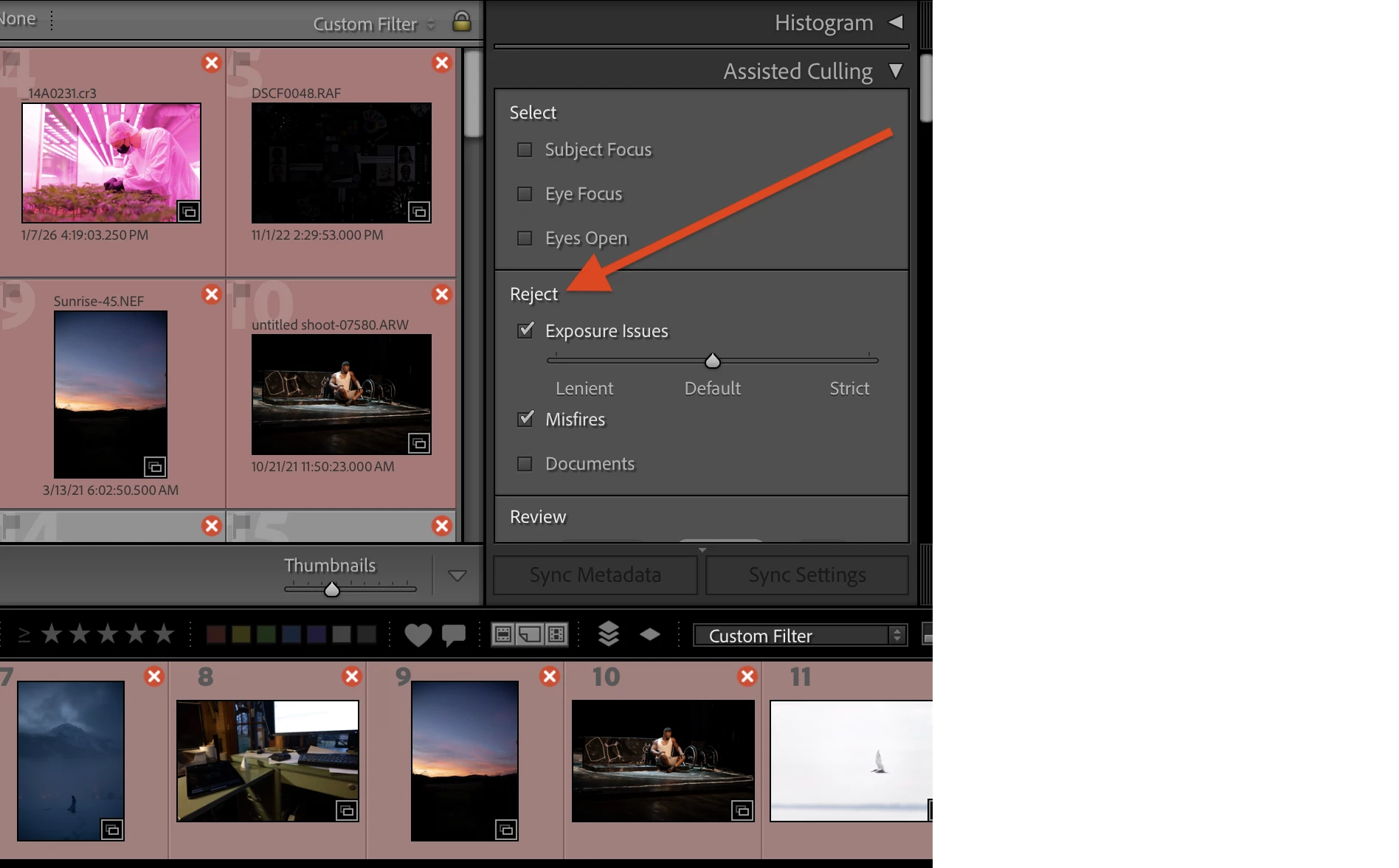
    The red X indicates a photo that’s been marked as rejected by Assisted Culling:


    I had to look it up by searching for “red x” in The Lightroom Queen’s Missing FAQ 15.4. Thank goodness real reference manuals are still available! The Adobe Help page shows screenshots of the red x but they’re not searchable by “red” or “x”.

    7 replies

    Participant
    June 30, 2026

    in the meantime I found out the symbol in the thumbnail section only shows, when I pop up “assisted culling”. It would be nice to understand this, but on the other hand I stop bothering as everything else is working …
    Thanks to everybody involved for thinking and helping :-)

    johnrellis
    Legend
    June 29, 2026

    The red-x badges remain on the filmstrip thumbnails even after unchecking all the checkboxes in the Assisted Culling panel. I haven’t figured out how to make them go away. I filed a bug report:

    https://community.adobe.com/bug-reports-674/assisted-culling-red-x-reject-badges-persist-on-filmstrip-thumbnails-1629898

    johnrellis
    johnrellisCorrect answer
    Legend
    June 29, 2026

    [View this post in your web browser. It contains formatting and images that don't appear in email.]


    The red X indicates a photo that’s been marked as rejected by Assisted Culling:


    I had to look it up by searching for “red x” in The Lightroom Queen’s Missing FAQ 15.4. Thank goodness real reference manuals are still available! The Adobe Help page shows screenshots of the red x but they’re not searchable by “red” or “x”.

    Participant
    June 29, 2026

    I have the same issue,  all pics in library have the same red x.  Just appeared mid use a few minutes ago.  macOS Tahoe 26.5.1

    dj_paige
    Legend
    June 27, 2026

    I don’t know what the red circle with white X means (I have never seen this before) but I’m pretty sure it indicates some type of problem with the photo. Are you able to edit this photo in the Develop Module? What happens if you restore the photo from backups?

    dj_paige
    Legend
    June 28, 2026

    What is the message that appears when you hover your mouse over this red circle? Please give us the exact word-for-word message.

    Rob_Cullen
    Community Expert
    Community Expert
    June 27, 2026

    @Claire H.   I too am curious about the ‘crossed red circle’.  I cannot find any reference to it anywhere. (Searched: Adobe Help, Google, Lightroom Queen, etc)  My only thought was the file may be in OneDrive or Dropbox without a local version available. Or a protected file?


    Regards. My System: Windows-11, Lightroom-Classic 15.4.1, Photoshop 27.8, ACR 18.4, Lightroom 9.4, Lr-iOS 10.4.0, Bridge 16.0.3 .
    Claire H.
    Community Manager
    Community Manager
    June 26, 2026

    Hi ​@markusa92925863, thanks for reaching out! Let’s try to get this fixed for you. Can you confirm if you are using Lightroom or Lightroom Classic? The library module sounds like LrC, so we will move this thread to the proper community forum. Let us know which version of Lightroom you are using, and we can continue to troubleshoot! ^CH

    Participant
    June 26, 2026

    Hi Claire, I’m using Lightroom Classic 15.4.1 on Apple Sequoia.

    Claire H.
    Community Manager
    Community Manager
    June 26, 2026

    Hi ​@markusa92925863, thanks for letting us know! I have moved your thread to the LrC community. Let’s try a few things first to see if we can fix this. Reset Lightroom Classic Preferences: Please refer to this Helpx article for steps.  https://adobe.ly/3HsQXpA It is recommended to back up your catalog before resetting preferences. You may refer to this article for more information:  https://adobe.ly/4dW8vqF

    See if that helps at all! If not, please send your system information, a screen recording of the issue, and a numbered list of the exact steps needed to replicate it. You can find your system info by going to Help > System Info, copying and pasting it into a text file, and attaching it here. Thanks! ^CH