



dunaz
Inspiring
May 5, 2018 3:50 PM UTC
Question

Missing publish service plug-ins, can't delete published photos

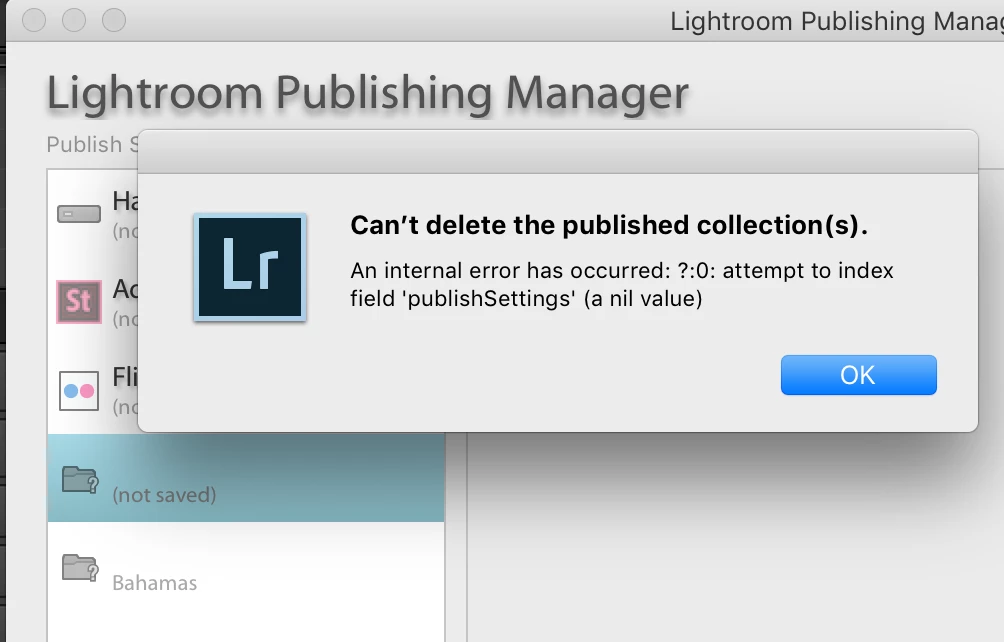
Hi there. I updated recently to the latest version of LRCCclassic. Now, all the published collections that were previously managed by a plug-in are unavailable. I want to delete them, but I get a message saying I can't. FYI, Plug-ins are now wrapped up inside the apps, apparently. 

Two things: I don't remember exactly where I had these items published, therefore I want to delete them. If they can't be deleted, then how to I figure out where I had them published, so that I can re-install and then delete. ;}

Below are screen shots. Machine specs: MBP late 2013, Mac OS 10.13.4, LRCCC 7.2.

What I see from my Library module in the Publish Services column...

the message I get when I try to delete the missing plug-in items...
Location for those plugins that I can find

Thanks, folks, any help will be appreciated!

7 replies

Akash Sharma
Legend
May 8, 2018 2:02 PM UTC

Hi dunaz,

Sorry that you're getting an error message "Can't delete published collections" while attempting to delete collections.

I'd recommend that to unauthorized and then re-authorize the service you're trying to add and then try deleting the existing one's. Refer this article for more details: Errors using Publish Services in Lightroom

Let us know if that helps.

Thanks,

Akash

Translate
johnrellis
Legend
Mar 17, 2025 2:26 AM UTC
 
Translate
Inspiring
Mar 16, 2025 10:24 AM UTC

After a hic-up on my computer I am now faced with the problem that there is a long list of "missing plug-in" in the Publish Services. If I try to delete them I get a error message


I was in the action of disabling SmugMug plugin when something happened and the pc just brutally stopped.  After restart everything seems to be working fine and I find no viruses or any other suspicious action on the machine. But this was the result.

I have been in contact with SmugMug and they had a bunch of ideas how to fix but none worked so they advice me to contact Adobe as this does not seem to come from their plug-in.

I disable, deleted, reinstalled, enabled and tried everything possible with the SmugMug plug-in but nothing effects these "missing plug-in". Everyone corresponds to a published collection I had in SmugMug when the pc died. It is very annoying even if it does not seem to have any effect on the function or performance of LR.


I  will be very happy if anyone has a solution.


(Windows 11 24H2)

Translate