



P: Batch-applying Upright > Level produces different results than individually
Applying Upright > Level in batch using Sync, Auto Sync, or a preset often produces results that are noticeably different than applying it or Crop > Auto individually in Develop. There appears to be no way to auto straighten a batch of photos consistently.
Download the following catalog:
https://www.dropbox.com/s/y5w7bv4ndn0fdl1/batch-level.2023.03.28.zip?dl=0
It has 9 masters, each with 5 virtual copies:
Master: Crop > Auto straighten
Copy 1: Upright > Level applied individually
Copy 2: Upright > Level Synced with just Upright Mode selected
Copy 3: A preset with Upright > Level, Upright Mode only selected, applied individually
Copy 4: The same preset, applied in batch using Library > Quick Develop
Copy 5: Upright > Level auto synced from another photo.
The preset is stored in the catalog folder as "Upright Level.xmp".
Here are the results of comparing copies 1 - 5 with the master (Crop > Auto). An "x" means that method produces different results than Crop > Auto:
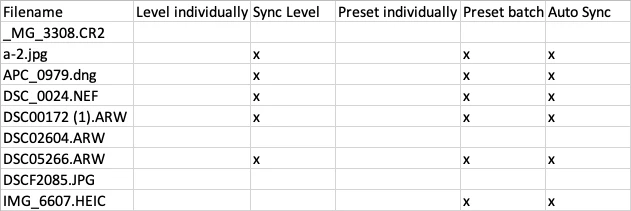
Applying Upright > Level produces the same results as Crop > Auto. But Syncing Upright Mode or applying it in a preset often but not always produces different results.
 AdChoices