



johnrellis
Legend
March 28, 2023
질문

P: Batch-applying Upright > Level produces different results than individually

  • March 28, 2023
  • 2 답변들
  • 758 조회

Applying Upright > Level in batch using Sync, Auto Sync, or a preset often produces results that are noticeably different than applying it or Crop > Auto individually in Develop. There appears to be no way to auto straighten a batch of photos consistently.

Download the following catalog:

https://www.dropbox.com/s/y5w7bv4ndn0fdl1/batch-level.2023.03.28.zip?dl=0


It has 9 masters, each with 5 virtual copies:


Master: Crop > Auto straighten

Copy 1: Upright > Level applied individually

Copy 2: Upright > Level Synced with just Upright Mode selected

Copy 3: A preset with Upright > Level, Upright Mode only selected, applied individually

Copy 4: The same preset, applied in batch using Library > Quick Develop 

Copy 5: Upright > Level auto synced from another photo.


The preset is stored in the catalog folder as "Upright Level.xmp".


Here are the results of comparing copies 1 - 5 with the master (Crop > Auto). An "x" means that method produces different results than Crop > Auto:
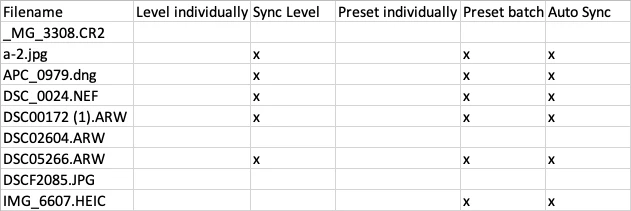


Applying Upright > Level produces the same results as Crop > Auto.  But Syncing Upright Mode or applying it in a preset often but not always produces different results.


2 답변

Rikk Flohr_Photography
Community Manager
Community Manager
March 29, 2023

Bug logged - Please leave the catalog intact for the Classic team to review.


Thank you for the report. 

Rikk Flohr: Adobe Photography Org
johnrellis
johnrellis작성자
Legend
July 7, 2025

@Rikk Flohr: Photography, you wrote "Bug logged", but the thread is in Discussions, rather than Bugs?

Rikk Flohr_Photography
Community Manager
Community Manager
July 7, 2025

That is correct. The team has closed the bug reported. If you like, I can move the requested functionality to feature requests. 

Rikk Flohr: Adobe Photography Org
Participant
March 28, 2023

I would like there to be a function where one has the facility to press a button that will allow each picture to be automatically straightened and then have the facility to still alter anything that needs adjusting to one's preference. There is already an auto crop angle button but one has to physically press this for each picture (if you copy and paste on all the rest of the pictures you end up with the same crop - obviously each picture requires their individual and unique crop). This would save ample time and cost for services like mine who operate on a large scale. 


Many thanks for this opportunity. 

johnrellis
johnrellis작성자
Legend
March 28, 2023

Transform > Upright > Level uses the same algorithm as Crop > Auto.  You can apply Upright > Level to a batch of photos using Sync, Auto Sync, or a preset (via Library's Quick Develop panel).  


Unfortunately, applying Upright > Level in batch often produces different results than applying it individually.  Sometimes the differences are minor, sometimes quite noticeable.   


See this bug report I just filed:

https://community.adobe.com/t5/lightroom-classic-bugs/batch-applying-upright-gt-level-produces-different-results-than-individually/idi-p/13686685