

Answered
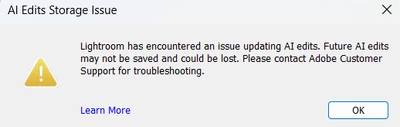
P: Error Message: AI Edits Storage Error
I’m getting the “AI Edits Storage Error” in Lightroom Classic, and I’ve already followed all the steps listed on Adobe’s help page, but the issue is still happening.
Here’s what I’ve tried so far:
-
Confirmed there is enough free disk space
-
Restarted Lightroom and my Mac
-
Ensured only one instance of Lightroom is open
-
Gave Lightroom Classic Full Disk Access and Files & Folders permissions in macOS
-
Verified my user account has Read & Write permissions
-
Checked that the catalog and
.lrcat-datafolder are accessible -
Not using any cleanup tools or cloud sync on the catalog while Lightroom is open
Despite all this, the error continues to appear and AI edits fail to save properly.


 AdChoices